Hyper-V Replica 1:1 Constraint and Authorization Settings
Short answer
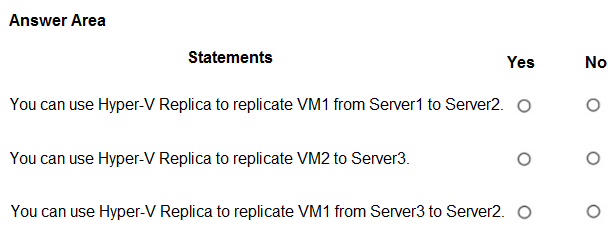
No, Yes, No. Hyper-V Replica enforces a strict 1:1 relationship, preventing Server1 from replicating to both Server3 and Server2 simultaneously. Server2 is configured to accept replication from Server1, making that path viable. Server3 is not configured to accept replication from Server2, blocking that path.
Question
Your network contains an on-premises Active Directory Domain Services (AD DS) domain.
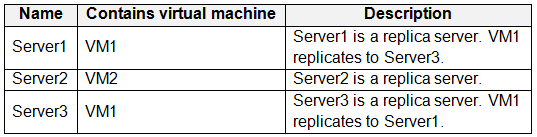
The domain contains the Hyper-V hosts shown in the following table.
Server1 has the Authorization and storage settings shown in the Server exhibit. (Click the Server1 tab.)
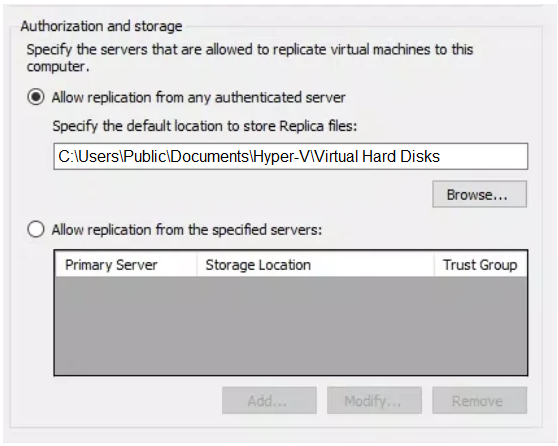
Server2 has the Authorization and storage settings shown in the Server2 exhibit. (Click the Server2 tab.)
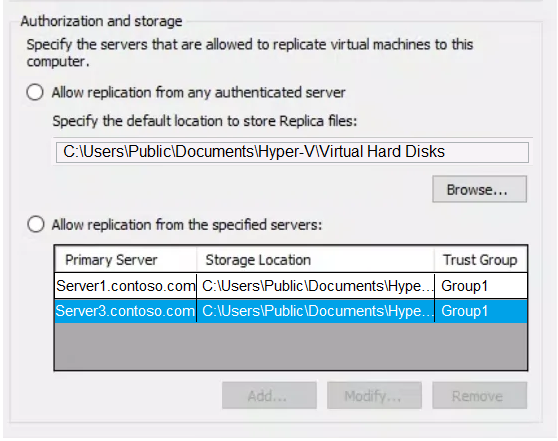
Server3 has the Authorization and storage settings shown in the Server3 exhibit. (Click the Server3 tab.)
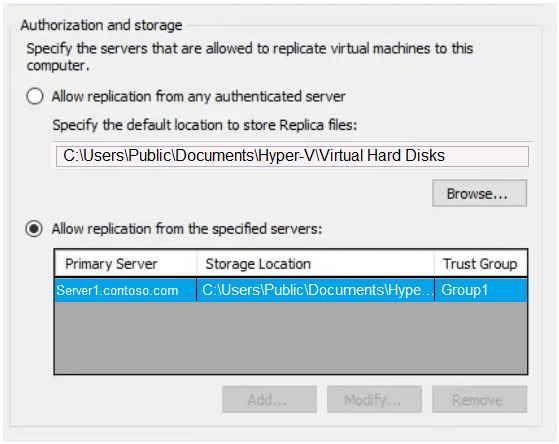
For each of the following statements, select Yes if the statement is true. Otherwise, select No.
NOTE: Each correct selection is worth one point.
Key Takeaways
Tests understanding that a source VM can only replicate to one target, combined with verifying specific authorization entries on the destination server.
Determines validity of Hyper-V Replica connections based on the strict 1:1 replication limit and target server authorization lists. The correct sequence is No, Yes, and No.
Common mistake: Learners often assume replication is bidirectional or unrestricted, incorrectly selecting 'Yes' for the first statement because they ignore the existing link to Server3, or selecting 'Yes' for the third statement by overlooking the missing authorization entry on Server3.
Expert Analysis
The core principle governing this scenario is the strict 1:1 replication constraint of native Hyper-V Replica. A single source VM can only replicate to one target replica server at any given time; concurrent multi-target (fan-out) replication from a single primary host is not supported by this technology.
First, evaluate the relationship between Server1 and Server3. The exhibit indicates that VM1 on Server1 is already actively replicating to Server3. Because this 1:1 link is established, Server1 cannot simultaneously initiate a second replication stream to Server2. Therefore, the statement regarding establishing a replica from Server1 to Server2 while Server1 is replicating to Server3 is No.
Second, analyze the authorization settings on Server2. The configuration shows that Server2 is set to accept replication requests specifically from Server1 and Server3. Since Server1 is currently prioritizing its replication relationship with Server3, it does not have an active connection to Server2. However, the question asks if a replica can be established (potential capability). Given Server2's open acceptance policy for Server1, the infrastructure permits this direction. Thus, the statement is Yes.
Third, examine the link between Server2 and Server3. The exhibit for Server3 explicitly details its Authorization and Storage settings. These settings define which servers are permitted to send replication data to Server3. The configuration restricts incoming replication sources, and critically, Server2 is not listed as an authorized source for Server3. Without explicit authorization on the target side, the replication request will fail. Consequently, you cannot establish a replica from Server2 to Server3. This statement is No.
This analysis relies entirely on interpreting the specific Authorization lists and the inherent limitation of Hyper-V Replica regarding multiple targets.
Exam Strategy
When encountering Hyper-V Replica questions, immediately check for existing replication relationships on the source. If a VM is already replicating to Target A, it cannot replicate to Target B due to the 1:1 rule. Always verify the 'Authorization' list on the target server to ensure the source IP or name is explicitly permitted before assuming connectivity is possible.
Frequently Asked Questions
Can Hyper-V Replica fan out to multiple targets?
What happens if the target server is not in the authorization list?
Discussion 5 contributions
Compiled from public community threads and reader submissions, lightly edited for clarity. Handles and vote tallies are shown as recorded, and comments reflect the views of individual contributors.
From public community threads 5
-
SDK76 👍 2There are no checkboxes in Server2 Auth / Storage settings!! Normally this indicates that entries listed are not activated; An example would be the preferred owners of a Failover Cluster priority list. The priority lists can be in node order, but if the checkboxes are not ticked, it does not matter. And the very fact that in Server1/Server3 the radio buttons ARE activated and Server2s are NOT, leads me to think the answer is N, N, N. But, if the entries are activated regardless of the state of the radio buttons, then Y, N, Y. Another garbage question.
-
alerap01 👍 21) YES, 2) no, 3) YES
-
ppardav 👍 21) YES 2) NO 3) YES
-
examtaker2026 👍 1No, No, Yes. The first statement is No because VM1 is already actively replicating to Server3; native Hyper-V Replica strictly enforces a 1:1 replication relationship per VM and does not support concurrent multi-target (1:N) replication from the primary host, meaning you cannot establish a second direct replica to Server2. The second statement is No because Server3's Authorization and Storage settings explicitly restrict inbound replication to Server1.contoso.com only, which denies any incoming traffic from Server2. The third statement is Yes because Hyper-V supports Extended Replication where the replica server (Server3) can chain-replicate the VM to an extended replica target (Server2), and Server2 already has Server3.contoso.com authorized in its allowed server list.
-
CloudEngJS 👍 1Y,N,Y - For answers 1 & 3, you need to carefully read the second image for Authorization and Storage. It says the settings are for Server 2, and that they accept replication FROM servers 1 & 3. That's why it's yes from server 1 to 2, and from server 3 to 2. The reason question 2 is no, is because the Server 3 settings do not allow replica from server 2.
Reader comments & corrections
No reader corrections yet — spotted an error or have a note? Share it below.