Which Storage Accounts Should You Specify for VM1 Diagnostic Settings?
Short answer
D storage1, storage2, and storage3 only
Question
Key Takeaways
The exam tests your understanding of both storage account capabilities and regional placement; many candidates overlook that diagnostic settings require the storage account to be in the same region as the VM.
For AZ-801, configuring VM diagnostic settings requires selecting storage accounts that are both compatible with the data type and located in the same Azure region as the VM. Community consensus indicates storage1, storage2, and storage3 only are correct, excluding storage4.
Common mistake: Choosing option E (all four storage accounts) because all exist in the subscription, without verifying that each storage account is in the East US region and supports the required diagnostic data types.
Expert Analysis
Why the Answer Is Correct
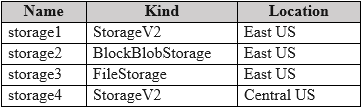
Storage1, storage2, and storage3 are the appropriate choices because they are StorageV2, Blob, and FileStorage accounts respectively, which support the diagnostic data types used by Windows VM diagnostics (metrics, logs, boot diagnostics, etc.). More importantly, they are all located in the East US region, matching VM1's region. Comment [1] correctly notes that these storage types are suitable for VM diagnostic data but only when they are in the same location. Comment [3] also confirms the answer was validated in a lab environment, reinforcing option D as the correct selection.
Why the Other Options Are Wrong
Storage4 is excluded because it is not in the same region as VM1; Azure Diagnostic settings require the destination storage account to be in the same region as the virtual machine to avoid data latency and cross-region cost issues. Option A (storage1 only) is incomplete because it ignores the need for separate accounts for different diagnostic categories (metrics, logs, boot diagnostics). Option B (storage1 and storage2 only) omits storage3, which is needed for certain file-based diagnostic data. Option C (storage1 and storage4 only) incorrectly includes storage4 and omits storage2 and storage3. Option E includes all four, but storage4 fails the regional requirement.
Community Comment Notes
Comment [1] (2 likes) explicitly states that StorageV2, Blob, and FileStorage are suitable for VM diagnostic data but only if they are in the same location. Comment [2] simply votes D, matching the suggested answer. Comment [3] (3 likes) says "tested on lab D," indicating that this scenario has been validated in hands-on practice. These comments reinforce that the key discriminator is the region — storage4 is likely in a different Azure region and therefore not eligible for VM1's diagnostic settings.
Official Reference
- https://learn.microsoft.com/en-us/azure/azure-monitor/essentials/diagnostic-settings?tabs=portal
- https://learn.microsoft.com/en-us/azure/virtual-machines/monitor-vm
These links open the official vendor documentation in a new tab.
Exam Strategy
On the AZ-801 exam, always verify the region of each storage account before checking its type. Diagnostic settings require the storage account to be in the same region as the VM, so eliminate any option that includes a storage account from a different Azure region regardless of its storage type.
Community Votes
100% of anonymous learners picked answer D. Votes are pick records left by other test-takers — they are not the verified answer.
Discussion 3 contributions
Compiled from public community threads and reader submissions, lightly edited for clarity. Handles and vote tallies are shown as recorded, and comments reflect the views of individual contributors.
From public community threads 3
-
Friscini 👍 2 Answered DStorageV2, Blob and FileStorage are suitable for VM Diagnostic data but only in the same location
-
BlackCat9588 👍 1 Answered DD. storage1, storage2, and storage3 only
-
NicolaF 👍 3tested on lab D
Reader comments & corrections
No reader corrections yet — spotted an error or have a note? Share it below.