What should you do first to implement JIT VM access for VM1?
Short answer
A Create a network security group (NSG).
Question
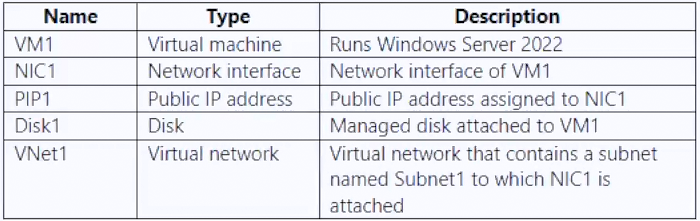
Key Takeaways
The exam tests whether you know JIT relies on an NSG (or Azure Firewall) to create temporary inbound rules, not on subscription ownership or enabling a Defender plan that is already enabled.
To implement just-in-time (JIT) VM access in Azure, the first step is to create a network security group (NSG) because JIT requires an NSG or Azure Firewall; since Defender for Servers is already enabled, Contributor access is sufficient. Community consensus strongly supports answer A.
Common mistake: The most common wrong answer is C, 'Request the Owner role for Sub1.' This mistake occurs because some sources list 'Owner' as a prerequisite, but the scenario already has Defender for Servers enabled, and Contributor can create and manage resources such as NSGs; JIT does not require Owner for this action.
Expert Analysis
Why the Answer Is Correct
JIT VM access in Microsoft Defender for Cloud works by using NSG rules or Azure Firewall rules to allow temporary access to specific ports. If the VM does not already have an NSG (as implied by the resource table), you must create one and associate it with the VM before enabling JIT. Since Sub1 already has Microsoft Defender for Servers enabled, the only missing prerequisite is an NSG, making A the correct first step.
Why the Other Options Are Wrong
B is incorrect because enabling enhanced security in Microsoft Defender for Cloud is redundant; the question states Microsoft Defender for Servers is already enabled. C is incorrect because the Contributor role is sufficient to create and manage resources for JIT; Owner is only needed for delegating access, not for enabling JIT. D is incorrect because application security groups are not used by JIT; JIT relies on classic NSG rules or Azure Firewall rules.
Community Comment Notes
Comment [1] correctly quotes Microsoft Learn documentation stating that JIT requires an NSG or Firewall configuration, with no Azure Firewall mentioned in the question, so an NSG is required. Comment [5] explains that Owner would only be needed if Defender for Cloud enhanced security were not already enabled. Comment [7] reinforces that Contributor can create and manage all Azure resources, so Owner is unnecessary. The voting distribution (A: 63, C: 21, B: 16) supports A as the consensus correct answer.
Official Reference
- https://learn.microsoft.com/en-us/azure/defender-for-cloud/just-in-time-access-usage
- https://learn.microsoft.com/en-us/azure/defender-for-cloud/just-in-time-access-overview
These links open the official vendor documentation in a new tab.
Exam Strategy
For JIT access questions, first check whether the VM has an NSG or Azure Firewall; if not, creating/attaching an NSG is the priority. Do not assume you need Owner or an extra Defender plan when the question explicitly states Defender for Servers is already enabled.
Community Votes
63% of anonymous learners picked answer A. Votes are pick records left by other test-takers — they are not the verified answer.
Discussion 13 contributions
Compiled from public community threads and reader submissions, lightly edited for clarity. Handles and vote tallies are shown as recorded, and comments reflect the views of individual contributors.
From public community threads 13
-
NotThatGuy242 👍 8 Answered A"JIT requires an NSG to be configured or a Firewall configuration (or both)" From here: https://learn.microsoft.com/en-us/azure/defender-for-cloud/just-in-time-access-usage There's no mention of Azure Firewall in the question, so an NSG would be required.
-
AppieHappie 👍 3According to Copilot, The Contributor-role on the Subscription level should suffice to perform all the steps required to configure JIT. You do need to configure NSG rules though, so my answer would be A.
-
SanMan_NZ 👍 2 Answered CCorrect, below are the prerequisites: You’ll need: 1.) An Azure Subscription 2.) Logged into the Azure Portal with an Azure account with the Subscription Owner role. 3.) A Standard Azure Defender plan. You can sign up while logged into the Azure Portal via Azure Security Center. 4.) Azure Cloud Shell or PowerShell. Be sure you log in once to create the storage account it needs at least once. 5.) The Azure Defender service enabled. Part of Azure Security Center, you’ll need to first enable it on your subscription. Azure Security Permissions - https://learn.microsoft.com/en-us/azure/defender-for-cloud/permissions
-
Kuikz 👍 1 Answered Ahttps://learn.microsoft.com/en-us/azure/defender-for-cloud/just-in-time-access-usage Just-in-time VM access shows your VMs grouped into: Configured - VMs configured to support just-in-time VM access, and shows: - the number of approved JIT requests in the last seven days - the last access date and time - the connection details configured the last user Not configured - VMs without JIT enabled, but that can support JIT. We recommend that you enable JIT for these VMs. Unsupported - VMs that don't support JIT because: - Missing network security group (NSG) or Azure Firewall - JIT requires an NSG to be configured or a Firewall configuration (or both) - Classic VM - JIT supports VMs that are deployed through Azure Resource Manager. - Other - The JIT solution is disabled in the security policy of the subscription or the resource group.
-
Escaruncho 👍 1 Answered AFrom what I've gathered, you would need the owner rule IF Microsoft Defender for Servers was not already enabled because you would need that to configure "Microsoft Defender for Cloud, Enhanced Security Management" which is presently just called "Microsoft Defender for Cloud". So if you don't need the owner role nor the "Enable enhanced...", that just leaves us with A. and D. which is definetely out of the question.
Show 8 more comments
-
mohamed1999 👍 1 Answered Ccontributor rights alone do not allow you to enable Just-In-Time (JIT) access in an Azure subscription. JIT access involves managing access to specific resources for a limited time window. To enable JIT, you need additional permissions related to security management and resource access control.
-
smorar 👍 1The answer is A. Owner: Has full access to all resources, including the right to delegate access to others. Contributor: You can create and manage all types of Azure resources, but you cannot grant access to others. You don't need to be an owner in this case.
-
indope94 👍 1 Answered BJe kunt geen JIT configureren of NSG linken aan JIT, tenzij je Enhanced Security aanzet in Defender for Cloud. De vraag is niet: “Wat is vereist voor JIT?” De vraag is: “Wat moet je als eerste doen?” en daarom ga ik voor antwoord B
-
BlackCat9588 👍 1 Answered AA. Create a network security group (NSG).
-
Chrisvt 👍 1 Answered COwner role is required to enable JIT
-
pnewcap 👍 2 Answered Bisn't it B?
-
bpaccount 👍 1 Answered AI think its A, NSG
-
starseed 👍 1answer is A
Reader comments & corrections
No reader corrections yet — spotted an error or have a note? Share it below.