Where Can You Enable Microsoft Defender for Servers in Azure?
Short answer
BC Workspace1 Sub1
Question
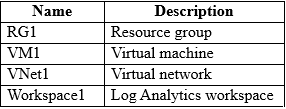
Key Takeaways
The exam tests understanding of Defender for Servers activation scopes, commonly trapping candidates who confuse resource groups or virtual networks as valid enabling targets.
This question tests your knowledge of deployment scopes for Microsoft Defender for Servers in Azure. The community consensus confirms that both the subscription and Log Analytics workspace are valid entry points for enabling the plan.
Common mistake: Candidates often select Management Groups or Resource Groups, mistakenly assuming hierarchical inheritance allows direct plan activation at those levels instead of subscription or workspace scope.
Expert Analysis
Why the Answer Is Correct
Microsoft Defender for Servers can be enabled directly at the subscription level or via the associated Log Analytics workspace. Enabling it at the subscription automatically provisions protection across all supported compute resources within that scope. Alternatively, activating the plan through the workspace achieves the same result by linking the security data collection to Defender’s backend services. Both methods provide complete server protection coverage as required by the scenario.Why the Other Options Are Wrong
Management groups operate above subscriptions and cannot host Defender plans directly since they only manage policy and assignment rules. Resource groups are logical containers for organizing resources and lack the control plane permissions needed to activate cloud security plans. Virtual networks define network boundaries and routing rules but do not serve as activation targets for monitoring or security solutions. These scopes simply do not expose the Defender for Servers toggle in the Azure portal.Community Comment Notes
Multiple users confirmed that enabling the plan at the subscription and workspace levels yields identical outcomes, aligning with official documentation. One contributor highlighted that while individual VMs can technically trigger the setup wizard, the question specifically asks for broader resource-level activation. Another user noted the question's phrasing could be clearer but agreed that options B and C remain the most accurate choices based on current platform behavior.Official Reference
https://learn.microsoft.com/en-us/azure/defender-for-cloud/tutorial-enable-servers-plan
This link opens the official vendor documentation in a new tab.
Exam Strategy
Always verify whether a security plan requires subscription-level configuration versus agent-based deployment. When multiple valid scopes exist in Azure, prioritize the highest logical container that matches the question’s stated objective to avoid overcomplicating your selection.
Community Votes
100% of anonymous learners picked answer BC. Votes are pick records left by other test-takers — they are not the verified answer.
Discussion 5 contributions
Compiled from public community threads and reader submissions, lightly edited for clarity. Handles and vote tallies are shown as recorded, and comments reflect the views of individual contributors.
From public community threads 5
-
d08427f 👍 2Question is asking regarding 'Defender for Servers' plan, and 'Servers' instead of a specific srv, so ans can only be Sub and Workspace
-
Azzainthemist 👍 2Done on subscription level and then Workspace separately, reference provided by NicolaF supports this
-
BlackCat9588 👍 2Not sure. Any link for support?
-
NicolaF 👍 1 Answered CAccording to this: https://learn.microsoft.com/en-us/azure/defender-for-cloud/tutorial-enable-servers-plan you can enable Defender for all Sub1, Workspace1 and VM1. So the question imho is not well posed
-
Escaruncho 👍 1I would go for B and C because it says I need to enable Microsoft Defender for Servers, not just for a computer (which would be VM1, in this case). Bad question, anyway.
Reader comments & corrections
No reader corrections yet — spotted an error or have a note? Share it below.