Azure Key Vault Role Permissions Analysis
Short answer
Key Vault Crypto Officer: Keys=Full, Secrets=None, Certificates=None. Key Vault Secrets Officer: Keys=None, Secrets=Full, Certificates=None. Key Vault Certificates Officer: Keys=None, Secrets=None, Certificates=Full. Key Vault Administrator: Keys=Full, Secrets=Full, Certificates=Full.
Question
You have an Azure subscription that contains an Azure key vault. The role assignments for the key vault are shown in the following exhibit.
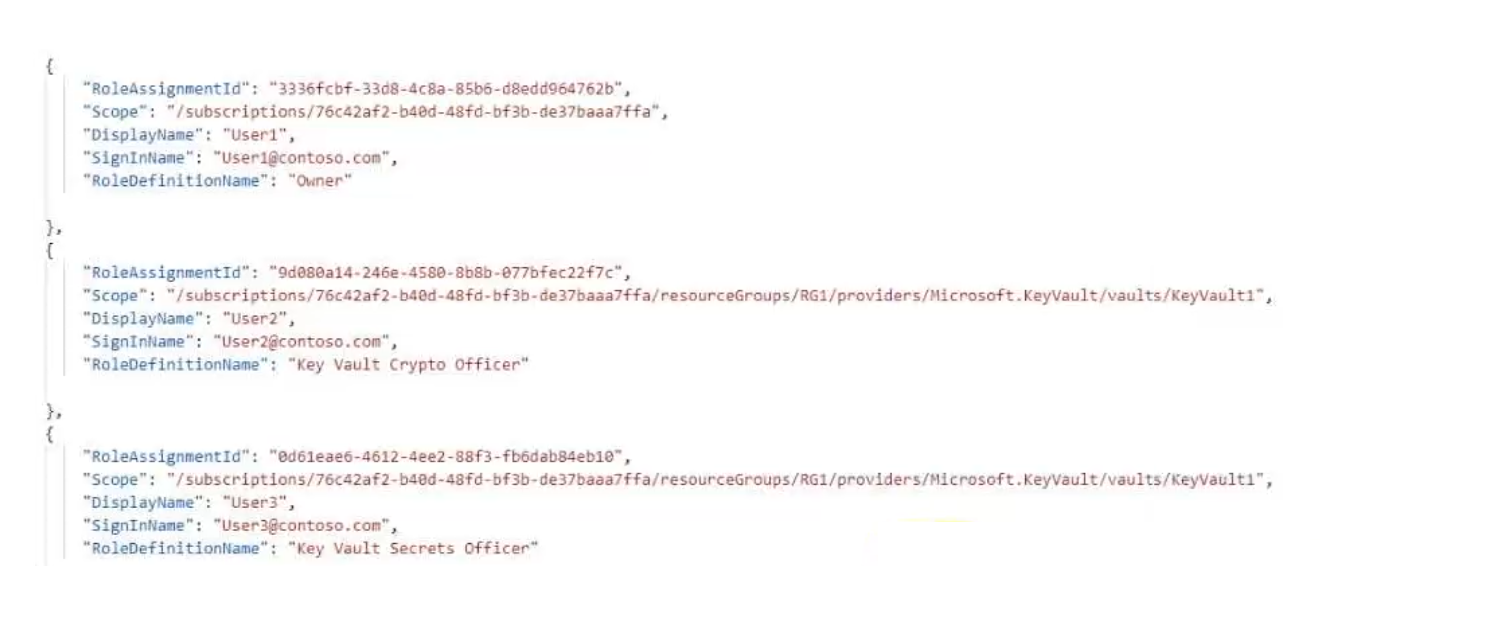
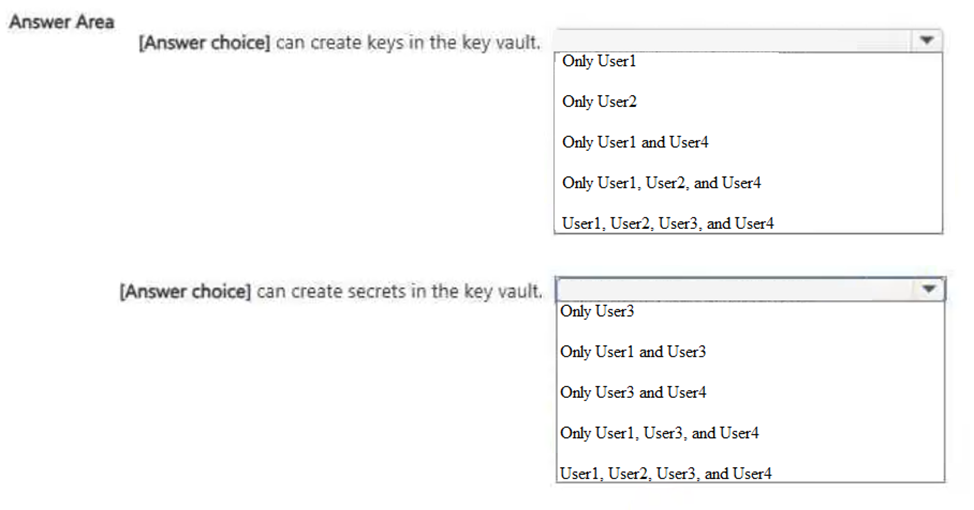
Use the drop-down menus to select the answer choice that completes each statement based on the information presented in the graphic.
NOTE: Each correct selection is worth one point.
Key Takeaways
The core trap is confusing the scope of 'Officer' roles with 'Administrator' roles; only the Administrator has Full access across all three asset types (Keys, Secrets, Certificates).
This question tests your understanding of Azure Key Vault built-in role permissions. It requires mapping specific roles to their capabilities regarding keys, secrets, and certificates.
Common mistake: Learners often assume that a specific Officer role (e.g., Keys Officer) has some elevated permissions over other types, but these roles are strictly limited to their specific domain. They also frequently mistake 'None' for 'Full' if they overlook the hierarchy.
Expert Analysis
Why the Answer Is Correct
The correct mapping relies on the strict definitions of Azure RBAC roles within Key Vault. The Key Vault Administrator role is defined as having full access to everything in the vault, so it maps to Full for Keys, Secrets, and Certificates. The specialized roles—Key Vault Crypto Officer, Key Vault Secrets Officer, and Key Vault Certificates Officer—are designed for least privilege. A Crypto Officer can manage keys but has no access to secrets or certificates (None). Similarly, the Secrets Officer manages only secrets (Full) and has None access to keys and certificates. The same logic applies to the Certificates Officer.
Why Other Candidate Answers Are Wrong
Common incorrect selections involve assigning 'Full' to an Officer role for assets outside their specialty (e.g., giving Keys Officer access to Secrets). Another error is assuming that because an Officer role is 'higher' than Reader/Writer, it might have cross-domain permissions. In reality, these roles are siloed. For instance, selecting 'Full' for Keys Officer against Secrets is incorrect because that role cannot read or write secrets.
Community Comment Notes
As mcdesilva74 noted in the comments, the solution follows a clear pattern: the Administrator gets 'Full' everywhere, while each specialized Officer gets 'Full' only for their specific category and 'None' for the others. This confirms the standard Microsoft documentation behavior for these legacy key management roles.
Official Reference
https://learn.microsoft.com/en-us/azure/key-vault/general/rbac-guide?tabs=azure-portal
This link opens the official vendor documentation in a new tab.
Exam Strategy
Memorize the 'siloed' nature of the specific Officer roles (Crypto, Secrets, Certificates). Remember that only the 'Administrator' role breaks this silo by having full control over all vault resources.
Frequently Asked Questions
What is the difference between Key Vault Secrets Officer and Manager?
Does Key Vault Administrator override individual restrictions?
Discussion 1 contributions
Compiled from public community threads and reader submissions, lightly edited for clarity. Handles and vote tallies are shown as recorded, and comments reflect the views of individual contributors.
From public community threads 1
-
mcdesilva74 👍 1Role Keys Secrets Certificates Key Vault Crypto Officer Full None None Key Vault Secrets Officer None Full None Key Vault Certificates Officer None None Full Key Vault Administrator Full Full Full
Reader comments & corrections
No reader corrections yet — spotted an error or have a note? Share it below.
Related Analysis
Practice All SC-500 Questions
Access 100 questions with complete answers and detailed explanations.
View Full SC-500 Practice Test →