Can Agent ID Developer PIM Settings Be Shortened to Two Days?
Short answer
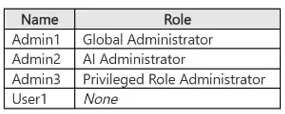
For the Agent ID Developer role, select No for the Admin1 approval statement, No for the Admin3 approval statement, and Yes for the statement that the active assignment can expire after two days.
Question
Overview
Contoso, Ltd. is a consulting company that has a main office in San Francisco and a branch office in Dallas.
Contoso has a hybrid environment that contains on-premises servers connected to Azure, a Microsoft 365 E5 subscription, and an Azure subscription named Sub1.
Existing Environment. Microsoft Entra tenant
Contoso has a Microsoft Entra tenant named contoso.com that contains the users shown in the following table.
Existing Environment. On-premises environment
The on-premises network contains an Active Directory Domain Services (AD DS) forest that syncs with contoso.com. The forest contains a server named Server1 that runs Windows Server.
Existing Environment. Azure subscription
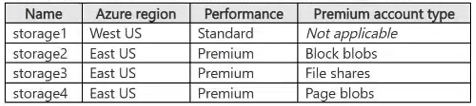
Sub1 contains the storage accounts shown in the following table.
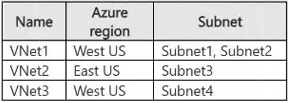
Sub1 contains the virtual networks shown in the following table.
Sub1 contains the virtual machines shown in the following table.
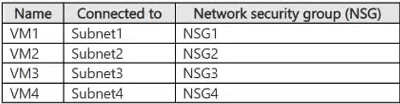
The network interface of VM1 is associated with an application security group named ASG1.
Sub1 contains the resources shown in the following table.

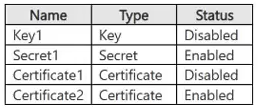
Vault1 stores the objects shown in the following table.
Existing Environment. Privileged Identity Management (PIM) configuration
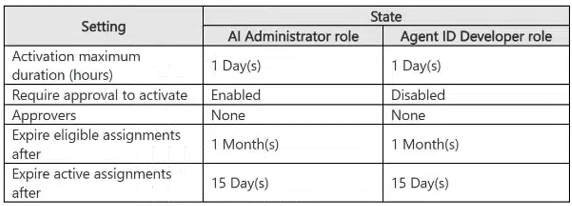
You manage privileged roles by using Privileged Identity Management (PIM). The PIM role settings are configured as shown in the following table.
Existing Environment. Microsoft Sentinel configuration
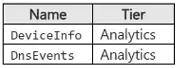
Contoso has a Microsoft Sentinel workspace that contains the following tables.
Requirements. Planned changes
Contoso plans to implement the following changes:
Integrate AKS1 with Vault1.
Enable Microsoft Entra Kerberos authentication for all supported storage.
Configure auditing for sql1 by using the Azure portal and store audit logs in a centralized location.
Requirements. Technical requirements
Contoso identifies the following technical requirements:
Protect Server1 by using file integrity monitoring.
Protect AKS1 by using Microsoft Defender for Cloud.
Configure Microsoft Sentinel to retain data for the maximum supported duration without changing the tier.
Store objects used for authentication and encryption in Vault1 and ensure that Vault1 regenerates the objects every 30 days, whenever possible.
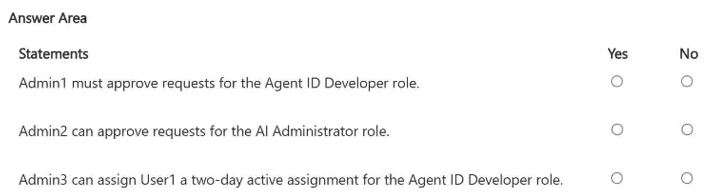
For each of the following statements, select Yes if the statement is true. Otherwise, select No.
NOTE: Each correct selection is worth one point.
Key Takeaways
The item tests whether you can separate PIM approval requirements from assignment-expiry duration; the trap is treating Admin1's Global Admin status or the 15-day active assignment as proof that Admin1 must approve or that maximum activation can exceed 24 hours.
This SC-500 hotspot tests Microsoft Entra Privileged Identity Management role settings for the Agent ID Developer role, including approver requirements and assignment expiry. The correct pattern is No, No, Yes: approval is not mandatory for either admin, but the active-assignment expiry can be reduced to two days.
Common mistake: Assuming a Global Admin such as Admin1 is automatically a mandatory approver, or confusing the role's active-assignment expiry setting with the activation maximum duration.
Expert Analysis
Why the Answer Is Correct
For the Agent ID Developer role, the PIM settings show that approval is not required, so an eligible user activates without a mandatory approver. That makes the Admin1 and Admin3 “must approve” statements false even though a Global Admin could act as an approver when approval is enabled. The third statement is about the active-assignment expiry: PIM allows shortening that expiry to two days, so it is Yes. The activation maximum duration is a separate control and is capped at 24 hours, which is why it should not be confused with a two-day active assignment.
Why Other Candidate Answers Are Wrong
Voting all three statements No is tempting if you focus on the 24-hour activation maximum, but that control does not govern active-assignment expiry. Voting Yes for the first two statements is wrong because neither Admin1 nor Admin3 is a mandatory approver; being a Global Admin does not override the role's Require approval setting. The key is to match each statement to the exact PIM row it references rather than applying one PIM rule to all three statements.
Community Comment Notes
denis91 agreed with the key “No / No / Yes” and stressed that approval is disabled for this role. LukeAR78 argued “All 3 answers are No” by pointing to the one-day activation maximum and noting “Expire active assignments is not the same thing.” HC_Harms focused on the existing 15-day active assignment and argued you can “configure it down for just two days,” which aligns with the third statement being Yes.
Official Reference
- https://learn.microsoft.com/en-us/entra/id-governance/privileged-identity-management/pim-how-to-change-default-settings
- https://learn.microsoft.com/en-us/entra/id-governance/privileged-identity-management/pim-configure
These links open the official vendor documentation in a new tab.
Exam Strategy
Read each PIM statement against the exact role-setting row: approval, approver list, activation maximum, and expire active assignments are separate controls. Do not let a Global Admin title or an unrelated 15-day assignment value override the specific setting being tested.
Frequently Asked Questions
Why is the Admin1 approval statement No if Admin1 is a Global Admin?
Does the 24-hour activation maximum prevent a two-day active assignment?
Discussion 4 contributions
Compiled from public community threads and reader submissions, lightly edited for clarity. Handles and vote tallies are shown as recorded, and comments reflect the views of individual contributors.
From public community threads 4
-
denis91 👍 1Yes, I agree with the answer key: No / No / Yes. The question tests a rule for each PIM configuration. “Admin1 must approve requests for the Agent ID Developer” = No For this role, approval is disabled. The eligible user activates on their own, immediately, and nobody needs to approve anything. The fact that Admin1 is a Global Admin doesn’t matter: they could be an approver, but the word “must” makes the statement false, because there is no approval step. “Admin2 can approve requests for the AI Administrator” = No Here approval is enabled, but the approvers field is empty. When no approver is set, PIM falls back to the defaults: Privileged Role Administrators and Global Administrators. So in this scenario, the approvers are Admin1 or Admin3. Admin2 holds the AI Administrator role, but that doesn’t make them an approver. Holding a role doesn’t give you the right to approve requests for that same role. “Admin3 can give User1 a two-day active assignment for the Agent ID Developer” = Yes This is the trick. Many people see “Maximum activation duration = 1 day” and answer No. But these are two different things: - Maximum activation duration (1 day): applies when an eligible user activates the role on their own. It’s the length of each privileged “session.” - Active assignment expiration (15 days): applies when an administrator assigns the role directly as active. It’s the limit on that assignment. Two days fits within 15 days, so the assignment is valid. And Admin3, as a Privileged Role Administrator, has permission to manage PIM assignments for Entra roles.
-
HC_Harms 👍 1I agree with the forst two no's. For the third answer I would go with yes. Why? We already have a 15 day active assigment configured. So why shouldn't we be allowed to configure it down for just two days? The maximum duration hours is active after(!) our 15 day (or two days in this case). Active assigment means, we can use this role without doing anything, no approval is needed, it's automatically active for this configured period of time.
-
LukeAR78 👍 1All 3 answers are No. Admin1 can approve the role, but the wording is 'must'. Admin 3 can approve as well. It's strange wording, but I would say no. The Third statement is also no. The Maximum activation is one day. Expire active assignments is not the same thing.
-
Craigg 👍 1Hi Hate question like this. Either Privilege admin approver or Global admin can approve the role. Either Admin 1 or Admin 3 must approve the role, but it can be either. The question should read only Admin 1 can approve requested role.
Reader comments & corrections
No reader corrections yet — spotted an error or have a note? Share it below.
Related Analysis
Practice All SC-500 Questions
Access 100 questions with complete answers and detailed explanations.
View Full SC-500 Practice Test →