Azure SQL Auditing Storage Account Selection
Contoso, Ltd. is a consulting company that has a main office in San Francisco and a branch office in Dallas.
Contoso has a hybrid environment that contains on-premises servers connected to Azure, a Microsoft 365 E5 subscription, and an Azure subscription named Sub1.
Existing Environment. Microsoft Entra tenant
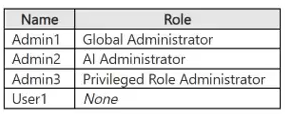
Contoso has a Microsoft Entra tenant named contoso.com that contains the users shown in the following table.
 Existing Environment. On-premises environment
The on-premises network contains an Active Directory Domain Services (AD DS) forest that syncs with contoso.com. The forest contains a server named Server1 that runs Windows Server.
Existing Environment. Azure subscription
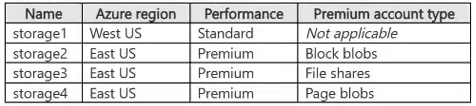
Sub1 contains the storage accounts shown in the following table.
Existing Environment. On-premises environment
The on-premises network contains an Active Directory Domain Services (AD DS) forest that syncs with contoso.com. The forest contains a server named Server1 that runs Windows Server.
Existing Environment. Azure subscription
Sub1 contains the storage accounts shown in the following table.
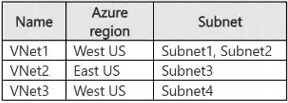
 Sub1 contains the virtual networks shown in the following table.
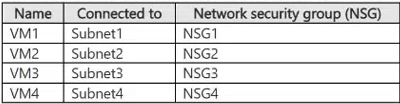
 Sub1 contains the virtual machines shown in the following table.
 The network interface of VM1 is associated with an application security group named ASG1.
Sub1 contains the resources shown in the following table.
The network interface of VM1 is associated with an application security group named ASG1.
Sub1 contains the resources shown in the following table.
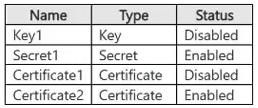
 Vault1 stores the objects shown in the following table.
 Existing Environment. Privileged Identity Management (PIM) configuration
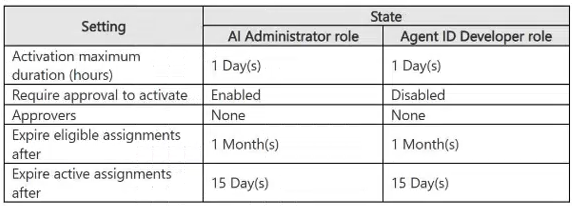
You manage privileged roles by using Privileged Identity Management (PIM). The PIM role settings are configured as shown in the following table.
Existing Environment. Privileged Identity Management (PIM) configuration
You manage privileged roles by using Privileged Identity Management (PIM). The PIM role settings are configured as shown in the following table.
 Existing Environment. Microsoft Sentinel configuration
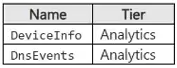
Contoso has a Microsoft Sentinel workspace that contains the following tables.
Existing Environment. Microsoft Sentinel configuration
Contoso has a Microsoft Sentinel workspace that contains the following tables.
 Requirements. Planned changes
Contoso plans to implement the following changes:
• Integrate AKS1 with Vault1.
• Enable Microsoft Entra Kerberos authentication for all supported storage.
• Configure auditing for sql1 by using the Azure portal and store audit logs in a centralized location.
Requirements. Technical requirements
Contoso identifies the following technical requirements:
• Protect Server1 by using file integrity monitoring.
• Protect AKS1 by using Microsoft Defender for Cloud.
• Configure Microsoft Sentinel to retain data for the maximum supported duration without changing the tier.
• Store objects used for authentication and encryption in Vault1 and ensure that Vault1 regenerates the objects every 30 days, whenever possible.
You need to implement the planned changes for sql1.
Which storage accounts can you use?
Requirements. Planned changes
Contoso plans to implement the following changes:
• Integrate AKS1 with Vault1.
• Enable Microsoft Entra Kerberos authentication for all supported storage.
• Configure auditing for sql1 by using the Azure portal and store audit logs in a centralized location.
Requirements. Technical requirements
Contoso identifies the following technical requirements:
• Protect Server1 by using file integrity monitoring.
• Protect AKS1 by using Microsoft Defender for Cloud.
• Configure Microsoft Sentinel to retain data for the maximum supported duration without changing the tier.
• Store objects used for authentication and encryption in Vault1 and ensure that Vault1 regenerates the objects every 30 days, whenever possible.
You need to implement the planned changes for sql1.
Which storage accounts can you use?
Community Insight
Tests knowledge of Azure SQL Database auditing requirements, specifically the constraint that audit logs must be stored in a storage account within the same region as the SQL server.
Determines the correct storage accounts for Azure SQL auditing by evaluating regional alignment and account type compatibility. The solution identifies that only storage accounts in the same region as the database and supporting standard general-purpose tiers are valid.
Learners often overlook the regional matching requirement or incorrectly assume that premium storage or different regions are supported for native portal-based auditing configuration.
Community Discussion (1 comments)
Comments & Corrections
No comments yet — spotted an error or have a note? Share it below.
Expert Analysis
Why the Answer Is Correct
The correct answer is A (storage1 only). To configure auditing for sql1 using the Azure portal, the target storage account must reside in the same region as the SQL server hosting sql1. According to the exhibit, sql1 is located in the West US region. Among the available storage accounts, only storage1 is listed in West US. Additionally, Azure SQL Auditing supports writing logs to Standard General-purpose v2 storage accounts, which storage1 is.Why the Other Options Are Wrong
Storage2, storage3, and storage4 are located in East US, which does not match the West US region of sql1; therefore, they cannot be used for native auditing via the portal due to regional constraints. Even though they might be technically capable of storing blobs, the specific service integration requires regional co-location for this configuration method. Option C includes storage3 (East US), which is invalid. Option D excludes the only valid West US account. Option E includes all invalid East US accounts.Community Comment Notes
As Craigg noted, "Regional Alignment: When deploying auditing through the Azure portal, the chosen storage account must be in the same region as your database and server." This highlights the critical dependency on geography for this specific feature setup. Another commenter emphasized that "Azure SQL Auditing natively writes logs to general-purpose Standard accounts," confirming the tier compatibility of storage1.Exam Strategy
Always check the region of the resource being configured against the region of the dependent resource (like storage for logging). For Azure SQL auditing via the portal, regional match is mandatory.
Frequently Asked Questions
Can I use a storage account in a different region for Azure SQL auditing?
No, when configuring auditing via the Azure portal, the storage account must be in the same region as the SQL server.
Does Azure SQL auditing support Premium storage accounts?
Yes, but it primarily targets General Purpose v2 accounts. The key constraint here is region, not just tier.
Related Analysis
Practice All SC-500 Questions
Access 100 questions with complete answers and detailed explanations.
View Full SC-500 Practice Test →