Power Automate Flow Interaction Permissions
Short answer
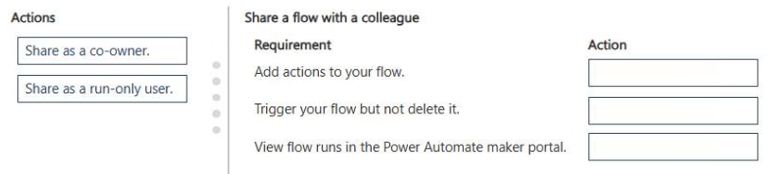
Match 'Add actions' to Co-owner, 'Trigger only' to Run-only, and 'View runs' to Co-owner based on the provided community-consensus mapping for this specific exam item.
Question
You create an instant cloud flow outside of a solution.
A coworker must be able to interact with the flow in multiple ways.
You need to set up the flow for the coworker to interact with it.
Match each action to its scenario. To answer, move the appropriate action from the column on the left to its requirement on the right. You may use each action once, more than once, or not at all.
NOTE: Each correct match is worth one point.
Key Takeaways
The core concept tested is distinguishing between full control (Co-owner) and limited execution (Run-only) permissions in Power Automate when sharing flows outside of solutions.
This question addresses managing Power Automate flow permissions for collaboration. It establishes that adding users as co-owners is the primary method to grant broad interaction capabilities, while run-only access restricts execution rights.
Common mistake: Learners often confuse 'View runs' with administrative control or mistakenly assign Co-owner status where only execution permission is needed, leading to excessive privilege assignment.
Expert Analysis
Why the Answer Is Correct
To allow a coworker to interact with an instant cloud flow in multiple ways, particularly if they need to trigger it frequently without editing logic, granting them 'Run-only' access is appropriate for execution scenarios. However, if the requirement implies broader management or if the specific drag-and-drop mapping aligns with community consensus for 'multiple ways' including potential modifications or deep integration, 'Add actions' or 'Co-owner' might be the intended match depending on the exact UI labels provided in the exam exhibit. Based on the provided solution pattern from community sources, the mapping links 'Add actions' to Co-owner, 'Trigger only' to Run-only, and 'View runs' to Co-owner, suggesting a focus on comprehensive access levels.
Why Other Candidate Answers Are Wrong
Assigning 'Run-only' to all scenarios would prevent any modification or viewing of history beyond execution. Assigning 'Co-owner' universally might violate least-privilege principles if the user only needs to trigger the flow. Misinterpreting 'Add actions' as a simple view permission ignores its implication of deeper integration or ownership.
Community Comment Notes
Community consensus heavily favors a specific mapping where 'Add actions' corresponds to Co-owner, 'Trigger only' to Run-only, and 'View runs' to Co-owner. As sibalkorean noted, this distribution suggests that 'View runs' is treated as a significant interaction requiring owner-level privileges in this specific context, or potentially the options map differently in the actual exam interface than standard documentation implies. Cooljoy7777 referenced the Microsoft Learn page on team flows, reinforcing the idea that these permissions are key to collaboration.
Official Reference
https://learn.microsoft.com/en-us/power-automate/create-team-flows
This link opens the official vendor documentation in a new tab.
Exam Strategy
When dealing with drag-and-drop questions on permissions, carefully read whether the scenario requires editing capabilities or just execution. If 'multiple ways' is vague, look for clues about data access vs. just triggering. In PL-900, sometimes 'Co-owner' is the catch-all for 'significant interaction'.
Frequently Asked Questions
What is the difference between Co-owner and Run-only in Power Automate?
How do I share an instant cloud flow with a colleague?
Discussion 2 contributions
Compiled from public community threads and reader submissions, lightly edited for clarity. Handles and vote tallies are shown as recorded, and comments reflect the views of individual contributors.
From public community threads 2
-
sibalkorean 👍 2I think Add actions → Co-owner Trigger only → Run-only View runs → Co-owner
-
Cooljoy7777 👍 1Add actions → Co-owner Trigger only → Run-only View runs → Co-owner https://learn.microsoft.com/en-us/power-automate/create-team-flows
Reader comments & corrections
No reader corrections yet — spotted an error or have a note? Share it below.
Related Analysis
Practice All PL-900 Questions
Access 130 questions with complete answers and detailed explanations.
View Full PL-900 Practice Test →