Which Power Automate Components Log Support Emails to Excel?
Short answer
Use a Trigger to start the flow when a new support email arrives, an Action to evaluate whether it is high priority, and an Action to write the email data to Excel.
Question
A company uses Microsoft Power Platform to manage support tickets.
Customers submit support requests by sending an email to a support email address.
All high-priority emails must be logged into a Microsoft Excel sheet for historical purposes.
You need to identify the components that are required for logging the emails in Excel.
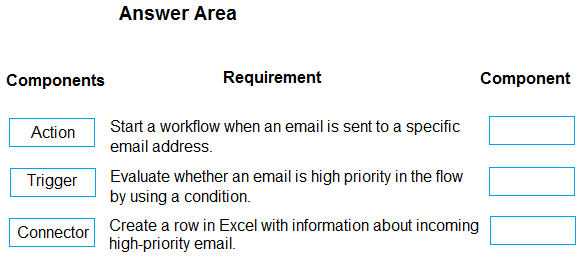
Which components should you use? To answer, drag the appropriate components to the correct requirements. Each component may be used once, more than once, or not at all. You may need to drag the split bar between panes or scroll to view content.
NOTE: Each correct selection is worth one point.
Key Takeaways
Tested: distinguishing Power Automate triggers from actions and connectors. The trap is choosing Connector for the Excel write step, but writing data to Excel is performed by an Action provided by the Excel connector.
This PL-900 drag-and-drop question tests Power Automate components: trigger, action, and connector. The correct mapping logs high-priority support emails to Excel using a Trigger and two Actions.
Common mistake: Many learners select Connector for the third slot because they think connecting to Excel is the requirement. However, the connector only enables the action; the actual logging step is an Action (e.g., Excel 'Add a row into a table').
Expert Analysis
Why the Answer Is Correct
The scenario requires a flow that starts on a new support email, evaluates whether it is high priority, and then logs it to Excel. In Power Automate, the component that starts a flow is a Trigger, so the first requirement maps to Trigger. The priority evaluation is a logical step performed by an Action (such as a Condition). Writing the email details to Excel is also a task performed by an Action (e.g., the Excel "Add a row into a table" action). Therefore, the correct selection is Trigger, Action, Action.
Why Other Candidate Answers Are Wrong
A common alternative is to place Connector in the third slot because the Excel connector is needed to access the Excel service. However, a connector is not a flow step; it is the underlying service connection that provides actions. The requirement "log the email to Excel" describes what the flow does, which is an Action, not the connection itself. As adamer noted, Microsoft Learn states: "To write data to an Excel spreadsheet, use the Write to Excel worksheet action." Choosing Connector would misidentify the component that performs the logging. Similarly, some might put Connector for the second slot, but checking priority is a built-in Action, not a connector.
Community Comment Notes
The community is divided, but the highest-voted answer, posted by AZ_Guru_Wannabe, is "Trigger Action Action." ziggy1117 argues for "Trigger, action, connector" and states that "for #3, you need a connector first to excel before you can create an action," but this conflates the service connection with the flow step. adamer counters that the third should be Action, quoting Microsoft Learn: "To write data to an Excel spreadsheet, use the Write to Excel worksheet action." storziberica notes the confusion between desktop flows (where it is an action) and cloud flows (where the option is via a connector), but for a cloud flow the action is still the component that logs the data. Overall, the official documentation and the top community answer support Trigger, Action, Action.
Official Reference
https://learn.microsoft.com/en-us/power-automate/desktop-flows/actions-reference/excel
This link opens the official vendor documentation in a new tab.
Exam Strategy
Memorize the three core Power Automate components: Trigger (starts the flow), Action (does the work), and Connector (provides access to a service). In drag-and-drop questions, map each requirement to the component that directly performs the task—writing to Excel is an Action, not a Connector. Remember a flow has only one Trigger but can have many Actions.
Frequently Asked Questions
Why is the third component an Action and not a Connector for logging to Excel?
Does checking high-priority email require a Connector or an Action?
Discussion 13 contributions
Compiled from public community threads and reader submissions, lightly edited for clarity. Handles and vote tallies are shown as recorded, and comments reflect the views of individual contributors.
From public community threads 13
-
ziggy1117 👍 6Trigger, action, connector - correct.. for #3, you need a connector first to excel before you can create an action to do anything
-
Tuchor123 👍 4Shouldn't the third be an Action as well?
-
adamer 👍 33rd one should be Action. "To write data to an Excel spreadsheet, use the Write to Excel worksheet action." Reference: https://learn.microsoft.com/en-us/power-automate/desktop-flows/actions-reference/excel
-
Moiz1031 👍 3Ok. I am changing my mind, as I have to select the Excel connector first, then I would select 'connector' for this question.
-
purplebagger 👍 3Trigger Action Action
Show 8 more comments
-
storziberica 👍 2The question is confusing, if we are talking about a desktop flow then yes it should be an action. But if it is in a cloud flow in the Power Automate portal then the option is via a connector.
-
CiscoWAU 👍 2Yes, but it is asking you which components you should use. Do you think you can perform that "action" without a connector to excel? ...
-
nemobumba 👍 2Trigger, Connector, Action
-
captainspork 👍 1The requirement to "Create a row in Excel with information about incoming high-priority email" describes the specific execution step that writes the data. While this step relies on the Excel Connector to authenticate and authorize the connection to the service, the actual component placed into the flow to create the row is an Action.
-
edzio 👍 13. Action: Create a row in Excel with information about incoming high-priority email. Connector: Provides the link between Power Automate and Excel, allowing actions to be performed on Excel files. Action: The specific task you want to perform, such as creating a row in an Excel sheet. The question is about the task.
-
rmeng 👍 1Trigger: Start a workflow when an email is sent to a specific email address. Action: Evaluate whether an email is high priority in the flow by using a condition. Connector: Create a row in Excel with information about incoming high-priority email.
-
Moiz1031 👍 1For 3) You need to select the write action from within the Excel connector. But as component you would select the Add a row Action from within the Excel connector. 'Action' should be my choice.
-
babuvt 👍 13. could be either Connector or Action. Both seem to be viable answers. However excel being an external data source it should be CONNECTOR if you think simple :-)
Reader comments & corrections
No reader corrections yet — spotted an error or have a note? Share it below.
Related Analysis
Practice All PL-900 Questions
Access 130 questions with complete answers and detailed explanations.
View Full PL-900 Practice Test →