Power BI Visualizes Data: Where Does Power Platform Store Data?
Short answer
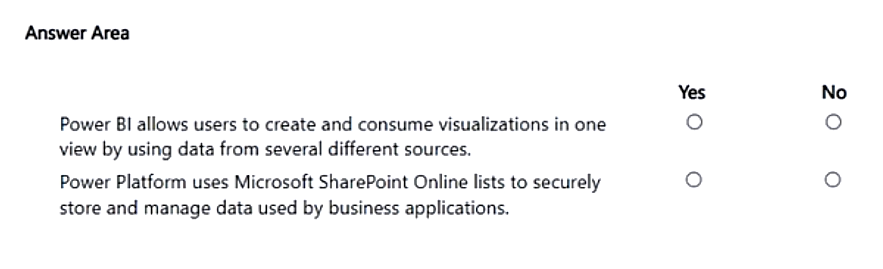
Select Yes for the statement that Power Platform can use SharePoint Online lists to store and manage data — apps and flows reach lists through the standard SharePoint connector.
Question
A company plans to use Power BI to visualize data.
Instructions: For each of the following statements, select Yes if the statement is true. Otherwise, select No.
NOTE: Each correct selection is worth one point.
Key Takeaways
The item tests the gap between a supported data source and the native data store; the trap is rejecting SharePoint Online lists outright just because Microsoft Dataverse is billed as the Power Platform's native database.
PL-900 hotspot items ask you to mark each statement about Power BI and the wider Power Platform as Yes or No, including whether SharePoint Online lists can store and manage app data. This page confirms the verdict: SharePoint lists are a valid Power Platform data store through the standard connector, while Dataverse is the native enterprise store.
Common mistake: The most common wrong approach is marking the SharePoint statement No simply because Microsoft Learn calls Dataverse the native enterprise data service. "Native" does not mean "the only supported store," so a statement about what Power Platform apps and flows can use stays Yes.
Expert Analysis
Why the Answer Is Correct
Power Apps canvas apps and Power Automate flows read and write SharePoint list items through the standard SharePoint Online connector, so a statement saying Power Platform can use SharePoint Online lists to store and manage data is true and must be marked Yes. The question's framing (a company plans to use Power BI to visualize data) deliberately separates the visualization layer from the storage layer: Power BI reports consume data, while the surrounding Power Platform apps and flows decide where that data physically lives. Microsoft's connector library treats SharePoint as a first-class tabular data source for both Power Apps and Power Automate, which is why list-backed solutions remain an extremely common low-cost build pattern in PL-900 scenarios. Dataverse being the native, enterprise-grade store with role-based security does not invalidate that capability in any way. The statement is graded on what it literally claims about a supported capability, so the correct selection is Yes.
Why Other Candidate Answers Are Wrong
Selecting No here usually comes from silently rewriting the statement into "SharePoint Online is the native Power Platform data store," which is a different claim that Dataverse would indeed win. That word swap is exactly the trap: "can use" statements are capability claims and test out as Yes, while absolute statements built around "native," "only," "required," or "default" test out as No. Statements suggesting Power BI itself is needed to store Power Platform data, or that SharePoint lists cannot be connected to apps and flows, are also false and would be marked No. Likewise, any claim that a SharePoint list delivers Dataverse's enterprise role-based security, auditing, and governed table model would be No, because those are Dataverse-specific attributes.
Community Comment Notes
The first commenter reasoned that Power Platform "can use SharePoint Online lists to store and manage data," while adding the caveat that "it is not the default or required data store" — a nuance that is correct but does not change the Yes verdict for a can-use statement. Cooljoy7777 pushed back citing the Microsoft Learn rule that Dataverse, "not SharePoint Online—is the enterprise storage and management system native" to Power Platform, yet the same post acknowledges that apps can connect to SharePoint lists via standard connectors. Read together, the disagreement in the thread is about wording rather than capability: the second commenter is right that Dataverse is the native store, and the first commenter is right that SharePoint lists remain usable storage. That is precisely why the statement's exact phrasing ("can use" versus "is the native store") decides the Yes/No selection.
Exam Strategy
Read each hotspot statement literally and flag absolute words such as native, only, required, and default, because those flip a true capability into a false claim, while softer phrasing like can use normally stays true. Confirm the subject of every statement first — Power BI versus Power Platform versus Dataverse — since the connector story differs for each. If a statement is only partly true, it is No; there is no partial credit inside a single hotspot row.
Official Reference
- https://learn.microsoft.com/en-us/connectors/sharepointonline/
- https://learn.microsoft.com/en-us/power-apps/maker/data-platform/data-platform-intro
These links open the official vendor documentation in a new tab.
Exam Strategy
For every hotspot statement, isolate the subject (Power BI, Power Platform, SharePoint, or Dataverse) and the strength of the verb before deciding. Capability wording such as can use, connect, or visualize is normally Yes, whereas absolute wording such as native, required, or the only way is normally No. Mark a row Yes only when the whole sentence is true as written, because each selection is worth a full point.
Frequently Asked Questions
Can Power Platform apps store and manage data in SharePoint Online lists?
Is SharePoint Online the native enterprise data store for Power Platform?
Discussion 2 contributions
Compiled from public community threads and reader submissions, lightly edited for clarity. Handles and vote tallies are shown as recorded, and comments reflect the views of individual contributors.
From public community threads 2
-
Cooljoy7777 👍 1you are wrong Microsoft Learn Rule: Microsoft Dataverse—not SharePoint Online—is the enterprise storage and management system native to Microsoft Power Platform. While Power Platform apps can connect to SharePoint lists via standard connectors, Dataverse is the native database service designed explicitly to store, secure, and manage application data with advanced enterprise role-based security. https://learn.microsoft.com/en-us/power-apps/maker/data-platform/data-platform-intro
-
Anonymous learner 👍 1I would say yes for the second question, Power Platform can use SharePoint Online lists to store and manage data, but only when solutions are intentionally built to use SharePoint; it is not the default or required data store.
Reader comments & corrections
No reader corrections yet — spotted an error or have a note? Share it below.
Related Analysis
Practice All PL-900 Questions
Access 130 questions with complete answers and detailed explanations.
View Full PL-900 Practice Test →