Repositioning report visuals by editing their position (X and Y coordinates)
Short answer
C The X and Y position properties place each visual on the report canvas.
Question
Key Takeaways
A visual's position — its X and Y values under General > Properties — is the coordinate pair that decides where the visual sits on the canvas; editing it moves the visual.
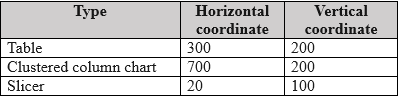
A report contains several visuals whose locations must change, and the exhibit lists per-visual coordinates, so the property controlling each visual's placement must be identified.
Common mistake: Confusing layer order or tab order with location — both order things (stacking depth and keyboard focus sequence) without moving a single pixel of any visual.
Expert Analysis
Why the Answer Is Correct
The exhibit shows each visual alongside coordinate values, which correspond to the visual's Position settings (X and Y) in the Format pane's General properties. Modifying the position (C) changes the canvas location of each visual directly — that is the definition of the task.
Why the Other Options Are Wrong
Layer order (A) determines which overlapping visual renders in front of another; it changes stacking, not placement. Padding (B) inserts space inside a visual between its border and contents — it alters the visual's internal layout, not its coordinates on the page. Tab order (D) sequences keyboard navigation through visuals, with no effect on where anything appears.
Community Comment Notes
A commenter reads the exhibit plainly: the numbers shown are coordinates, and coordinates are the position property, so C is correct. Another observes that layer and tab order clearly cannot relocate anything, leaving position as the only candidate.
Official Reference
https://learn.microsoft.com/en-us/power-bi/fundamentals/desktop-what-is-desktop
This link opens the official vendor documentation in a new tab.
Community Votes
100% of anonymous learners picked answer C. Votes are pick records left by other test-takers — they are not the verified answer.
Discussion 12 contributions
Compiled from public community threads and reader submissions, lightly edited for clarity. Handles and vote tallies are shown as recorded, and comments reflect the views of individual contributors.
From public community threads 12
-
MITZ619 👍 4 Answered CC. should be the correct answer because the position of a visual in Power BI determines where it appears on the report page.
-
jaume 👍 2 Answered CIt seems clear to me modifying the layer order and/or tab order is not going to change the location of any visual but it could be argued modifying the padding is changing it. Anyway, no discusion modifying the position is changing the position
-
Florinuca 👍 2The correct answer is C = Position (X and Y coordinates)
-
539d541 👍 2 Answered CRidiculously wrong answer given.....it is C
-
Anloindian123 👍 1 Answered CThe coordinates correspond to the position of each visual. C is correct
Show 7 more comments
-
noone420 👍 8 Answered CC is correct
-
albert1809 👍 3 Answered Ci think the answer is C
-
LuluSkyy 👍 1Correct answer is C
-
rcaliandro 👍 1 Answered CC, the position
-
INDEAVR 👍 1 Answered CC. the position
-
varuns 👍 1 Answered Cthe position
-
AfuIRa 👍 1WhatsApp
Reader comments & corrections
No reader corrections yet — spotted an error or have a note? Share it below.
Related Analysis
Practice All PL-300 Questions
Access 116 questions with complete answers and detailed explanations.
View Full PL-300 Practice Test →