Northwind Traders semantic model: choosing Import storage mode for the Power BI tables
Short answer
C Import matches the once-daily 7 AM data currency requirement while giving the fastest interactive performance.
Question
 -
-  -
-  -
-  -
-  -
-  -
-  -
- 
Key Takeaways
Import mode is the right fit when data only needs a once-daily refresh: it delivers the fastest visual interaction and can compress data, whereas DirectQuery and Dual trade interactive performance for freshness the 7 AM requirement does not demand.
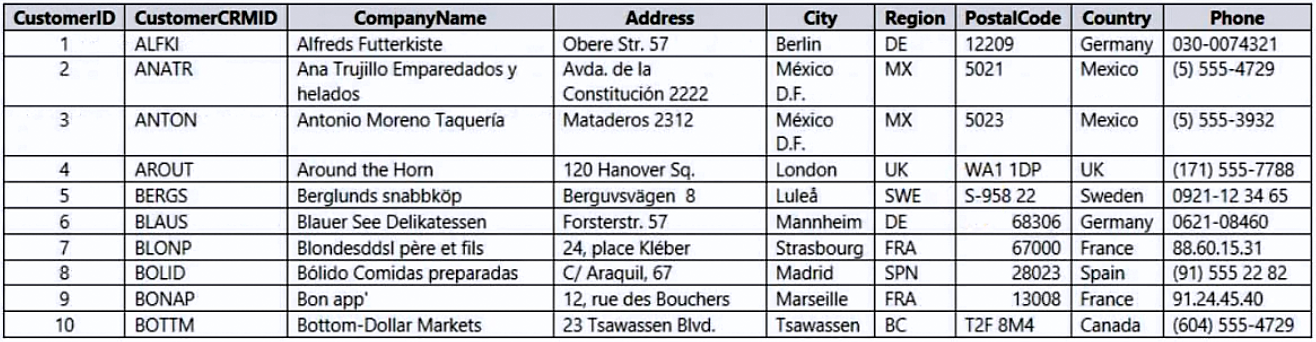
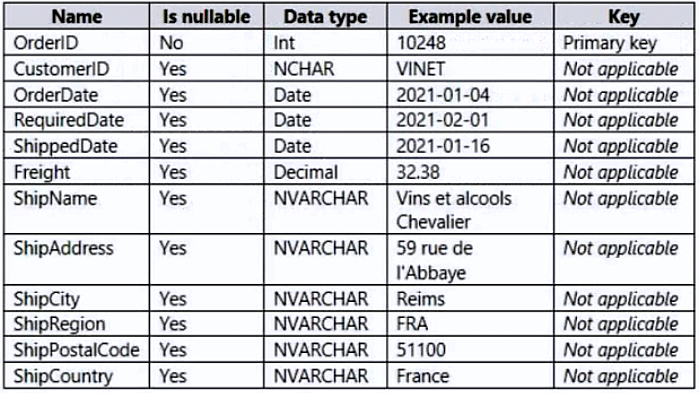
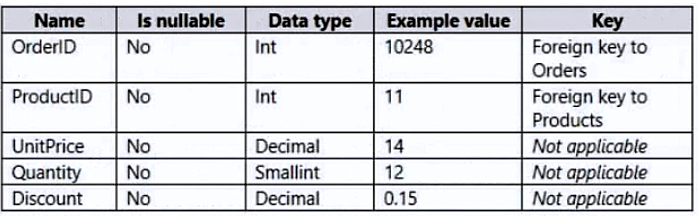
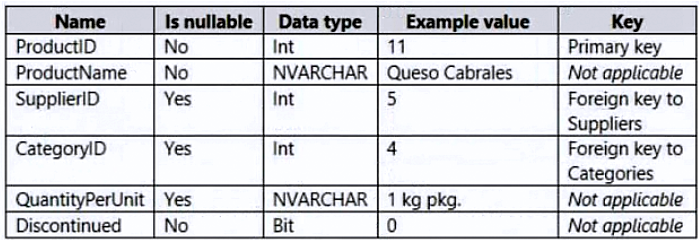
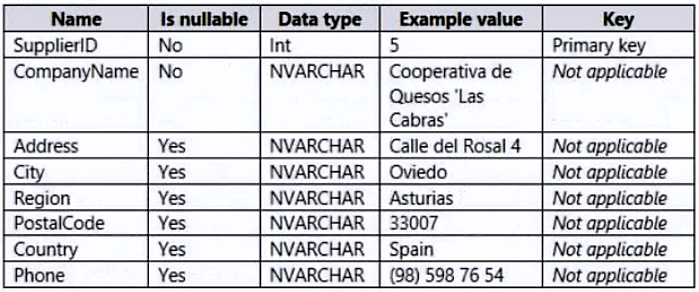
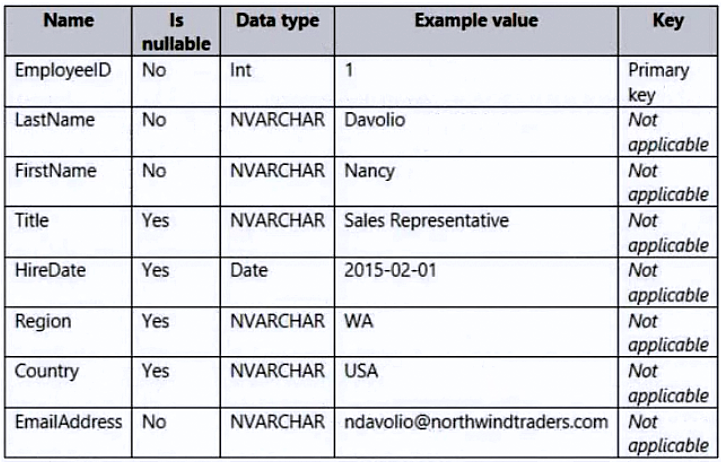
A Power BI case study for Northwind Traders requires picking one storage mode for all tables in the semantic model, given that data must be current as of 7 AM Pacific Time daily, reports must respond quickly, and the dataset must stay small.
Common mistake: Assuming Dual or DirectQuery is needed for RLS or freshness — DirectQuery/Dual are only warranted for near-real-time data or very large models, and the case study explicitly allows a daily 7 AM refresh window.
Expert Analysis
Why the Answer Is Correct
Import (C) satisfies every stated technical requirement. Data currency is only required as of 7 AM Pacific Time each day, which maps exactly to a once-daily scheduled refresh of an imported model. Import also provides the fastest response times when users interact with visualizations, because queries run against the in-memory VertiPaq engine rather than hitting source systems.
Why the Other Options Are Wrong
DirectQuery (A) would send every visual interaction to the source systems, which is slower and unnecessary when a daily refresh window is acceptable. Dual (B) mixes Import and DirectQuery per table and only makes sense when a single table must serve both roles in DirectQuery-heavy models — nothing in the requirements calls for it, and it adds complexity that contradicts the simplicity of the case study. Live connection (D) is not a storage mode for building a semantic model from multiple sources; it connects a report to an external published model, which cannot satisfy the requirement to build a single dataset here.
Community Comment Notes
Tex02, the most-endorsed comment, reasons that reports only update at 7 AM and need fast response times, pointing to Import. Several commenters independently reach the same conclusion. One popular comment claims DirectQuery does not support RLS, which is inaccurate — DirectQuery does support row-level security — but the conclusion favoring Import still stands on the refresh and performance requirements alone.
Official Reference
https://learn.microsoft.com/en-us/power-bi/transform-model/desktop-storage-mode
This link opens the official vendor documentation in a new tab.
Frequently Asked Questions
For the PL-300 Northwind Traders semantic model, why is Import (C) preferred over DirectQuery (A)?
Does DirectQuery support row-level security in Power BI semantic models?
Why not use Dual (B) or live connection (D) for the Northwind Traders semantic model?
Community Votes
50% of anonymous learners picked answer C. Votes are pick records left by other test-takers — they are not the verified answer.
Discussion 20 contributions
Compiled from public community threads and reader submissions, lightly edited for clarity. Handles and vote tallies are shown as recorded, and comments reflect the views of individual contributors.
From public community threads 20
-
Tex02 👍 14I agree with C as reports are updated at 7am only and needs fast response times.
-
9d92039 👍 11 Answered BImport for the excel file, DirectQuery for the tables on SQL server
-
rcaliandro 👍 5 Answered CVery small datasets updated once a day, also for me is C
-
f133b89 👍 3 Answered CStorage Mode Recommendation: Use Import mode for all tables in the semantic model. This ensures: Fast performance during report interactions. Dataset size is minimized due to Power BI's efficient compression techniques. Data can be refreshed daily to meet the 7 AM Pacific Time requirement.
-
stephenrooke 👍 2Its B Dual as the question asks to minimise the size of the dataset. Normally to do this you'd use direct query but as there is an excel spreadsheet this must be imported hence you need to use dual. Using import would create a larger dateset as it would pull the database data into the dataset
Show 15 more comments
-
Arnav123 👍 2 Answered BDual because you can chose what you want to import (eg. historical data) and what you want to use with direct query (eg.recent sales data). Import will help in increasing performance and direct query will keep the data size minimized.
-
Fatima300 👍 2 Answered CImport Mode is the best choice. It ensures fast report performance, daily refreshes
-
Srilatha_B 👍 2 Answered BOne of the datasource is Azure SQL DB which is 5GB. Import doesn't make sense
-
Mo_Suhail 👍 2 Answered BIt's B Dual as the question asks to minimize the size of the dataset.
-
Odidepse 👍 1 Answered CBest answer is c, it cannot be direct query , it gives faster query performance but a trade off is fast visual response time which is a requirement / I wont go with live connection you are building dataset in powerbi and I wont go for dual mode, Nothing is captured on the import and direct query . Import mode for the dataset (semantic model) presents the best solution for the refresh security and fast response times for 'visual' interaction.
-
BhavnishM 👍 1 Answered CSeen similar question in measure up as well, C is the correct answer : DirectQuery doesn't supports RLS and since Dual is a combination of import and direct query, Dual is not supported as well. You are storing historical data , past 3 years and current year. Import is the best fit for historical data.
-
carrascal8 👍 1 Answered BDual: Conectar Azure SQL en DirectQuery para evitar almacenar 2 GB en Power BI. Conectar Excel en modo Import porque es liviano (5 MB) y evitar consultas lentas.
-
Mi4as 👍 1 Answered CAny word about RLS in the comments below. It means DirectQuery (or Dual) is not supported and only Import is available.
-
RahulPawar1998 👍 1 Answered CImport is the correct answer, because the time is set for the 7 AM data and for this the import option is best.
-
Davery 👍 1Isn't there a 1 GB limit for the import mode. Source 1 is 2 GB. So therefore must be dual?
-
faruk3d 👍 5 Answered CC: Import
-
MonikaStop 👍 4 Answered BI think it should be B
-
Nik0987 👍 2 Answered Cagree with C
-
ERlK2025 👍 1 Answered Cupdated at 7am only
-
RG10 👍 1OPTION B: DUAL
Reader comments & corrections
No reader corrections yet — spotted an error or have a note? Share it below.
Related Analysis
Practice All PL-300 Questions
Access 116 questions with complete answers and detailed explanations.
View Full PL-300 Practice Test →