Shrinking a Power BI model for monthly transaction totals with a star schema
Short answer
ABD Star-schema relationships, dropping TransactionID, and monthly grouping deliver the totals at minimal size.
Question
Key Takeaways
Star-schema relationships plus dropping the high-cardinality TransactionID column cut size without touching reporting capability, and grouping Transactions by account and month start date in Power Query collapses detail rows into the exact grain the monthly totals need.
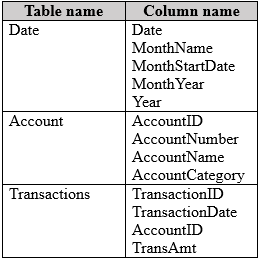
A semantic model with Date, Account, and Transactions tables must show monthly transaction totals for the current and prior year, follow a star schema, and minimize model size, with three actions to choose.
Common mistake: Adding a MonthStartDate column to Transactions as a separate step — the grouping operation can derive MonthStartDate directly from TransactionDate, and a standalone added column works against the minimize-size requirement.
Expert Analysis
Why the Answer Is Correct
One-to-many relationships (A) from the dimension tables into Transactions are the backbone of a star schema, letting month and account attributes slice the facts. Deleting TransactionID (B) removes a high-cardinality column that no monthly report needs, directly shrinking the model. Grouping the Transactions query by AccountID and MonthStartDate derived from TransactionDate, aggregating the sum of TransAmt (D), folds daily detail rows into one row per account per month — the precise grain required for current- and prior-year monthly totals, and a massive reduction in fact table size.
Why the Other Options Are Wrong
Grouping the Date query by MonthNumber (C) would break the date dimension's daily grain, destroying the ability to relate and filter by real dates while saving almost nothing, since a Date table is tiny. Adding a MonthStartDate column to Transactions (E) as an additional step contradicts the minimization goal: the grouping in D can derive the month start from TransactionDate directly, and a standalone column merely enlarges the fact table for no benefit the grouping does not already provide.
Community Comment Notes
The most-endorsed voting bloc backs A, B, and D, with one comment arguing that E would increase data size since month-start information already exists in the Date table. A dissenting bloc supports A, D, E on the grounds that D needs a MonthStartDate column to group on; that overlooks the wording 'MonthStartDate for TransactionDate,' which lets the grouping derive the value from TransactionDate directly.
Official Reference
https://learn.microsoft.com/en-us/power-bi/guidance/star-schema
This link opens the official vendor documentation in a new tab.
Exam Strategy
To minimize model size while maintaining a star schema, always prioritize aggregating fact tables at the required reporting grain rather than storing daily detail. Identify and remove high-cardinality surrogate keys that are not needed for slicing or filtering to immediately reduce memory footprint.
Frequently Asked Questions
Why delete TransactionID in Power BI?
Can I group by MonthStartDate directly?
Community Votes
57% of anonymous learners picked answer ABD. Votes are pick records left by other test-takers — they are not the verified answer.
Discussion 5 contributions
Compiled from public community threads and reader submissions, lightly edited for clarity. Handles and vote tallies are shown as recorded, and comments reflect the views of individual contributors.
From public community threads 5
-
32c0a0b 👍 2I'll go for ADE, As with out creating a start month date column we cannot group or aggregate the table: So its: 1) Create Start month date column 2) Group or aggregate 3) create relationships
-
5bf040d 👍 2I believe E is not correct because adding MonthStartDate to the Transactions table would increase the data size, and this information is already available in the Date table.
-
SylUK 👍 2A B D are the correct answers . E and F go against the requirement .
-
kai_data 👍 1Selecting D without E, makes no sense as transactions query have no MonthStartDate to aggregate on. But E indeed increase the size of the model.
-
BIT2024 👍 1for me is ADE
Reader comments & corrections
No reader corrections yet — spotted an error or have a note? Share it below.
Related Analysis
Practice All PL-300 Questions
Access 116 questions with complete answers and detailed explanations.
View Full PL-300 Practice Test →