PREVIOUSYEAR returns the full previous year, not the same day of last year
Short answer
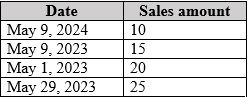
D PREVIOUSYEAR expands the May 9, 2024 filter to all of 2023, summing 15 + 20 + 25 = 60.
Question
Key Takeaways
PREVIOUSYEAR('Date'[Date]) returns all dates of the entire previous year relative to the last date in context — with a May 9, 2024 filter it sweeps all of 2023 (15 + 20 + 25 = 60), not just the matching day.
A card visual shows a Previous Year Sales measure using CALCULATE with PREVIOUSYEAR while the report page filters to May 9, 2024, so the displayed value depends on exactly which dates PREVIOUSYEAR expands to.
Common mistake: Treating PREVIOUSYEAR like SAMEPERIODLASTYEAR for a single day — the matching-day value is 15 (option B), but PREVIOUSYEAR's contract is the whole previous year, which is where the popular wrong answers come from.
Expert Analysis
Why the Answer Is Correct
PREVIOUSYEAR returns a table of all dates from the previous year given the last date in the current context. The page filter puts the last date at May 9, 2024, so the function expands to every day of 2023. Summing Sales Amount over 2023 from the shown data gives 15 (May 9) + 20 (May 1) + 25 (May 29) = 60. CALCULATE then evaluates [Sales Amount] in that full-year context, so the card displays 60 (D).
Why the Other Options Are Wrong
A (10) is the current-year value for May 9, 2024 — what the measure would show with no time intelligence at all. B (15) equals Sales Amount on the matching day May 9, 2023, which is the behavior of SAMEPERIODLASTYEAR over a one-day filter, not PREVIOUSYEAR's full-year window. C (35) corresponds to 2023 dates up to May 9 (15 + 20), a partial-year slice that no listed time-intelligence function produces for this filter context.
Community Comment Notes
The most-endorsed comment reasons that PREVIOUSYEAR calculates for the complete calendar year from last year, arriving at 60, and notes that Power BI behaves this way in a matrix as well. Another comment correctly identifies 15 as the value SAMEPERIODLASTYEAR would produce, which isolates the distinction the question is testing.
Official Reference
https://learn.microsoft.com/en-us/dax/previousyear-function-dax
This link opens the official vendor documentation in a new tab.
Exam Strategy
When you see PREVIOUSYEAR, immediately think 'full calendar year' rather than 'same month/day'. Do not assume it only shifts the date by one year; it resets the context to Jan 1st through Dec 31st of the prior year. If the question asks for a single-day comparison, look for SAMEPERIODLASTYEAR or DATEADD instead.
Frequently Asked Questions
What is the difference between PREVIOUSYEAR and SAMEPERIODLASTYEAR?
How does a page-level filter affect PREVIOUSYEAR results?
Community Votes
38% of anonymous learners picked answer B. Votes are pick records left by other test-takers — they are not the verified answer.
Discussion 7 contributions
Compiled from public community threads and reader submissions, lightly edited for clarity. Handles and vote tallies are shown as recorded, and comments reflect the views of individual contributors.
From public community threads 7
-
gpsaran 👍 6 Answered Dshould it not be 60 because Previousyear calculates for complete calendar year from last year? Even Power BI calculates like that in a matrix.
-
c034d75 👍 5 Answered BThe correct option is B, because it relates to the previous year date which is May 9, 2023.
-
5bf040d 👍 3 Answered BThe PREVIOUSYEAR function does not sum all values up to May 9, 2023. Instead, it shifts the filter context to the entire previous year relative to the current filter context. Since the filter context is restricted to May 9, 2024, the PREVIOUSYEAR function shifts the filter to May 9, 2023.
-
Anloindian123 👍 3 Answered CI agree with C. PREVIOUSYEAR pulls anything from 2023 up to May 9th 2023. SAMEPERIODLASTYEAR is what results in option B
-
4b88f2d 👍 2 Answered CI think is C too, because the key as Anloindian said: PREVIOUSYEAR pulls anything from 2023 to the date they give us.
Show 2 more comments
-
b92fc92 👍 1 Answered DI think is D, 15 is the result with SAMEPERIODLASTYEAR()
-
Jasmine121 👍 1 Answered CI vote for C
Reader comments & corrections
No reader corrections yet — spotted an error or have a note? Share it below.
Related Analysis
Practice All PL-300 Questions
Access 116 questions with complete answers and detailed explanations.
View Full PL-300 Practice Test →