Unpivoting a wide month-year grid into month, year, and amount columns
Short answer
B Unpivot melts the year columns into rows, yielding month, year, and order amount columns.
Question
Key Takeaways
Unpivot converts column headers into row values — turning the year columns into a Year column and leaving Month plus the unpivoted amount, which is exactly the target three-column shape.
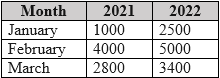
A CSV previewed in Power Query holds order amounts in a wide month-by-year grid, and the target shape is three columns: month, year, and the order amount for that month and year.
Common mistake: Reaching for transpose because the table looks rotated — transposing merely flips the grid and produces another wide table with month names as columns, not the long three-column layout.
Expert Analysis
Why the Answer Is Correct
The source is a wide grid where each year is a column header and each month a row. Unpivoting (B) melts those year columns into rows, producing an Attribute column (year) and a Value column (order amount) beside the existing Month column — precisely the required month, year, amount triple. Microsoft's unpivot documentation describes this header-to-rows transformation as the standard way to normalize cross-tab data.
Why the Other Options Are Wrong
Remove (A) deletes columns or rows, discarding the year and amount information the target shape needs. Transpose (C) flips the table so months become column headers — still wide, just rotated, and further from the goal. Pivot (D) goes the wrong direction entirely: it rolls rows up into columns, which is the operation you would use to undo the transformation being sought.
Community Comment Notes
The most-endorsed comment answers unpivot outright. Another walks the alternatives: removing anything loses information, and transposing yields a table with month names as columns — neither approaches the required long format.
Official Reference
https://learn.microsoft.com/en-us/power-query/unpivot-column
This link opens the official vendor documentation in a new tab.
Community Votes
100% of anonymous learners picked answer B. Votes are pick records left by other test-takers — they are not the verified answer.
Discussion 7 contributions
Compiled from public community threads and reader submissions, lightly edited for clarity. Handles and vote tallies are shown as recorded, and comments reflect the views of individual contributors.
From public community threads 7
-
jaume 👍 1 Answered BWhatever we could remove (option A) would result in a loss of information Transposing the table (Option C) would result in a 4x3 table with columns "Month", "January", "February" and "March" We shoud unpivot 2nd and 3rd columns
-
INDEAVR 👍 11 Answered BB. unpivot
-
rcaliandro 👍 1 Answered BB. unpivot. Correct choice
-
IVO999 👍 1 Answered BB is correct
-
539d541 👍 1 Answered BB - unpivot
Show 2 more comments
-
noone420 👍 1 Answered BB unpivot
-
ChopChop007 👍 1Correct!
Reader comments & corrections
No reader corrections yet — spotted an error or have a note? Share it below.
Related Analysis
Practice All PL-300 Questions
Access 116 questions with complete answers and detailed explanations.
View Full PL-300 Practice Test →