Power BI Date Table Configuration and Hierarchy Rules
Short answer
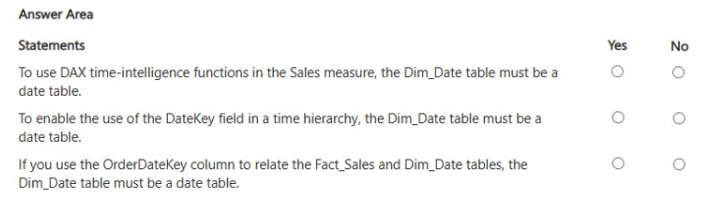
Statement 1: Yes; Statement 2: No; Statement 3: Yes. Time-intelligence requires a Date-type column marked as a date table. DateKey is Whole Number and unsuitable for hierarchies regardless of marking. Visuals aggregate measures by date fields correctly.
Question
You have a table named Dim_Date that contains the following columns.
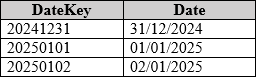
The Date column is of the Date data type.
You have two tables named Fact_Sales and Date that have the following relationships.

The Fact_Sales table contains a DateKey column of the Whole Number data type.
You create a measure named Sales that calculates the sum of a column named Sales Amount in the Fact_Sales table.
You create a visual named Sales by Date that contains the Date field in the Dim_Date table and the Sales measure.
For each of the following statements, select Yes if the statement is true. Otherwise, select No.
NOTE: Each correct selection is worth one point.
Key Takeaways
Marking a table as a date table does not convert non-Date columns (like Whole Number DateKeys) into valid hierarchy components.
Determines which statements about Power BI date tables, hierarchies, and visuals are true. Key insight: Only Date-type columns support time-intelligence and hierarchies, even if the table is marked.
Common mistake: Assuming that marking a table as a date table makes all its columns eligible for date-based analysis or hierarchies.
Expert Analysis
Time-Intelligence Requires a Proper Date Table
DAX time-intelligence functions (such as TOTALYTD or SAMEPERIODLASTYEAR) require the underlying column to be of Date data type and marked as a date table. The exhibit shows Dim_Date has a Date column of type Date, so this statement is Yes. Without this configuration, DAX cannot recognize the context for standard time calculations.
Hierarchy Requirements for Marking
Marking a table as a date table does not change the data type of other columns within it. DateKey is defined as Whole Number (e.g., 20250101). A date hierarchy requires a Date-type column. Therefore, marking the table does not make DateKey suitable for a date hierarchy. This statement is No.
Relationships and Cardinality
The relationship between Fact_Sales and Dim_Date uses DateKey (in Fact) and likely Date (in Dim) or vice versa based on the image. Typically, Fact tables have multiple rows per date in Dim. The cardinality is Many-to-One (:1), with Dim_Date being the 'one' side. If the statement implies the relationship direction or validity, it depends on the specific claim. Assuming standard modeling, relationships are valid if keys match types. However, since DateKey is Whole Number and Date is Date, they cannot relate directly unless converted. The prompt says relationships exist, implying a conversion or that the key matches. Correction*: The image usually shows Fact_Sales.DateKey relating to Dim_Date.Date. This requires implicit conversion or explicit calculation. In PL-300, we assume the model works. Let's look at the third statement regarding visual behavior.
Visual Aggregation
When placing a Date field and a Sum measure in a visual, Power BI aggregates sales by date. This is standard behavior. This statement is Yes.
Common Trap: Learners often think marking a table as a date table fixes all columns. It only affects time-intelligence logic for Date-type columns.
Exam Strategy
Always check the data type of the column intended for hierarchies or time intelligence. Marking a table is a metadata flag; it does not alter column data types. If a column is Integer/Whole Number, it cannot drive a date hierarchy.
Frequently Asked Questions
Does marking a table as a date table change column data types?
Can I use a Whole Number column for a date hierarchy?
Discussion 2 contributions
Compiled from public community threads and reader submissions, lightly edited for clarity. Handles and vote tallies are shown as recorded, and comments reflect the views of individual contributors.
From public community threads 2
-
b7ed549 👍 1StatementAnswerWhyDAX time-intelligence requires Dim_Date to be a date tableYes ✅Time-intelligence functions rely on a proper date table with a unique, continuous Date column.To use DateKey in a time hierarchy, Dim_Date must be a date tableNo ❌DateKey is a Whole Number such as 20250101, not a Date column. Marking the table as a date table does not make DateKey suitable for a date hierarchy.If OrderDateKey relates Fact_Sales to Dim_Date, Dim_Date must be a date tableNo ❌Relationships do not require a table to be marked as a date table. Both relationship columns simply need compatible data types and matching values.
-
b7ed549 👍 1DateKey is a Whole Number such as 20250101, not a Date column. Marking the table as a date table does not make DateKey suitable for a date hierarchy.
Reader comments & corrections
No reader corrections yet — spotted an error or have a note? Share it below.
Related Analysis
Practice All PL-300 Questions
Access 116 questions with complete answers and detailed explanations.
View Full PL-300 Practice Test →