Counting Product Categories Sold Using DAX CALCULATE

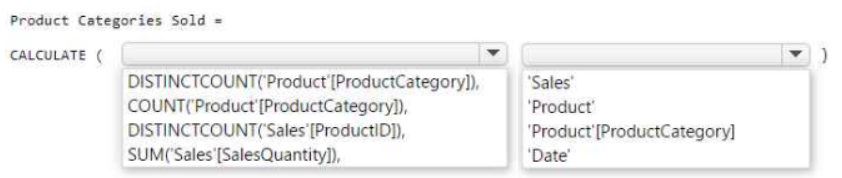
Answer Use CALCULATE(DISTINCTCOUNT('Product'[ProductCategory]), 'Sales'). DISTINCTCOUNT counts each category once, and the 'Sales' filter excludes categories with no sales in the selected period.

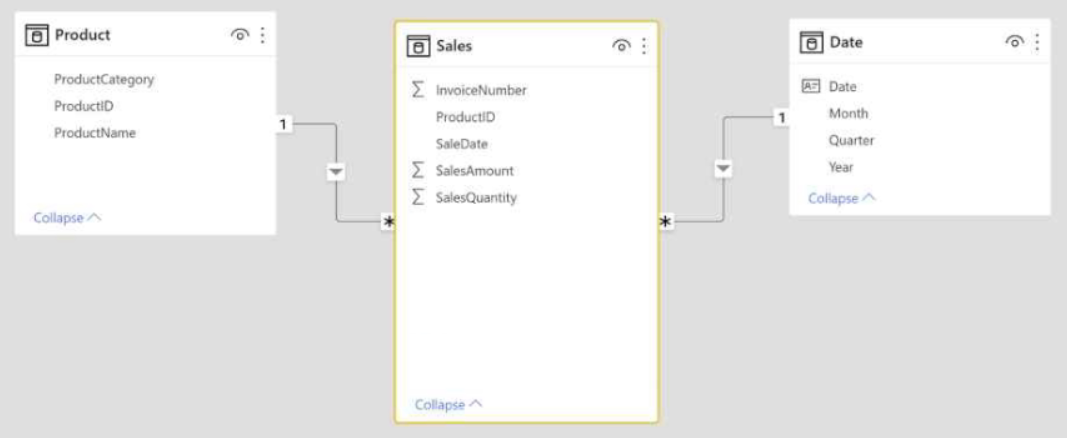
HOTSPOT You have the Power BI data model shown in the following exhibit. exhibit You need to create a measure to count the number of product categories that had products sold during a selected period. How should you complete the DAX expression? To answer, select the appropriate options in the answer area. NOTE: Each correct selection is worth one point. exhibit
Community Insight

The test is whether you combine DISTINCTCOUNT on Product[ProductCategory] with a CALCULATE filter argument of the 'Sales' table — the trap is picking COUNT (which double-counts) or filtering on the Date table, which cannot express 'had products sold'.

This PL-300 hotspot asks for a DAX measure that counts how many distinct product categories had products sold in a selected period. The correct expression is CALCULATE(DISTINCTCOUNT('Product'[ProductCategory]), 'Sales'), because DISTINCTCOUNT avoids double-counting repeated category rows and filtering by the Sales table removes categories with no transactions.

Choosing COUNT or filtering CALCULATE with the Date table. COUNT tallies every sales row, inflating the total far beyond the number of categories, and a Date-table filter returns all categories regardless of whether anything was actually sold, since the Date table has no relationship to sales activity.

Community Discussion (71 comments)

e68b25f 👍 1
CALCULATE( DISTINCTCOUNT('Product'[ProductCategory]), 'Sales' )
omath 👍 3
Answer: 1. DISTINCTCOUNT ( 'Product'[ProductCategory] ), 2. Sales Explanation: - DISTINCTCOUNT('Product'[ProductCategory]) → counts unique categories. - 'Sales' → ensures only categories with actual sales are included. - The relationship between Sales → Product ensures that only categories tied to sold products are counted. * Why not the others: - COUNT('Product'[ProductCategory]) → counts rows, not distinct categories. - DISTINCTCOUNT(Sales[ProductID]) → counts products, not categories. - SUM(Sales[SalesQuantity]) → gives total quantity, not number of categories.
prabhath132 👍 3
Tested. Answer is wrong.Correct answer is : Distinctcount('Product'[product category], 'sales'
b2775a4 👍 4
CALCULATE( DISTINCTCOUNT('Product'[ProductCategory]), 'Sales' )
jaume 👍 1
I would vote for DISTINCTCOUNT('Sales'[ProductId]) and filter to be applied to 'Date' (distinct) counting the Product Category in the Product table would return '1' for each category as they are listed only once in that table, aren't they? so we should count (distinctcount) how many times they are listed in the 'Sales" table
rcaliandro 👍 1
The correct answer is DISTINCTCOUNT('Product'[ProductCategory]), 'Date'
rcaliandro 👍 5
Sorry I was wrong the correct answer is DISTINCTCOUNT('Product'[ProductCategory]), Sales). I tested it
Mo2011 👍 2
Tested CategorySoldCount = CALCULATE( DISTINCTCOUNT(Products[ProductCategory]),Sales)
ultrxlight 👍 1
it has to be sales and not date because of the filter flow
Elektrolite 👍 1
Both Sales and Date passed as a calculate modifier seem unnecessary
Dani_eL 👍 12
The question is: the number of product categories that had products sold during a selected period. Tested with data from adventureWorks using: 1 report, 2 cards, 1 slicer card 1 has 'date' card 2 has 'sales' slicer is connected to Date table (using between dates parameters) Using 'Date' will always return all the distinct categories no matter the selected dates in the slicer. Using 'Sales' returns the number of distinct categories sold between the two dates of the slicer correct tested answer is: Distinctcount('Product'[product category], 'sales'
jeffbeckinc 👍 1
This is a terrible question but I am going to say the posted answer is corrected since there is no cross filter direction in the relationship or DAX to indicate that Sales should be filtered on. The date table has to be connected to the Sales table by the sales date and by using date to filter, you are not using a fact table to filter in the answer. Terrible question, but this is my best attempt to defend the posted answer.
jeffbeckinc 👍 2
I would like to withdraw or edit my prior comment. I believe the answer should be DistinctCount, Sales. I did not test it out properly before, when mirroring the model relationship as shown in the question. DISTINCTCOUNT on Sales is the answer I believe
lukelin08 👍 4
correct answer is Distinctcount('Product'[product category], 'sales'
applushka 👍 3
tested in PBI: Product Categories Sold = CALCULATE(DISTINCTCOUNT('Product'[ProductCategory]), Sales) will return count of categories sold per selected time period
odyash 👍 6
Answer: CALCULATE(DISTINCTCOUNT('Product'[ProductCategory]), 'Sales') Explanation (my attempt): "to count num. of prod. categories" -> DISTINCTCOUNT('Product'[ProductCategory]) "had products sold" -> therefore, we want the filter to be the table sales, so that if a product ID is not found in sales table, then this ID's product category will not be counted in DISTINCTCOUNT "during a selected period" -> I think this means we can "select" the desired period from a slicer in the report's page, or in the Filters pane, so this filter will automatically propagate to this DAX formula.
AdrianBalescu 👍 2
perfect explanation
RMUK 👍 2
Distinctcount('Product'[product category], 'Date'
AdrianBalescu 👍 3
it is 'Sales' not Date'
tranquanghuy2111 👍 3
so we need to add SALES here, not DATE
sunkkki 👍 3
I was wondering why it should be 'Sales,' not 'Date,' but here's chat GPT's explanation. Product Categories Sold = CALCULATE( DISTINCTCOUNT(Product[ProductCategory]), Date ) what this formula does: - It counts the distinct product categories from the 'Product' table. - The filter context is based on the 'Date' table, meaning the calculation will consider only the dates that are currently selected or visible in your report. In short, it has nothing to do with Sales, which is not what we want.
tranquanghuy2111 👍 6
chat GPT is totally wrong. Assuming we have another FACT table called STOCK. in this fact table we do have relationship with Product and Date. so if we use DATE not SALES, how power BI can calculate and distinguish the point "products sold during a selected period" with "products in stock during a selected period
Acrious 👍 8
Distinctcount('Product'[product category], 'sales' For those saying Count, it cannot be count. Yes the words they use are give us the count of categories in this period. But they mean Distinct, it has too. If you have Categories A B C And selling stuff like A bike A chain B wheel There are only 2 categories. Now 3. If you do a count now you said 3... But there will never be 3 categories its 1 and 1 with a duplicate... = 2. And sales not Date, because date has a 1 - Many relationship with Sales. so if you do a count on Date, you could end up with more than you expected as it would include duplicate categories from sales to cover the dates of those sales.
kayani29 👍 6
The answer should be: Distinctcount('Product'[product category], 'sales' as the question clearly states: product categories that had products sold during a "selected period" so the period is already selected.
JJMC5544 👍 4
DISTINCTCOUNT ( 'Product' [ProductCategory] ), 'Sales' - Context Transition thanks to CALCULATE
ZSun 👍 3
yes, he is.
Alvin_2113 👍 2
Correct Answer: Tested: COUNT(‘Product’[Product Category]), ‘Sales’
Rinesh25 👍 5
Correct Answer - CALCULATE(DISTINCTCOUNT('Product'[Category]), 'Sales')
LouStar2 👍 23
This question was definitely on todays exam
itenginerd 👍 2
Reread the assignment statement: "You need to create a measure to count the number of product categories that had products sold during a selected period." You don't need to count the # of products sold, just how many product categories had any member items sell in the time period. So DistinctCount is the one you want to use here.
psychopriti 👍 2
YOU DUMB?
AshND 👍 2
In your example scenario, Cat A should be included in the count of categories having sales. It doesn't matter how much sale it has, the fact that it is present in 'Sales' means that category has some sale and it should be included in the count.
Dani_eL 👍 1
the One to Many relationship is responsible for the filter on the Date table
og44 👍 2
I guess use want to see time somewhere like me. Also the question is very vague, by mentioning just sale table, he think he is spanning some time, it is the whole history. I tried this to narrow down: filteronSale = CALCULATE(DISTINCTCOUNT('Product'[Category]), FILTER(Sales, Sales[OrderDateKey]=20170712)) yes it narrowed and gave me somehting. However if you use date table in the filter it is not the same behaviour.
cokimon 👍 1
If cat A has product B and product C. If B is sold twice and C is sold 4 times, the total count of cat A sold is 6. So it should be COUNT.
RazaTheLegend 👍 6
Wrong Tested, correct answer is Distinctcount('Product'[product category], 'sales'
niki_dat 👍 6
Tested - CALCULATE(DISTINCTCOUNT('Product'[Category]), 'Sales')
ElieG 👍 2
because we should see the sold items, if we filter by Date we wont get the sold items, and after filtering the sold items we can then check the date that we want.
SanaCanada 👍 3
Correct Asnwer Distictcount(Sales(ProdecutID) and Date question count of product category, which product sold out on seleted time period mean Sales..Sold out ...got ProductID...distinct....product id retrieve product category..on selected time period ...date
DiogoMartins 👍 2
In my opinion, the correct answer is: COUNT and Sales There is no need to use DISTINCTCOUNT since you are already counting unique values in a dimension table. The sales table purpose is to give context on the categories to count
Maniula 👍 1
Product ID is the Key and it will have unique values, Product Category can be repeated (many ID's belonging to the same category)
Flaty 👍 7
Distinctcount('Product'[product category],'sales') ... is correct. You have to use Distinctcount because in the product Table the ProductCategory is listed several times - it is not a unique value (depending how many different products belong to a productcategory). As Filter "Sales" is correct as well, even when you want to use the "Date" Table it is not possible to use it in the formula (Intellisense). As explanation I am sure it is because of the filter direction going from Date -> Sales. To test: When you use for example a Table-Visual and you add the MonthName first then the Sales-Table information (rows) is filtered by the Months - adding now the measure will filter the ProductCategory by the Months.
MrWood47 👍 7
The answer should be: CALCULATE( DISTINCTCOUNT('Product'[ProductCategory]),'Sales') We would need to evaluate the distinct count of PRODUCT CATEGORIES (not products) based on the filter context provided by the Sales table. The reason we're not using the Date table as the filter expression in the CALCULATE function to count the number of product categories sold is that the Date table doesn't directly contain any information about the product categories.
Outsider 👍 2
COUNT is the answer. We want count how many products were sold in a period of time. So, if yesterday we sold 2 Bikes, 1 Scoter and 3 Helmet. DISTCOU of ProdCat will be 3. Because is checking how many unique/distinct ProdCat are...so, Bike, Scoter and Helmet. So, Count will returns 6 that is total amount of items sold.
XavierF08 👍 5
But the requirement is to Count the Product Category not the specific Product. So if you have 2 Bikes with different Model, lets call it under Category[2 Wheel] , 3 Cars with different model, lets call it under Category[4 Wheels]. In the table it would look like this Category Product 2 Wheel Bike A 2 Wheel Bike B 4 Wheel CarA 4 Wheel CarB 4 Wheel CarC, Given the requirement, we will only need the sales for Catagories 2Wheel and 4 wheels right? If we dont distinct it it will have multiple amount for each category with multiple rpoducts
BWayne32 👍 2
Distinctcount('Product'[product category], 'sales' We have to count the distinct number of categories in the product table and then use the filter 'sales' so it will return only those product categories with products sold.
Rajaneshk 👍 1
It say's that count the number of product categories but not to count the distinct number of categories so I think it should be count function.
ewelaela 👍 1
DistinctCount, Sales - tested
Abhi_1526 👍 2
I agree , That is dimension table so no need of having duplicates
semauni 👍 6
A product category can be assigned to multiple products, so there is a possibility of duplicates.
Cieno 👍 6
It's asking the number of product categories in selected period. Not sales quantity. Distinctcount('Product'[product category]), Date
rege07 👍 1
Can you guy see the CALCULATE function
eekman 👍 3
Right answer is: COUNT(Product[ProductCategory],'Date')
semauni 👍 10
But he gave a column as a parameter?
svg10gh 👍 2
Should be =count(Product[ProductCategoty],'Date')
RooneySmith 👍 2
I think DISTINCTCOUNT('Sales['ProductID]) can be valid too here.
Mubarakbabs 👍 1
No, it won't. This will count the number of products sold. But the question requires that you count the number of product categories.
svg10gh 👍 1
Why DISTINCTCOUNT ? not required distinct required only product category list.
Sushvij 👍 115
Wrong Tested, correct answer is Distinctcount('Product'[product category], 'sales'
Inesd 👍 1
But Distinctcount takes one argument which is the column for which you want to apply the function, am I wrong ?
Elektrolite 👍 1
DistinctCount only accepts 1 argument so your DAX is wrong. There needs to be a closing bracket and a CALCULATE
lmrod 👍 6
Tested and I completely agree DAX expression should be: CALCULATE (DISTINCTCOUNT(Product[ProductCategory]),Sales)
cokimon 👍 13
If you don't specify [date], how can you count how many sold for a specified period?
ben_g_smith 👍 12
Tested today by building a replica model and Sushvij is correct. To help clarify all questions the reason other answers are wrong: COUNT counts the number of times the ProductCategory is sold so will double count, you only need to count it once per time period so you must use DISTINCTCOUNT. DISTINCTCOUNT does use a column - Product[product category] The given answer using 'Date' column is very wrong - it's the wrong table to count sales on! It should be 'Sales'
kail85 👍 3
Distinctcount would make sense if the column to be counted has duplicates. Not applicable here, so COUNT would be the right answer. Second one would be Date
eekman 👍 6
That can't be right, DISTINCTCOUNT requires a column as parameter not a table. https://learn.microsoft.com/en-us/dax/distinctcount-function-dax Right answer is: COUNT(Product[ProductCategory],'Date')
mybarbie9917 👍 2
I have the feeling that this answer is correct. Can you please explain more details for your test and the result?
kail85 👍 5
Why not SUM('Sales'[SalesQuantity]) 'Date'
ikramus 👍 1
sum only take one parameter as a column
mambamota 👍 2
I think answer is correct
mambamota 👍 1
i think Sum is correct

Comments & Corrections

No comments yet — spotted an error or have a note? Share it below.

Log in to comment, report an error, or add a note about this question.

Submitted for moderation before publishing. Keep it helpful and respectful.

Expert Analysis

Why the Answer Is Correct

The measure must return the number of product categories, so the base expression is DISTINCTCOUNT('Product'[ProductCategory]) — ProductCategory repeats for every product in a category, so only DISTINCTCOUNT gives each category a single count. Wrapping it in CALCULATE with 'Sales' as the filter argument applies the active filter context (such as a Date slicer) to the transactions, so a category only appears in the count if rows for it exist in Sales during the selected period. This matches the requirement's two halves: "number of product categories" maps to DISTINCTCOUNT on the category column, and "had products sold" maps to filtering on Sales.

Why Other Candidate Answers Are Wrong

A plain COUNT of ProductCategory counts one row per sales transaction, so a category with 500 sold items is counted 500 times and the result is not a category count at all. Filtering CALCULATE with the Date table is also wrong because the Date table contains no information about which products were sold; as one commenter demonstrated, the result stays the same no matter which dates the slicer selects. DISTINCTCOUNT also cannot be built on the Sales table alone if only the category column is available, since the category lives in Product and must be reached through the model relationship.

Community Comment Notes

Sushvij's answer of DISTINCTcount on 'Product'[product category] with 'Sales' was independently verified: ben_g_smith reported "Tested today by building a replica model and Sushvij is correct." Flaty noted that "in the product Table the ProductCategory is listed several rows" and that using "Date" is not possible as the filter. MrWood47 and odyash both express the same verdict, CALCULATE(DISTINCTCOUNT('Product'[ProductCategory]), 'Sales'), while cokimon raised the fair objection, "If you don't specify [date], how can you count how many sold for a specified period?" — the answer is that the Date slicer's filter context already flows into CALCULATE automatically.

Official Reference

Exam Strategy

On hotspot DAX items, read the requirement for two separate clues: the aggregation target ("number of product categories" → DISTINCTCOUNT on the category column) and the filter source ("had products sold" → the transaction table, not the date table). Remember that slicer filter context from the Date table reaches CALCULATE automatically, so you rarely need Date as an explicit filter argument.

Frequently Asked Questions

Why filter CALCULATE with the Sales table instead of the Date table for this measure?

The Sales table is what identifies categories that actually had products sold. A Date-table filter only carries calendar rows, so every category would be counted regardless of sales activity.

Why use DISTINCTCOUNT instead of COUNT for Product[ProductCategory]?

ProductCategory repeats once per product, so COUNT would return a transaction-level total rather than a category count. DISTINCTCOUNT returns each category only once.

More PL-300 FAQ →

Related Analysis

Practice All PL-300 Questions

Access 116 questions with complete answers and detailed explanations.

View Full PL-300 Practice Test →

← Back to PL-300 Study Guide