Does Selecting Prevent Failback Keep App1 on Server2?
Short answer
A Yes
Question
 -
- 
Key Takeaways
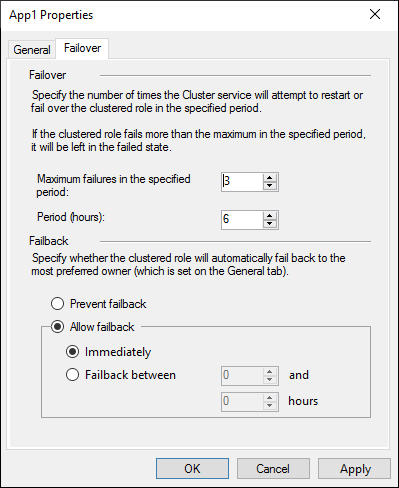
The exam is testing whether you understand failback behavior: 'Prevent failback' is the direct setting that stops a clustered application from moving back to a recovered node, even if no preferred owner is explicitly listed.
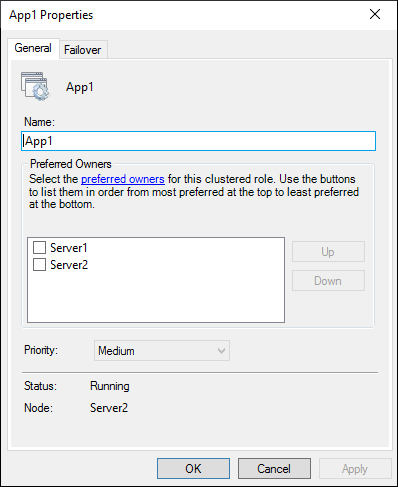
In this AZ-801 failover cluster scenario, setting 'Prevent failback' keeps App1 on Server2 after Server1 restarts. The community is split, but the official answer is Yes because preventing failback stops the application from returning to Server1.
Common mistake: Choosing B because 'no preferred owner is selected' and assuming the failback setting is irrelevant. In reality, selecting 'Prevent failback' explicitly guarantees the app remains on Server2, so it satisfies the goal.
Expert Analysis
Why the Answer Is Correct
Selecting 'Prevent failback' in the Failover tab configures the clustered role to stay on its current owner after another node comes back online. When Server1 shuts down and App1 fails over to Server2, 'Prevent failback' stops the cluster from moving App1 back to Server1 after Server1 restarts, which directly matches the requirement.Why the Other Options Are Wrong
Option B ('No') is incorrect because the question asks whether this solution meets the goal, not whether it is the only possible solution. Even if no preferred owner is selected and the cluster would not automatically fail back, selecting 'Prevent failback' still ensures that App1 remains on Server2. The setting does not create any behavior that would move App1 away from Server2.Community Comment Notes
Comment [1] suggests that without a preferred owner the setting makes no difference, but that observation does not make the solution invalid. Comments [3] and [4] correctly support answer A, recognizing that preventing failback is the appropriate way to keep the application on Server2. The key is to read the goal as 'keep App1 on Server2,' which is exactly what this option accomplishes.Official Reference
- https://learn.microsoft.com/en-us/windows-server/failover-clustering/failover-clustering-overview
- https://learn.microsoft.com/en-us/windows-server/failover-clustering/configure-cluster-roles
- https://learn.microsoft.com/en-us/powershell/module/failoverclusters/set-clustergroup
These links open the official vendor documentation in a new tab.
Exam Strategy
When answering 'Does this meet the goal?' questions, focus on whether the proposed action directly produces the stated outcome, not on whether it is necessary. If the setting prevents failback, it keeps the role on the current node, so answer Yes; avoid overthinking preferred-owner prerequisites.
Community Votes
50% of anonymous learners picked answer A. Votes are pick records left by other test-takers — they are not the verified answer.
Discussion 4 contributions
Compiled from public community threads and reader submissions, lightly edited for clarity. Handles and vote tallies are shown as recorded, and comments reflect the views of individual contributors.
From public community threads 4
-
zuzmo483 👍 2 Answered BAgain, will make no difference. There is no preferred owner selected, and the service already runs on Server2. No ticked box means the cluster will decide who is the best for the service. The failback setting would only make difference if we had a preferred node configured.
-
boapaulo 👍 1Repeated question, same as number 1 in this topic
-
BlackCat9588 👍 1 Answered AA - Yes. make sense
-
e836f13 👍 1 Answered Ait is what it is
Reader comments & corrections
No reader corrections yet — spotted an error or have a note? Share it below.