Identify the Microsoft Foundry SDK Entry Point
Short answer
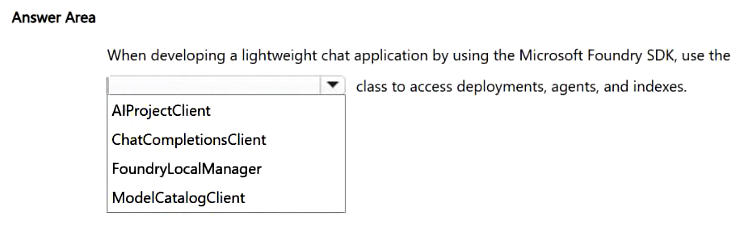
AIProjectClient
Question
Select the answer that correctly completes the sentence.
Key Takeaways
Tests recognition of AIProjectClient as the primary SDK client for interacting with Foundry project resources like agents and indexes.
Learn which class serves as the entry point for the Microsoft Foundry SDK to manage AI resources. The correct answer is AIProjectClient for unified access to deployments and agents.
Common mistake: Learners often confuse AIProjectClient with general Azure SDK clients like BlobServiceClient or LanguageServiceClient, failing to recognize the specialized Foundry-specific client designed for unified project management.
Expert Analysis
The question tests knowledge of the Microsoft Foundry SDK entry point for managing AI resources. The correct completion is AIProjectClient. This class serves as the primary client object, providing unified access to deployments, agents, and indexes within a specific Foundry project. It abstracts the underlying Azure AI services into a cohesive interface for developers.
Why this matters: Understanding the SDK hierarchy is crucial for efficient implementation. Using AIProjectClient allows for streamlined management of multiple AI capabilities (like text, speech, and vision) under a single project context. Getting this wrong could lead to fragmented code or incorrect resource targeting.
Adjacent decision: If the scenario involved creating a new project programmatically rather than accessing an existing one's resources, the answer would likely involve FoundryManagementClient or similar management-plane APIs. The distinction between control plane (management) and data plane (resource interaction) is key here.
Operational consequence: Misidentifying the client can result in permission errors or inability to interact with deployed models. Developers must ensure they are using the correct namespace (Microsoft.AI.Foundry) and class (AIProjectClient) to successfully call methods like GetDeploymentAsync or CreateAgentAsync.
Official Reference
https://learn.microsoft.com/en-us/azure/ai-foundry/
This link opens the official vendor documentation in a new tab.
Exam Strategy
When encountering SDK questions, identify the specific service scope (e.g., 'Foundry project') and match it to the most granular client that handles those operations. Look for keywords like 'unified access' or 'project-level' which typically point to the main project client rather than individual service clients.
Frequently Asked Questions
What is the primary purpose of AIProjectClient?
Which namespace contains AIProjectClient?
Discussion 1 contributions
Compiled from public community threads and reader submissions, lightly edited for clarity. Handles and vote tallies are shown as recorded, and comments reflect the views of individual contributors.
From public community threads 1
-
GrandWizard_007 👍 1Answer: AIProjectClient Reason: Use the AIProjectClient class from the Microsoft Foundry SDK — it’s the thin‑client entry point that provides unified access to deployments, agents, and indexes in your Foundry project
Reader comments & corrections
No reader corrections yet — spotted an error or have a note? Share it below.
Related Analysis
Practice All AI-901 Questions
Access 105 questions with complete answers and detailed explanations.
View Full AI-901 Practice Test →