Azure AI Foundry Deployment vs. Inference Parameters
Short answer
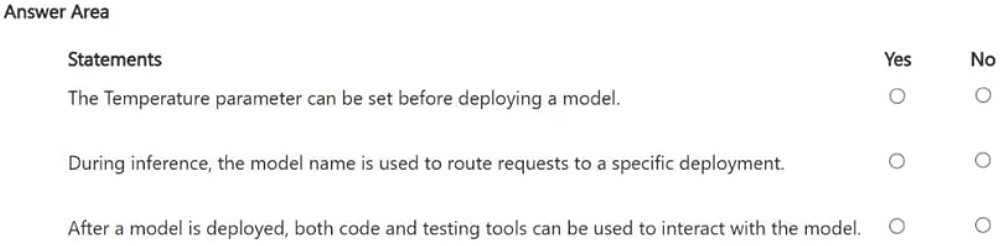
Temperature: No. Model name: No. Code + testing tools: Yes.
Question
For each of the following statements, select Yes if the statement is true. Otherwise, select No.
NOTE: Each correct selection is worth one point.
Key Takeaways
The question tests the distinction between static deployment configuration (deployment name) and dynamic inference settings (temperature), plus the correct identifier for routing API requests.
In Azure AI Foundry, temperature is an inference-time parameter, not a deployment setting. Requests are routed via the deployment name, and post-deployment interaction uses SDKs or testing tools.
Common mistake: Learners often confuse 'Temperature' as a deployment setting because it affects output quality, or they assume the 'Model Name' routes requests, failing to recognize that Azure requires the unique 'Deployment Name' for routing.
Expert Analysis
Temperature is an inference parameter, not a deployment setting The statement claiming "Temperature" is a model deployment parameter is false. In Microsoft Azure AI Foundry and Azure OpenAI, the deployment process involves provisioning the model resource, assigning a unique deployment name, and configuring static properties like the base model version or capacity units. Temperature, which controls the randomness of token selection, is dynamic. It is specified at inference time (when making API calls) or in the testing playground, allowing different requests to the same deployment to have varying creativity levels without re-deploying the model.
Requests use the Deployment Name, not the Model Name The statement that the "model name" is used to route requests is false. This is a critical distinction in Azure's architecture. When you deploy a model (e.g., GPT-4), you assign it a deployment name (e.g., "my-gpt4-deployment"). The endpoint URL and API requests must reference this deployment name to route traffic correctly. A single underlying model can have multiple deployments with different configurations; therefore, the model name alone cannot identify the specific instance processing the request. Using the model name instead of the deployment name will result in a routing error.
Post-Deployment Interaction via Code and Tools
The statement that code and testing tools can be used to interact with the deployed model is true. Once deployed, the model exposes an HTTP endpoint. Developers interact with it using SDKs (such as the azure-ai-inference Python library) or REST APIs by sending prompts and parameters (like temperature). Additionally, Azure AI Foundry provides built-in testing interfaces and playgrounds for manual evaluation and debugging. These tools allow immediate validation of the model's behavior before full integration into production applications.
Official Reference
- https://learn.microsoft.com/en-us/azure/ai-services/openai/concepts/models
- https://learn.microsoft.com/en-us/azure/ai-foundry/
These links open the official vendor documentation in a new tab.
Exam Strategy
When evaluating Azure AI services, always separate the resource definition from the request execution. If a setting changes how the model responds to a specific prompt (like temperature, top_p, or max_tokens), it is an inference parameter. If it defines which model instance exists (like deployment name or SKU), it is a deployment property. For routing, remember that the endpoint is tied to the deployment name, not the underlying model family name.
Discussion 6 contributions
Compiled from public community threads and reader submissions, lightly edited for clarity. Handles and vote tallies are shown as recorded, and comments reflect the views of individual contributors.
From public community threads 6
-
Lathi123 👍 12Temperature → No Temperature is an inference/request parameter, not a deployment setting. It can be specified when making requests to the deployed model. Model name → No This is a common exam trap. You use the deployment name in the model parameter to route the request to a particular deployment—not the underlying model name. Code + testing tools → Yes After deployment, you can interact with the model in the Foundry Playground and access the Code tab/examples to use it programmatically.
-
Avbud 👍 51. NO! -> temperature is a per-request inference parameter! you pass it in each API call (or set it in the playground per session)
-
3839ee0 👍 3✅ The Temperature parameter can be set before deploying a model. Temperature controls how random/creative the model's responses can be. ✅ During inference, the model name is used to route requests to a specific deployment. The deployment/model name tells the service which deployed model should process the request. ✅ After a model is deployed, both code and testing tools can be used to interact with the model. You can test it through tools such as a playground/testing interface or call it programmatically through an API/SDK.
-
jucasino 👍 21 --> NO 2 --> YES 3 --> YES
-
Jedi_Jeremy 👍 1NO "Temperature" is not a model deployment parameter. In Microsoft Foundry, temperature is an inference/generation parameter, meaning you specify it when making a supported inference request, not when provisioning the model deployment YES the model name is used with an important Azure/Foundry nuance: the model parameter is typically used to identify the deployment you want inference sent to, rather than merely identifying the underlying foundation model response = client.responses.create( model="my-gpt-deployment", input="Explain Azure Availability Zones" )
Show 1 more comment
-
Ama100 👍 1No - Temperature is an inference-time parameter specified in the API request or playground, not during deployment. No - In Azure OpenAI, requests are routed using the deployment name, not the model name. Multiple deployments can use the same model. Yes - A deployed model can be accessed through SDKs/APIs and through tools such as the Azure AI Foundry playground/testing interface.
Reader comments & corrections
No reader corrections yet — spotted an error or have a note? Share it below.
Related Analysis
Practice All AI-901 Questions
Access 105 questions with complete answers and detailed explanations.
View Full AI-901 Practice Test →