OpenAI Images API Image Generation Code
Short answer
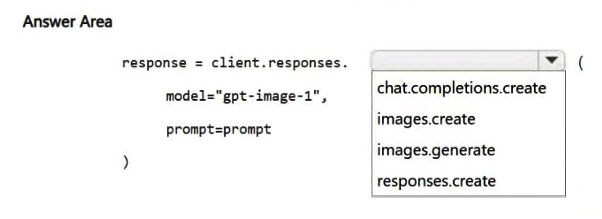
Select `client.images.generate` for the code block. Pass the model `gpt-image-1`, the user prompt, and configuration parameters like `n=1` and `size`.
Question
You deploy a model named gpt-image-1 in Microsoft Foundry.
You need to ensure that an application can generate an image from a user prompt by using the OpenAI Images API.
How should you complete the Python code? To answer, select the appropriate option in the answer area.
NOTE: Each correct selection is worth one point.
Key Takeaways
The question tests knowledge of the specific API surface for image generation; the common trap is confusing it with text or response generation methods like 'client.responses.create'.
This scenario requires selecting the correct Python method to generate images using the OpenAI Images API and the gpt-image-1 model within Microsoft Foundry. The solution involves identifying the specific client function designed for image creation.
Common mistake: Learners often select generic LLM completion endpoints (like chat completions) because they are more familiar, failing to recognize that the dedicated 'images.generate' method is required for visual output.
Expert Analysis
Why the Answer Is Correct
To generate an image from a text prompt using the OpenAI Images API, you must use the client.images.generate method. This endpoint is specifically designed to handle the request payload containing the model name (gpt-image-1), the user prompt, and parameters like size and number of images.
Why Other Candidate Answers Are Wrong
Methods such as client.chat.completions.create or client.responses.create are intended for text-based interactions or complex reasoning tasks. Using these for image generation would result in an error because they do not support the image-specific output formats required by the task.
Community Comment Notes
Community consensus correctly identifies client.images.generate as the necessary function. One commenter noted the distinction between generating a simple image versus multimodal responses, reinforcing that the dedicated Images API is the correct path for this specific requirement.
Exam Strategy
Memorize the distinct API clients and methods: 'chat' for text, 'images' for visuals, and 'audio' for speech. When a question specifies 'generate an image', immediately look for the images namespace in the code options.
Frequently Asked Questions
What is the difference between client.images.generate and client.chat.completions?
client.images.generate creates visual media from text prompts, while client.chat.completions generates text-based conversational responses.Which model should I specify for image generation in Azure OpenAI?
dall-e-3 or gpt-image-1 depending on availability, ensuring the method matches the image API.Discussion 3 contributions
Compiled from public community threads and reader submissions, lightly edited for clarity. Handles and vote tallies are shown as recorded, and comments reflect the views of individual contributors.
From public community threads 3
-
BabiRahul 👍 2C. Reason: The question specifically says to generate an image using the OpenAI Images API with the gpt-image-1 model. Azure OpenAI documentation for GPT Image models uses the Images API with client.images.generate(...) for image generation.
-
Jedi_Jeremy 👍 1For the OpenAI Images API, the correct choice is images.generate() The key difference is the API surface and intent: client.images.generate() means: “Generate an image using the dedicated Images API.” client.responses.create() means: “Ask a model to produce a response,” which can involve text and, with the appropriate model/tools, more complex multimodal workflows. For the exam question you showed, images.generate() is the intended answer because it explicitly says to use the OpenAI Images API.
-
Sr18 👍 1C. stream = client.images.generate( model="gpt-image-1.5", prompt="A cute baby sea otter", n=1, size="1024x1024", stream=True, partial_images = 2 )
Reader comments & corrections
No reader corrections yet — spotted an error or have a note? Share it below.
Related Analysis
Practice All AI-901 Questions
Access 105 questions with complete answers and detailed explanations.
View Full AI-901 Practice Test →