SharePoint Member Permissions: Site Access vs File Sharing
Short answer
Statement 1 is No because Members cannot invite users to the site; Statement 2 is Yes because Members can typically share files; Statement 3 is No because Members cannot change site sharing settings.
Question
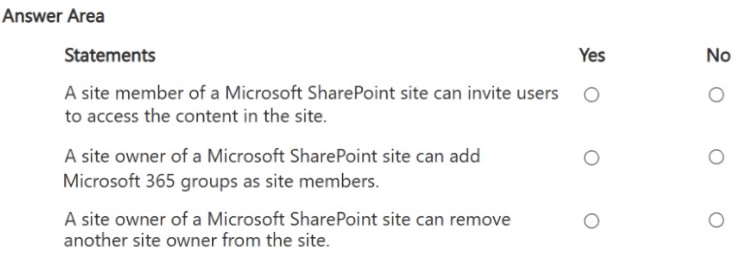
For each of the following statements, select Yes if the statement is true. Otherwise, select No.
NOTE: Each correct selection is worth one point.
Key Takeaways
The main trap is distinguishing between 'sharing content' (allowed for Members) and 'managing site access/settings' (restricted to Owners).
Learn which actions SharePoint Members can perform by default. This guide clarifies that Members can share files but cannot invite users to the site or change sharing settings.
Common mistake: Learners often select 'Yes' for all statements, incorrectly assuming that because Members can edit content, they also have full control over site access and security settings.
Expert Analysis
This question tests the distinction between site-level access management and content-level sharing permissions in Microsoft 365 SharePoint, specifically regarding the default behavior for Members.
First, consider the statement: "A member can invite users to access the content in the site." In modern SharePoint sites, the Member role grants Edit permissions to existing site content (files, folders, lists) but does not grant the ability to manage site membership. Only Owners have the permission to add or remove users from the site itself. While Members might share individual files if specific settings allow it, they cannot "invite users to access the site" as a whole. Therefore, this statement is No.
Second, evaluate the statement: "A member can share files in the site with external users." By default, SharePoint Online restricts sharing capabilities based on tenant-wide policies and site-specific settings. However, unless explicitly disabled by an administrator, Members generally retain the ability to generate sharing links for files and folders, even to external users (depending on the tenant's external sharing level). The key here is that the Member role includes Edit rights, which typically implies the ability to share the items they can edit. Thus, this statement is Yes, assuming standard default configurations where external sharing is permitted at the tenant level.
Finally, assess the statement: "A member can change the sharing settings of the site." Managing site-level sharing settings (such as who can share externally or disabling external sharing entirely) is a privileged administrative action reserved for Owners and Site Collection Administrators. Members do not have access to these high-level configuration controls. Therefore, this statement is No.
The common trap is confusing "sharing files" (which Members can often do) with "managing site membership/sharing settings" (which only Owners can do). Confusing these two leads to incorrect selections.
Official Reference
https://learn.microsoft.com/en-us/sharepoint/manage-site-permissions
This link opens the official vendor documentation in a new tab.
Exam Strategy
When analyzing SharePoint permission questions, always separate 'content actions' (edit, share file) from 'administrative actions' (manage members, change settings). If the role is Member, assume they can interact with data but not configure the site structure or security policies unless specified otherwise.
Frequently Asked Questions
Can a SharePoint Member share files with external users?
Who can add new users to a SharePoint site?
Discussion 2 contributions
Compiled from public community threads and reader submissions, lightly edited for clarity. Handles and vote tallies are shown as recorded, and comments reflect the views of individual contributors.
From public community threads 2
-
27705f1 👍 5No: By default, Members have Edit permissions but cannot share the site itself with new users — only Owners can. Members can share individual files/folders if "Members can share" is enabled in site permissions settings, but that's not on by default in modern SharePoint sites, and the statement says "invite users to access the content in the site" (i.e., grant site access), which is an Owner-level action. The default behavior: Members can edit content, but inviting new users to the site is restricted to Owners unless an Owner explicitly enables member sharing. Yes Yes
-
Maria Camila Aristizabal 👍 1Afirmación 1: Sí Afirmación 2: Sí Afirmación 3: Sí el miembro si puede compartir sitios, no están preguntando que tipo de permisos porque este si lo hace el administrador, pero el miembro si puede compartir, que ya el usuario pueda ingresar o no es otra cosa.
Reader comments & corrections
No reader corrections yet — spotted an error or have a note? Share it below.