Microsoft 365 Global Reader Role Permissions Analysis
Short answer
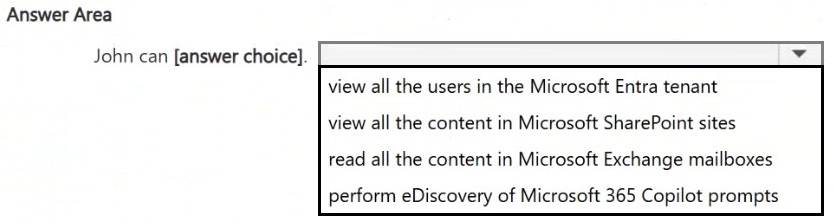
John can view all the users in the Microsoft Entra tenant. He cannot view all the content in Microsoft SharePoint sites or read all the content in Microsoft Exchange mailboxes.
Question
Your organization has a Microsoft 365 subscription.
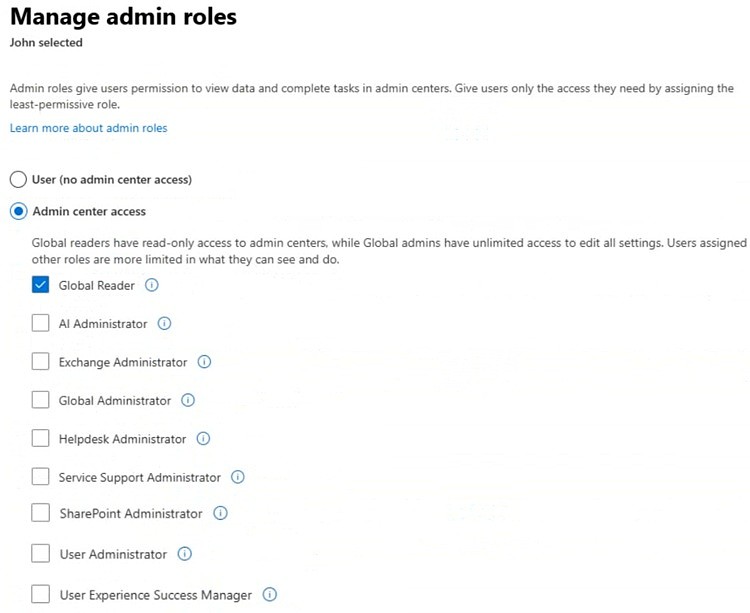
A user named John is assigned an admin role as shown in the following exhibit.
Use the drop-down menus to select the answer choice that completes the statement based on the information presented in the graphic.
Key Takeaways
The test focuses on distinguishing between administrative configuration visibility and actual data/content access rights for the Global Reader role.
Determine the correct capabilities of the Global Reader role in Microsoft 365. Learn why it allows viewing Entra ID users but restricts access to SharePoint and Exchange content.
Common mistake: Candidates often incorrectly assume that broad administrative roles like Global Reader grant access to all data within the tenant, including email bodies and document contents, due to the 'global' nature of the title.
Expert Analysis
The scenario presents a user, John, assigned the Global Reader administrative role within a Microsoft 365 environment. The task is to determine the specific capabilities granted by this role compared to other potential actions. The Global Reader role is designed to provide read-only access across all Microsoft 365 admin centers and services without granting permission to view actual content or make changes.
First, consider the scope of Microsoft Entra ID (formerly Azure AD). The Global Reader role includes permissions to view users, groups, and directory settings in Microsoft Entra ID. Therefore, the capability to "view all the users in the Microsoft Entra tenant" is explicitly permitted. This aligns with the role's purpose of allowing administrators to monitor identity configurations without risking accidental modifications.
Next, evaluate access to SharePoint content. While Global Readers can view the SharePoint Admin Center to see site collections and usage metrics, they do not automatically gain access to the actual content within those sites. Reading site content requires specific SharePoint permissions (such as Read or Full Control at the site level). Thus, the option to "view all the content in Microsoft SharePoint sites" is incorrect because the role lacks the necessary data-level permissions.
Finally, examine Exchange mailbox access. Similar to SharePoint, Global Readers can view the Exchange Admin Center but cannot read the actual content of mailboxes. Accessing mailbox content requires the Mailbox Import Export role or similar specific delegated permissions. Consequently, the ability to "read all the content in Microsoft Exchange mailboxes" is not granted by the Global Reader role.
In summary, the correct completion of the statement relies on understanding that Global Reader provides administrative visibility into identity structures (Entra ID) but does not extend to reading private user data in collaboration or communication tools like SharePoint or Exchange.
Exam Strategy
When analyzing admin roles, always separate 'administrative center access' from 'data content access'. Roles like Global Reader provide high-level visibility for monitoring but rarely include permissions to read private user data like emails or documents unless specifically delegated.
Frequently Asked Questions
Can Global Reader modify user accounts?
Does Global Reader have access to Teams chat history?
Discussion 7 contributions
Compiled from public community threads and reader submissions, lightly edited for clarity. Handles and vote tallies are shown as recorded, and comments reflect the views of individual contributors.
From public community threads 7
-
MultiCloudIronMan 👍 13View all users in thr Entra tenant
-
ak1447 👍 7View all the users in the Microsoft Entra tenant. ✅ Yes Global Reader has read-only access across all admin centers, including Entra ID — so viewing users is permitted View all the content in Microsoft SharePoint sites. ❌ No Global Reader can view SharePoint admin center settings, but cannot read actual site content Read all the content in Microsoft Exchange mailboxes ❌ No Global Reader cannot access mailbox content — that requires roles like Exchange Admin or specific eDiscovery roles Perform eDiscovery of Microsoft 365 Copilot prompts ❌ Noe Discovery requires dedicated compliance roles (e.g., eDiscovery Manager) — not granted by Global Reader
-
hierro 👍 3La correcta es view all the users in the Microsoft Entra tenant.
-
mlyfr 👍 3view all the users in the Microsoft Entra tenant
-
2d2bc95 👍 2View all users in the Entra tenant
Show 2 more comments
-
DieFear 👍 1✅ View all the users in the Microsoft Entra tenant → Global Readers have read-only access to Microsoft Entra and can view users and configuration. ❌ View all the content in Microsoft SharePoint sites → Requires SharePoint permissions; Global Reader does not automatically get access to site content. ❌ Read all the content in Microsoft Exchange mailboxes → Global Reader cannot read users' mailbox contents. ❌ Perform eDiscovery of Microsoft 365 Copilot prompts → Requires specific eDiscovery/Compliance permissions, not just Global Reader.
-
Tiz_21 👍 1Correct answer is "view all the users in the Microsoft Entra tenant" The exhibit shows that John has the Global Reader admin role. Global Reader provides read-only access across Microsoft 365 admin centers. This means John can view administrative information, but he cannot make changes. With the Global Reader role, John can: View users in Microsoft Entra ID, groups, tenant settings, admin center information, Review configuration details. However, Global Reader does not give John permission to open and read all user content.
Reader comments & corrections
No reader corrections yet — spotted an error or have a note? Share it below.