Using Audit and eDiscovery for File Modification and Copy Requests
Short answer
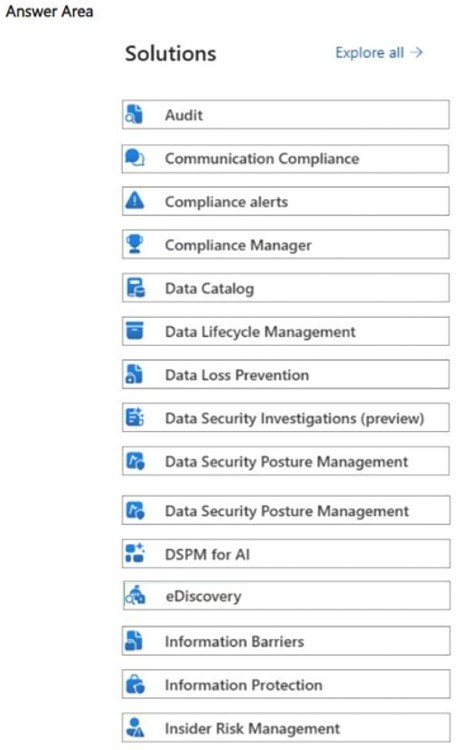
Use Audit to identify the recent files modified by User1 and use eDiscovery to obtain copies of those files.
Question
Your organization has a Microsoft 365 subscription.
The HR department at your company asks for a copy of all the recent files that were modified by a user named User1.
What should you use in the Microsoft Purview portal? To answer, select the appropriate solutions in the answer area.
Key Takeaways
The trap is confusing Audit (activity logs) with eDiscovery (content collection). Audit identifies the 'who' and 'when', while eDiscovery provides the 'copy'.
Learn how to use Microsoft Purview Audit to identify files modified by a specific user and eDiscovery to export copies of those files for HR requests.
Common mistake: Selecting only Audit. Learners often choose Audit because it shows file modifications, but fail to realize that Audit does not allow exporting the actual file content, which is required to 'get a copy'.
Expert Analysis
The scenario requires two distinct actions: identifying which files were modified by User1 and obtaining a copy of those files. In Microsoft Purview, these tasks are handled by different tools.
Audit is the correct solution for the first part. The Audit log records user activities across Microsoft 365 services. You can search for specific events like FileModified or FileEdited, filter by the user "User1", and view metadata such as file names and modification dates. However, Audit logs do not contain the actual file content; they only provide event-level activity data.
eDiscovery is the correct solution for the second part. The requirement explicitly asks to "get a copy" of the files. eDiscovery (Standard or Premium) allows you to create cases, search for content based on criteria (like being modified by User1), and export the actual files from SharePoint, OneDrive, Exchange, and Teams. While Audit helps identify what happened, eDiscovery is necessary to collect and export the content itself.
Common confusion arises because both tools involve searching. Comments often debate whether Audit or eDiscovery is primary. The key distinction is that Audit provides the list of activities, while eDiscovery provides the ability to retrieve the actual documents. Since the question asks what to use in the portal to satisfy the HR request for a copy, both are relevant but serve different functions: Audit for identification/verification of the event, and eDiscovery for the collection/export of the files.
Exam Strategy
When a question asks for 'activity logs' or 'events', think Audit. When it asks for 'content', 'files', 'emails', or 'copies', think eDiscovery. For comprehensive investigations, remember that Audit identifies the scope, and eDiscovery collects the evidence. Always check if the requirement is just to see the record or to retrieve the actual data.
Frequently Asked Questions
Can I export files directly from the Audit log?
Is eDiscovery only for legal holds?
Discussion 9 contributions
Compiled from public community threads and reader submissions, lightly edited for clarity. Handles and vote tallies are shown as recorded, and comments reflect the views of individual contributors.
From public community threads 9
-
468fa2a 👍 6But to meet the 'get a copy' requirement, you also need eDiscovery. Audit logs provide the events, but not the copies of data
-
AnonymousJhb 👍 4Wrong - its Audit. Ediscovery is more for legal hold / investigation, which is done after an audit is completed.
-
Godfirst_E 👍 3Seeing the HR is asking for a "copy" i believe Ediscovery is the right answer.
-
TDAC 👍 2Answer is correct: eDiscovery To produce copies of files, especially across SharePoint, OneDrive, Teams, and Exchange, you must use Microsoft Purview eDiscovery (Standard or Premium). eDiscovery allows you to: Search for content by user activity, including “modified by” Collect files across all Microsoft 365 workloads Export the files for HR as a packaged download Apply date filters (e.g., “recent files”) Source: https://learn.microsoft.com/en-us/purview/edisc-search-export
-
hierro 👍 2eDiscovery (Descubrimiento electrónico): Es la herramienta diseñada específicamente para identificar, retener y exportar contenido (como archivos de OneDrive, SharePoint o correos de Exchange) que pueda ser relevante para una investigación o una solicitud de departamentos como RRHH. Puedes crear un caso, buscar archivos filtrando por el "Usuario1" y por la fecha de modificación para luego descargar una copia de los resultados.
Show 4 more comments
-
omath 👍 2Answer: Audit Explanation: Purview Audit lets you: - Search for FileModified, FileAccessed, FileUploaded, FileDownloaded, etc. - Filter by User1 - Export the results - Identify exactly which files were modified and when This is the only Purview solution that gives you event‑level file activity tied to a specific user.
-
Godfirst_E 👍 2EDIT: Just reading the question, it said solutions so perhaps Audit and Ediscovery because audit tells you the recent files that have been edited and you use Ediscovery to get a copy of the files.
-
PauloJRamos 👍 1The requirement is to obtain a list of all recent files modified by a specific user (User1). In the Microsoft Purview portal, Audit allows you to: Search user activities across Microsoft 365. Filter by a specific user. Identify file operations such as modified, edited, created, deleted, downloaded, or shared files. Export the results for HR or compliance investigations. Why not eDiscovery? eDiscovery is used to search for and collect content itself (emails, documents, Teams messages). To determine which files User1 modified, you first use Audit because it captures the activity logs.
-
ak1447 👍 1Explanation The scenario asks for a copy of all recent files modified by User1 — this is a content collection task for HR purposes (likely an investigation or departure scenario). eDiscovery is the correct tool because it allows you to: Search across M365 content (SharePoint, OneDrive, Exchange, Teams) scoped to a specific user Filter by activity such as modified files Export/collect the actual content as a copy — which is exactly what HR is asking for
Reader comments & corrections
No reader corrections yet — spotted an error or have a note? Share it below.