Entra ID Security Group Capabilities and Exchange Mailbox Permissions
Short answer
Statement 1: Yes; Statement 2: Yes; Statement 3: No. Standard security groups work for Entra ID permissions and M365 licenses, but Exchange mailbox permissions require a mail-enabled security group.
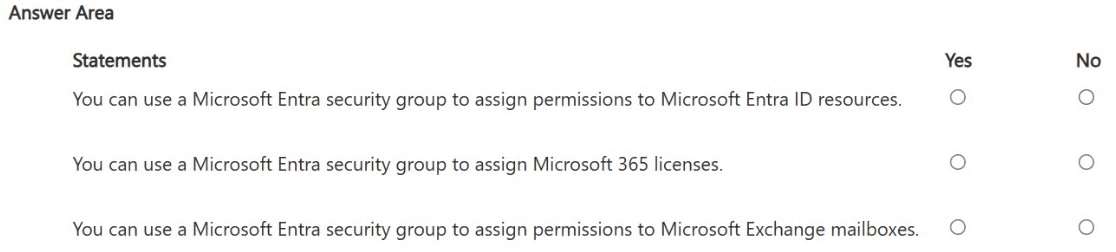
Question
For each of the following statements, select Yes if the statement is true. Otherwise, select No.
NOTE: Each correct selection is worth one point.
Key Takeaways
The main trap is assuming any security group works for Exchange permissions; however, mailbox delegation requires a mail-enabled security group, not a standard one.
Determine if standard Entra ID security groups can assign Entra permissions, M365 licenses, and Exchange mailbox permissions. The correct answers are Yes, Yes, and No.
Common mistake: Learners often mark all three as 'Yes', overlooking that Exchange Online RBAC requires the group to be mail-enabled to function as a valid recipient for mailbox permissions.
Expert Analysis
This scenario tests the distinction between standard Microsoft Entra ID security groups and mail-enabled security groups within the Microsoft 365 ecosystem. To determine the correct responses, we must trace the specific capability requirements for each statement against Entra ID and Exchange Online documentation.
Statement 1: Assign permissions to Microsoft Entra ID resources. Standard security groups are a fundamental object in Entra ID designed specifically for this purpose. They can be used to grant access to applications, Azure resources, and other Entra ID-integrated services. Therefore, this statement is Yes. As noted in learner discussions, this is a core mechanism for identity-based access control.
Statement 2: Assign Microsoft 365 licenses. Group-based licensing is a supported feature in Microsoft Entra ID. Administrators can assign a Microsoft 365 license to a security group, and all members inherit that license automatically. This works for both cloud-only and synced groups. Thus, this statement is also Yes.
Statement 3: Assign permissions to Exchange mailboxes. This is the critical trap. While you can add users to a standard security group, Exchange Online’s role-based access control (RBAC) and mailbox permission model (such as Full Access, Send As, or Send on Behalf) require the group to be recognized as a recipient object. A standard cloud-only Entra security group does not have an email address and is not visible in the Exchange address list. To assign mailbox permissions using a group, it must be a mail-enabled security group. Since the prompt specifies only "Security group" without the "mail-enabled" qualifier, a standard group cannot be used directly for these specific Exchange permissions. Therefore, this statement is No.
The consensus among experienced learners highlights this nuance: while generalizing might suggest "Yes," the technical requirement for Exchange mailbox delegation mandates a mail-enabled object, making the strict answer "No" for a plain security group.
Official Reference
https://learn.microsoft.com/en-us/entra/fundamentals/whats-new#security-groups
This link opens the official vendor documentation in a new tab.
Exam Strategy
When evaluating group capabilities in Microsoft 365 exams, always distinguish between 'Entra ID objects' and 'Exchange recipients'. If a question involves Exchange-specific actions like mailbox delegation or sending as another user, verify if the group is explicitly 'mail-enabled'. A standard security group lacks an email address and cannot be used for these Exchange tasks, even though it works perfectly for Azure/Entra resource access.
Frequently Asked Questions
Can I use a regular security group for Exchange mailbox permissions?
Does group-based licensing work with standard security groups?
What is the difference between a security group and a mail-enabled security group?
Discussion 6 contributions
Compiled from public community threads and reader submissions, lightly edited for clarity. Handles and vote tallies are shown as recorded, and comments reflect the views of individual contributors.
From public community threads 6
-
27705f1 👍 7Yes Yes No : This is the trap. Exchange mailbox permissions (Full Access, Send As, Send on Behalf) require a mail-enabled security group — a regular cloud-only Entra security group is not recognized by Exchange Online's RBAC/permissions model for mailbox delegation. Exchange permissions assignment requires the group to have an email address and be recognized as a recipient object in Exchange.
-
ak1447 👍 6Explanation Statement 1 — Yes: Security groups are a core mechanism in Entra ID for granting access to resources like apps, Azure resources, and Entra ID-integrated services. This is one of their primary purposes. Statement 2 — Yes: Group-based licensing is a supported feature in Microsoft Entra ID. You can assign a Microsoft 365 license to a security group, and all members inherit that license automatically. This requires at least Microsoft Entra ID P1. Statement 3 — No: Exchange mailbox permissions (e.g., Full Access, Send As) are managed within Exchange itself, not through Entra security groups directly. You'd use Exchange admin center or PowerShell to assign mailbox permissions — a security group doesn't natively grant Exchange mailbox access the way it does for Entra ID resources.
-
MultiCloudIronMan 👍 3Yes No Yes checked
-
60ed5c2 👍 2Yes Yes No. A standard security group cannot be used for mailbox permissions. it has to be a mail enabled security group (or a user).
-
DieFear 👍 1Assign permissions to Microsoft Entra ID resources Security groups can be used to grant access to applications, resources, and roles in Entra ID. Answer: Yes Assign Microsoft 365 licenses Group-based licensing is a Microsoft Entra feature that allows licenses to be assigned to all members of a security group. Answer: Yes Assign permissions to Exchange mailboxes Mailbox permissions (such as Full Access and Send As) can be assigned to mail-enabled security groups, allowing all group members to inherit the permission. Answer: Yes
Show 1 more comment
-
Acrious 👍 1Y, Y, and Yes. While it is true exchange needs it to be mail enabled, Microsoft is generalizing. There is no thing called Mail enabled. and you add it, its a Mail Enabled Security Group, so the answer is yes. Don't let the missing of the additional setting fool you.
Reader comments & corrections
No reader corrections yet — spotted an error or have a note? Share it below.