Microsoft 365 Copilot Web Search Administration Controls
Short answer
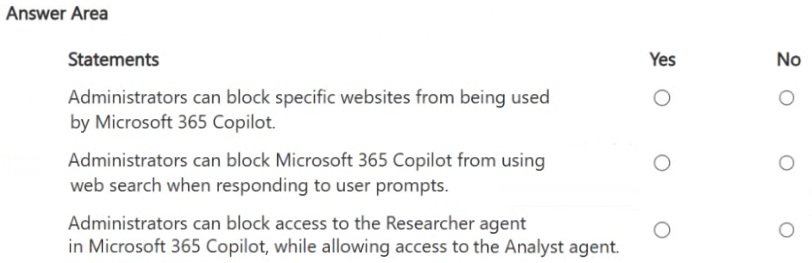
Statement 1 is No because administrators cannot block specific external websites from Copilot's web search; Statement 2 is Yes because administrators can disable web search entirely for Copilot; Statement 3 is No because detailed monitoring of specific external URLs accessed by Copilot is not supported.
Question
For each of the following statements, select Yes if the statement is true. Otherwise, select No.
NOTE: Each correct selection is worth one point.
Key Takeaways
The main trap is confusing granular domain blocking (which is not possible) with global service disabling (which is possible) when configuring Copilot security settings.
This page explains how Microsoft 365 administrators manage Copilot's web grounding, confirming that while global web search can be disabled, specific external URLs cannot be blocked or monitored individually.
Common mistake: Candidates often select 'Yes' for blocking specific websites, mistakenly assuming that Copilot behaves like a standard browser managed by Content Filtering rules, which it does not.
Expert Analysis
Web Search Granularity and Control
The core concept tested here is the level of control administrators have over Microsoft 365 Copilot's web grounding (Bing search integration).
- Blocking Specific URLs: The statement suggests admins can block specific websites/domains from being sources for Copilot. This is No. While Microsoft 365 allows content filtering and SharePoint/OneDrive sharing controls, there is no native feature in the M365 Admin Center to create a "blocklist" of specific external domains that Copilot is forbidden to query. Copilot uses Bing's index; admins cannot selectively exclude individual sites from that index for Copilot.
- Disabling Web Search Entirely: The statement suggests admins can turn off web search entirely for Copilot. This is Yes. Administrators can disable Copilot's ability to use web search (grounding) via tenant-wide settings or specific policies. When disabled, Copilot relies solely on internal enterprise data (M365 apps, SharePoint, etc.).
- Monitoring Web Usage: The statement implies admins can monitor which specific websites Copilot accesses. This is generally No in the context of granular monitoring. While usage analytics exist, detailed logs of every specific external URL queried by Copilot are not provided in a way that allows administrative monitoring of specific site access for governance purposes in the same way as DLP or audit logs for internal files. However, the primary focus of this exam question type is usually distinguishing between granular blocking (impossible) and global disabling (possible).
Based on standard AB-900 exam logic:
- Statement 1: No (Cannot block specific external domains)
- Statement 2: Yes (Can disable web search globally)
- Statement 3: No (Cannot monitor specific external URL access in detail)
Exam Strategy
When answering questions about Copilot governance, always distinguish between 'tenant-wide toggles' (e.g., enable/disable Copilot, enable/disable web search) and 'granular content filters' (e.g., specific URL blocking). If a control sounds like a traditional firewall rule applied to an AI agent, it is likely false unless explicitly documented as a new feature.
Frequently Asked Questions
Can I block specific domains from being used by Copilot?
How do I stop Copilot from using Bing?
Discussion 4 contributions
Compiled from public community threads and reader submissions, lightly edited for clarity. Handles and vote tallies are shown as recorded, and comments reflect the views of individual contributors.
From public community threads 4
-
ak1447 👍 3Statement 1 — Yes: Admins can configure web search settings in the Microsoft 365 admin center to block specific URLs/domains from being used as sources when Copilot grounds responses in web content. This is managed through search result filtering controls. Statement 2 — Yes: Admins have the ability to turn off web search entirely for Microsoft 365 Copilot via the M365 admin center. Statement 3 — Yes: The Researcher and Analyst agents can be managed independently by admins. Through the Microsoft 365 admin center, admins can control which Copilot agents are available to users, allowing them to enable/disable specific agents selectively.
-
0547a52 👍 3Administrators can block specific websites from being used by Microsoft 365 Copilot. 👉 No There is no granular control to block individual external websites used by Copilot’s web grounding. Administrators can block Microsoft 365 Copilot from using web search when responding to user prompts. 👉 Yes Admins can disable web search/Bing grounding for Copilot responses via tenant settings. Administrators can block access to the Researcher agent in Microsoft 365 Copilot, while allowing access to the Analyst agent. 👉 Yes Agent access can be controlled, allowing selective enablement or restriction of specific Copilot agents.
-
mlyfr 👍 3NO / YES / NO
-
FS202 👍 1No Yes Yes
Reader comments & corrections
No reader corrections yet — spotted an error or have a note? Share it below.