Mapping Microsoft Purview Solutions to Data Discovery and Sharing Requirements
Short answer
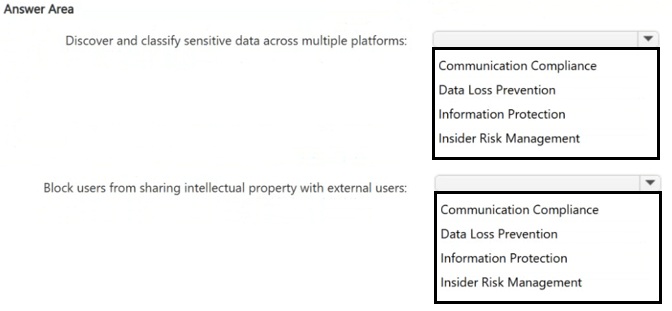
For discovering and classifying sensitive data, use Microsoft Purview Information Protection. For blocking users from sharing intellectual property externally, use Data Loss Prevention (DLP).
Question
Your organization has a Microsoft 365 subscription.
You need to use Microsoft Purview to meet the following requirements:
• Discover and classify sensitive data across multiple platforms.
• Block users from sharing intellectual property with external users.
Which Microsoft Purview solution should you use for each requirement? To answer, select the appropriate options in the answer area.
NOTE: Each correct selection is worth one point.
Key Takeaways
The main trap is confusing the identification of data (Information Protection) with the enforcement of sharing rules (DLP); you must select both correctly for different requirements.
Learn which Microsoft Purview components handle data classification versus sharing restrictions. This page explains why Information Protection is used for discovery and DLP for blocking external sharing.
Common mistake: Learners often select DLP for the first requirement because they associate it with 'data protection', but DLP does not primarily handle the initial discovery and classification scanning across platforms; Information Protection is required for that step.
Expert Analysis
This scenario requires mapping two distinct Microsoft Purview capabilities to specific organizational requirements within the Microsoft 365 environment. The correct solution relies on understanding the functional separation between data discovery/classification and policy enforcement.
Requirement 1: Discover and classify sensitive data across multiple platforms. The appropriate solution is Microsoft Purview Information Protection. This component is designed specifically for scanning, detecting, and labeling sensitive information such as intellectual property, credit card numbers, or contracts. It operates by applying sensitivity labels to files and messages across various platforms (SharePoint, OneDrive, Exchange, etc.). As noted in community feedback, it handles the "discovery" and "classification" aspect through automated scanning and label application.
Requirement 2: Block users from sharing intellectual property with external users. The appropriate solution is Data Loss Prevention (DLP). While Information Protection identifies the data, DLP is the enforcement engine that creates policies to prevent unauthorized actions. DLP policies monitor user activity and can block or restrict sharing when sensitive data (identified by Information Protection) is detected being shared externally. This directly addresses the requirement to "block users" from taking specific sharing actions.
The key distinction is that Information Protection is about identifying and labeling data, whereas Data Loss Prevention is about controlling how that data moves and who can access it.
Official Reference
- https://learn.microsoft.com/en-us/microsoft-365/compliance/information-protection?view=o365-worldwide
- https://learn.microsoft.com/en-us/microsoft-365/compliance/data-loss-prevention-policies?view=o365-worldwide
These links open the official vendor documentation in a new tab.
Exam Strategy
When faced with a multi-part scenario involving Microsoft Purview, break down each requirement by its verb: 'discover/label' points to Information Protection, while 'block/restrict/enforce' points to Data Loss Prevention. Always verify if the question asks for the tool that finds the data or the tool that stops the action.
Frequently Asked Questions
Can DLP discover sensitive data?
Do I need both Information Protection and DLP?
Discussion 3 contributions
Compiled from public community threads and reader submissions, lightly edited for clarity. Handles and vote tallies are shown as recorded, and comments reflect the views of individual contributors.
From public community threads 3
-
hierro 👍 13Respuesta 1: Information Protection Microsoft Purview Information Protection es la solución encargada de descubrir, clasificar y proteger datos sensibles en nubes, aplicaciones y dispositivos. Utiliza etiquetas de sensibilidad para identificar la importancia de los datos en múltiples plataformas. Respuesta 2: Data Loss Prevention Data Loss Prevention (DLP) es la herramienta diseñada específicamente para aplicar políticas que bloqueen el intercambio de información protegida (como propiedad intelectual) con destinatarios no autorizados, especialmente usuarios externos.
-
TDAC 👍 4Response 1: Information Protection “Microsoft Purview Information Protection is the solution responsible for discovering, classifying, and protecting sensitive data across clouds, applications, and devices. It uses sensitivity labels to identify the importance of data across multiple platforms.” Response 2: Data Loss Prevention “Data Loss Prevention (DLP) is the tool specifically designed to enforce policies that block the sharing of protected information (such as intellectual property) with unauthorized recipients, especially external users.”
-
fe59431 👍 1✅ Answers (Confidence: High) Discover and classify sensitive data across multiple platforms → Information Protection Block users from sharing intellectual property with external users → Data Loss Prevention Why Information Protection is how Purview finds and labels your data. It detects sensitive information (credit card numbers, contracts, IP) and applies sensitivity labels, either manually or automatically, across Exchange, SharePoint, OneDrive, Teams, and devices. Its job is to discover, classify, label, and encrypt. Data Loss Prevention (DLP) is the enforcement part. A DLP policy spots sensitive content and blocks or warns when someone tries to share it outside the company by email, Teams, SharePoint, or from a device. The two work as a pair. Information Protection labels a design file “Highly Confidential,” and a DLP rule says “block external sharing of anything labeled Highly Confidential.”
Reader comments & corrections
No reader corrections yet — spotted an error or have a note? Share it below.