M365 Copilot Licensing and Agent Capabilities
Short answer
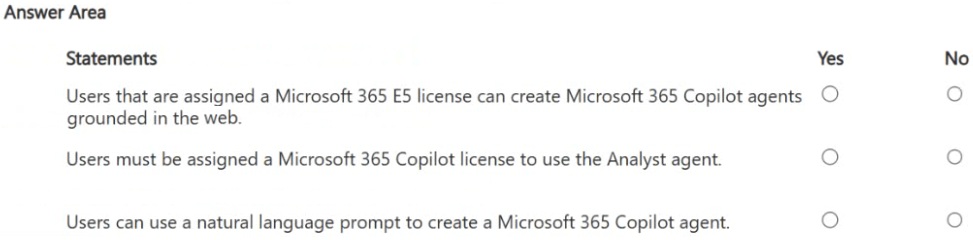
No, Yes, Yes. Users with only an E5 license cannot create web-grounded agents (requires Copilot Studio license). The Analyst agent requires a Microsoft 365 Copilot license. Agent Builder supports natural language creation without programming.
Question
For each of the following statements, select Yes if the statement is true. Otherwise, select No.
NOTE: Each correct selection is worth one point.
Key Takeaways
The primary trap is assuming E5 includes all Copilot Studio features; E5 covers basic chat but not advanced web-grounded agent creation which requires a separate Copilot Studio license.
Determine if E5 licenses allow web-grounded agent creation, if the Analyst agent requires Copilot licensing, and if Agent Builder uses natural language. The correct answers are No, Yes, Yes.
Common mistake: Learners often select 'Yes' for the first statement because E5 includes Copilot Chat. However, they miss that 'web-grounded' agents require the more expensive Copilot Studio license, leading to an incorrect full-mark selection.
Expert Analysis
The scenario tests the licensing and capability boundaries of Microsoft 365 Copilot Agents. To determine the correct selections, we must evaluate each statement against official Microsoft documentation regarding Copilot Studio (formerly Power Virtual Agents) and Microsoft 365 Copilot.
Statement 1: Can a user with only an E5 license create a web-grounded agent? The answer is No. While users with Microsoft 365 E5 licenses can use "Agent Builder" (often referred to as Copilot Studio Lite) within Copilot Chat to create simple agents, these specific agents are restricted in their grounding capabilities. Official doctrine states that agents grounded in external web sources or requiring advanced customization typically require a separate Copilot Studio license. The E5 license alone does not grant the right to create fully featured web-grounded agents outside the limited scope of Agent Builder. Therefore, the statement claiming they can be created with only an E5 license is false.
Statement 2: Does the Analyst agent require a Microsoft 365 Copilot license? The answer is Yes. The Analyst agent is a pre-built, specialized capability within the Microsoft 365 Copilot ecosystem. Access to any Microsoft 365 Copilot features, including specific agents like Analyst, requires a valid Microsoft 365 Copilot add-on license. It is not included in standard E3/E5 subscriptions.
Statement 3: Does Agent Builder support natural language prompts without programming? The answer is Yes. A core feature of Agent Builder is its low-code/no-code interface. It allows administrators to create agents using natural language instructions (prompts) rather than writing code, making it accessible for basic administrative tasks.
This question highlights the critical distinction between standard M365 E5 licensing and the additional requirements for advanced Copilot Studio functionality.
Official Reference
https://learn.microsoft.com/en-us/microsoft-copilot-studio/
This link opens the official vendor documentation in a new tab.
Exam Strategy
When facing HOTSPOT questions on licensing, always distinguish between 'included' features (E5) and 'add-on' features (Copilot/Copilot Studio). If a statement mentions advanced capabilities like 'web-grounded' or 'custom plugins', check if it exceeds the base E5 entitlement. Memorize that Copilot Studio is a separate SKU from M365 Copilot.
Frequently Asked Questions
What is the difference between E5 and Copilot Studio licensing?
Can I use natural language to build agents in M365?
Discussion 2 contributions
Compiled from public community threads and reader submissions, lightly edited for clarity. Handles and vote tallies are shown as recorded, and comments reflect the views of individual contributors.
From public community threads 2
-
60ed5c2 👍 7No Yes Yes - although it is very tricky because technically you can create an M365 Copilot agent grounded in the web with only an E5 license if you use agent builder (aka copilot studio lite). I verified this with an account that only has an E5 license. I tried asking Copilot if I was missing something in the wording. Copilot said that something created with agent builder can't be grounded in the web. But that is also not true because you can absolutely specify public facing urls as a knowledge source which I would consider to be "grounded in the web". Analyst 100% requires a copilot license to use it.
-
killionb12 👍 2Yes – Microsoft 365 E5 users can create web-grounded agents using Agent Builder in Microsoft 365 Copilot Chat, subject to organizational settings. Yes – The Analyst agent is a Microsoft 365 Copilot capability that requires a Microsoft 365 Copilot license. Yes – Agent Builder supports creating agents using natural language prompts without requiring programming.
Reader comments & corrections
No reader corrections yet — spotted an error or have a note? Share it below.