Microsoft 365 Copilot Data Access and Automation Limits
Short answer
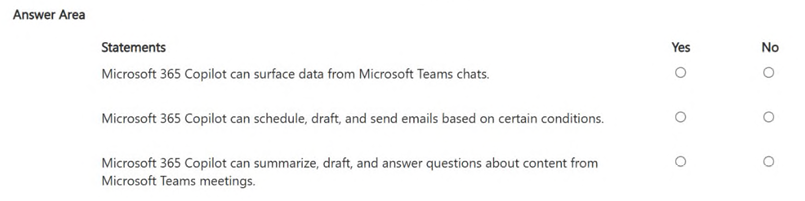
Yes, No, Yes. Copilot can surface Teams chat data via Microsoft Graph permissions, cannot autonomously schedule or send emails, but can assist in scheduling meetings by suggesting times and creating invites.
Question
For each of the following statements, select Yes if the statement is true. Otherwise, select No.
NOTE: Each correct selection is worth one point.
Key Takeaways
The question tests the boundary between Copilot's ability to access graph data (Yes) versus its inability to perform autonomous actions like sending emails (No), while still supporting meeting coordination (Yes).
This page explains whether Microsoft 365 Copilot can access Teams chats, schedule emails, or manage meetings. The correct answers are Yes, No, and Yes respectively, based on its role as an assistant rather than an autonomous agent.
Common mistake: Candidates often select 'Yes' for all three, assuming Copilot can fully automate tasks. They fail to recognize that Copilot requires human intervention for sending emails and does not have independent agency to act on triggers without explicit user commands.
Expert Analysis
The governing principle for this scenario is the distinction between Copilot as a context-aware assistant and Copilot as an autonomous automation engine. Microsoft 365 Copilot operates within strict security boundaries defined by Microsoft Graph permissions, meaning it can only access and surface data that the user already has permission to view. It does not bypass identity or access controls.
For the first statement regarding Teams chats, the answer is Yes. Because Copilot integrates directly with the Microsoft Graph, it can read and summarize content from Teams conversations provided the user has access to those chats. This is a core capability of the chat experience, allowing users to catch up on missed discussions without leaving their current context.
For the second statement regarding email scheduling and sending, the answer is No. While Copilot can draft emails, suggest replies, and even propose meeting times based on calendar availability, it lacks autonomous execution capabilities. It cannot independently schedule messages to send later or trigger automatic sends based on conditions. Such actions require explicit human confirmation and are typically handled by workflow automation tools like Power Automate, not the Copilot interface itself. Comments in the discussion often confuse drafting assistance with automated action; however, the exam doctrine strictly separates Copilot's generative assistance from autonomous agent behavior.
For the third statement regarding meeting scheduling, the answer is Yes. Copilot can analyze calendar data and suggest optimal meeting times or create meeting invites if the user initiates the request. It acts as an intelligent scheduler that proposes options, but the final action of creating the invite remains under user control. This distinguishes it from fully autonomous agents that might book meetings without any user prompt. The key insight is that Copilot assists in the process but does not replace the user as the decision-maker for sensitive actions like sending emails.
Official Reference
https://learn.microsoft.com/en-us/microsoft-copilot/microsoft-copilot-overview
This link opens the official vendor documentation in a new tab.
Exam Strategy
When evaluating Copilot capabilities, always ask if the action is 'generative assistance' or 'autonomous execution'. If the tool drafts, summarizes, or suggests, it is likely 'Yes'. If the tool performs a transactional action like sending an email or executing a rule-based workflow without user confirmation, it is 'No'. Distinguish between Copilot Studio agents (which can be more autonomous) and standard M365 Copilot (which is assistant-focused).
Frequently Asked Questions
Can Copilot send emails automatically?
Does Copilot see private Teams chats?
What is the difference between Copilot and an Agent?
Discussion 9 contributions
Compiled from public community threads and reader submissions, lightly edited for clarity. Handles and vote tallies are shown as recorded, and comments reflect the views of individual contributors.
From public community threads 9
-
fcb3021 👍 5i would say 3 times yes
-
TDAC 👍 3Answer is correct: Y N Y Regarding using Copilot to SEND emails... Copilot can draft emails and help you refine them, but it cannot autonomously schedule or send emails based on conditions or triggers. It does not act as an automation engine or rule-based workflow tool. Sending emails automatically based on conditions would require workflow automation (e.g., Power Automate), not Copilot.
-
Scooter47 👍 3YNY Changing my answer to YNY. M365 Copilot CAN surface data from Teams chats.
-
KOLADY 👍 2YNY. It can only draft meeting schedules and not schedule messages
-
jim85 👍 2Agree! YYY
Show 4 more comments
-
C10140404550 👍 1Yes – Microsoft 365 Copilot can surface information from Microsoft Teams chats that the user has permission to access. Copilot uses Microsoft Graph data, including chats, emails, files, meetings, and other organizational content, to provide context-aware responses. No – Microsoft 365 Copilot can help draft emails and suggest actions, but it does not automatically schedule, draft, and send emails based on predefined conditions. Such automated workflows require additional tools such as Microsoft Power Automate. Yes – Microsoft 365 Copilot can summarize meetings, generate content from meeting discussions, and answer questions about meeting transcripts, recordings, notes, and shared content in Microsoft Teams meetings.
-
Scooter47 👍 1NNY - I'm leaning a little different here, but could easily be wrong. Copilot cannot surface data from Teams chats, but Copilot Chat can. Not too clear here. Copilot is unable to "Send" emails for you, nor can it "Schedule" emails to send later. These are explicit Outlook-side Copilot controls. If certain conditions are met, Copilot can summarize, draft, and answer questions about content from Teams. I would say NNY. Again, not as specific as I'd like.
-
ExamBrainKing 👍 1No, with Copilot for M365 License cannot shedule, and send itseld emails, there is no automation in Copilon, instead you can use power platform - but the question is about just Copilot funcionnality. If u want to do automation, it could be only reached by Agent in Copilot Studio, with Copilot studio license needed
-
Mayo 👍 1I agree to YYY. Copilot can do all three
Reader comments & corrections
No reader corrections yet — spotted an error or have a note? Share it below.