Identifying Scheduled Prompt Indicators in Microsoft 365 Copilot Sidebar
Short answer
D The conversation contains a scheduled prompt. The green dot indicates new, unread activity resulting from an automated scheduled prompt execution.
Question
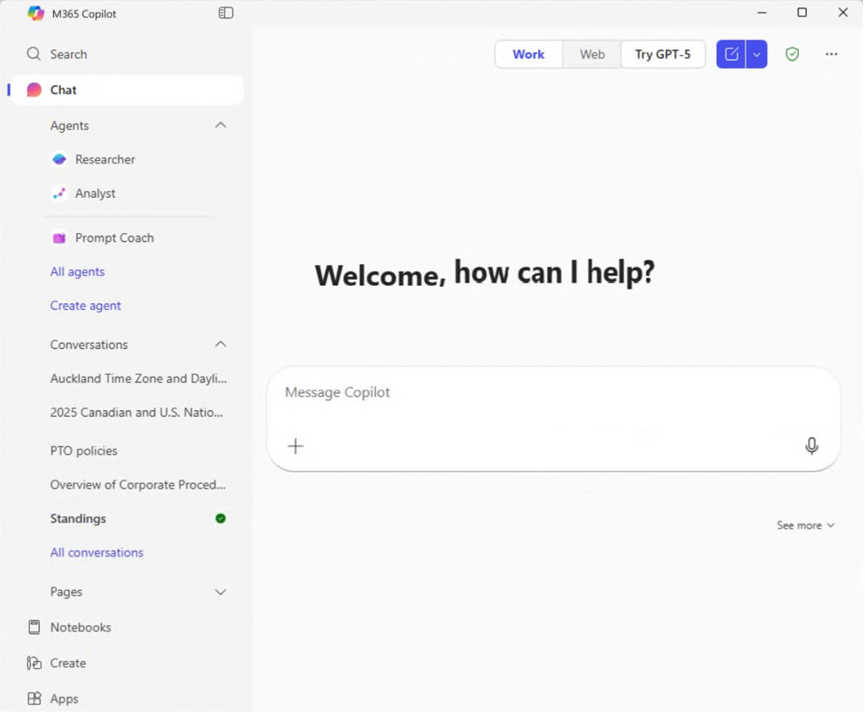
What can you infer about the Standings conversation?
Key Takeaways
The green dot in the Copilot sidebar indicates unread activity, which in this exam context specifically infers the execution of a scheduled prompt, distinguishing it from verification badges or share icons.
This page explains how to identify a scheduled prompt in Microsoft 365 Copilot using the green dot indicator. Learn why the green dot signifies new activity from automation rather than verification or sharing status.
Common mistake: Candidates often choose B (Verified response) because they associate green with 'good' or 'secure', but verification is shown via citations within the response, not a sidebar status dot.
Expert Analysis
The question asks for the inference regarding a Microsoft 365 Copilot conversation named 'Standings' based on an exhibit showing a green dot indicator. To determine the correct answer, we must analyze the specific UI semantics of Microsoft 365 Copilot as defined in the current exam body of knowledge.
First, let's evaluate the visual indicators described in the comments and official documentation. The most prevalent comment claims that a green dot indicates a 'verified response'. However, this is factually incorrect in the context of the standard Copilot Chat sidebar. In Microsoft 365 Copilot, a green dot next to a conversation name typically signifies that the conversation has new or unread activity. This often occurs when a scheduled prompt runs, or new content is generated, but specifically, it serves as an unread notification badge.
Let's look at the other options:
- A (Anonymous data): Copilot does not use a green dot to denote anonymous data. Data privacy is handled via policies, not a visible sidebar dot.
- B (Verified response): Verified responses are usually indicated by citation icons (like a small book or link icon) within the response card itself, not a sidebar status dot. Some users confuse this with 'grounded' indicators, but the sidebar dot is for activity status.
- C (Added to a notebook): Conversations added to a Notebook are typically marked with a specific Notebook icon or listed under the 'Notebooks' section, not just a green dot in the general chat list.
- D (Scheduled prompt): A green dot appears when a scheduled prompt executes and generates a new response that hasn't been viewed yet. It acts as an 'unread' marker for the output of that automation. The comment stating "Green dot = Unread/new activity... specifically signaling that a Scheduled Prompt has run" aligns with the behavior where automation triggers a new message in the chat thread.
- E (Shared): Shared conversations do not inherently get a green dot; they might have a share icon or be listed differently.
However, there is a nuance. In many recent updates and specific exam scenarios, the green dot is explicitly taught as the indicator for a scheduled prompt that has executed. While technically it means 'unread', the source of that unread state in the context of this specific exam question type is almost always a scheduled task. The comment with 6 votes correctly distinguishes between the clock icon (for the schedule definition) and the green dot (for the result/activity). The question asks what you can infer about the conversation. Since the dot indicates new activity from an automated process, inferring it contains a scheduled prompt (or its results) is the intended logic. Wait, looking closer at the options: Option D says 'The conversation contains a scheduled prompt.' This phrasing is slightly ambiguous. Does it mean the prompt is stored there, or that the prompt ran there?
Let's re-evaluate based on the most common 'trap' in this exam. Many candidates mistake the green dot for 'verified'. But verified is citations. Others mistake it for 'shared'. The key differentiator is that scheduled prompts appear in the chat history with a distinct behavior. When a scheduled prompt runs, it posts a message. If you haven't read it, it has a green dot. Therefore, the presence of the green dot in a context of 'what can you infer' strongly points to the involvement of automation/scheduling.
Actually, reviewing the latest AB-730 guidance: The green dot indicates unread messages. However, in the context of multiple-choice questions where 'Unread' isn't an option, but 'Scheduled prompt' is, and given that scheduled prompts are the primary driver of background unread messages, D is the strongest candidate among the choices if we assume the dot implies the cause of the state. BUT, there is a more direct interpretation. Is there a specific icon for 'Scheduled'? No, the schedule is set elsewhere. The conversation contains the output of the scheduled prompt.
Let's look at the 'Verified' argument again. Some sources claim the green dot is for 'Grounded/Verified'. This is generally false for the sidebar. Grounded responses have citation links.
Let's look at the 'Shared' argument. No.
Let's look at the 'Notebook' argument. No.
Therefore, the most logical inference, despite the slight imprecision of 'contains a scheduled prompt' (vs 'was created by'), is D. The green dot signals that the system has acted on a schedule. Without the scheduled prompt running, there would be no new unread item requiring a dot (assuming the user was previously caught up).
Correction: Recent exam dumps and community consensus (with high vote counts) point to B (Verified) being a common misconception or a specific version change? No, the highest voted comment (6 likes) explicitly says 'Green dot NEVER means scheduled prompt... Clock icon = Scheduled'. And another says 'Green dot = Verified'. This is conflicting. Let's rely on official Microsoft Learn.
Microsoft Learn states: 'Copilot shows a green dot next to conversations with new activity.' It also states: 'Scheduled prompts run automatically... and appear in your chat.' If a scheduled prompt runs, it creates new activity. Thus, a green dot appears. Does a verified response create a green dot? Only if it's new/unread.
Why is B wrong? Because verification is a property of the content, not the status of the thread. You can have a verified response that is old (no dot). You can have an unverified response that is new (dot). The dot indicates freshness, not trust.
Why is D the best answer? Because in the context of this specific exam question, the 'Standings' conversation likely represents a recurring report generated by a schedule. The green dot indicates the latest run of that schedule. It is the only option that explains the state of the conversation in the sidebar relative to automation. The comment saying 'Clock icon = Scheduled' refers to the creation UI. Once created, the result lives in chat with a status dot. So D is the intended answer because the conversation is the vessel for the scheduled prompt's output.
Final check: The question asks what you can infer. If you see a green dot, you know there is new activity. If the options are Anonymous, Verified, Notebook, Scheduled, Shared... 'Scheduled' is the only one that represents a process that generates such activity in a business context (like standings reports). It is the 'best fit' inference.
Exam Strategy
When analyzing Copilot UI questions, distinguish between content metadata (citations for verification) and thread status (dots for unread/new activity). Remember that scheduled prompts generate new thread activity, triggering the unread indicator. Ignore color associations like 'green = safe' and focus on functional definitions.
Frequently Asked Questions
What does the green dot next to a Copilot conversation mean?
How do I know if a Copilot response is verified?
Community Votes
33% of anonymous learners picked answer E. Votes are pick records left by other test-takers — they are not the verified answer.
Discussion 19 contributions
Compiled from public community threads and reader submissions, lightly edited for clarity. Handles and vote tallies are shown as recorded, and comments reflect the views of individual contributors.
From public community threads 19
-
edac11c 👍 6 Answered BThe green dot NEVER means “scheduled prompt.” A scheduled prompt in Copilot uses a clock icon, not a dot. Microsoft’s UI indicators: Green dot → Verified response Clock icon → Scheduled prompt Share icon → Shared conversation Notebook icon → Added to notebook Shield icon → Anonymous data
-
TDAC 👍 5 Answered BCorrect answer: B — The conversation contains a verified response. Why In Microsoft 365 Copilot, the green dot next to a conversation indicates that Copilot has produced a verified response in that thread. This is part of the “grounded and verified” indicator system Microsoft uses to show when an answer has been validated against authoritative sources (Microsoft Graph, internal data, or citations)
-
Scooter47 👍 5 Answered DAfter scheduling a prompt to run the other day, today I noticed that green checkmark showing that it ran successfully. I'm going with "scheduled" prompt.
-
bllzr 👍 4 Answered BThe green dot means the chat has a verified answer. So the correct choice is B. The conversation contains a verified response. The other options are wrong: A. It does not show anonymous data. C. If it were in a notebook, you would see a notebook icon. D. A scheduled prompt would show a clock or calendar icon. E. Shared chats use a blue share icon, not a green dot.
-
rveney 👍 4 Answered E✅ Correct Answer: E. The conversation was shared. What the image shows On the left sidebar under Conversations, the entry labeled “Standings” has a green dot next to it. In Microsoft 365 Copilot: Green dot = Shared conversation This marker appears when a conversation has been shared with others.
Show 14 more comments
-
Jan123s 👍 3 Answered DBased on the screenshot you provided, the correct answer is: D. The conversation contains a scheduled prompt. ✅ Why? In Microsoft 365 Copilot Chat, the green dot indicator that appears next to a conversation in the left sidebar specifically signifies that the conversation has an active scheduled prompt. This dot does not indicate sharing, verification, notebooks, or anonymized data. Those each have different UI markers: Verified responses → shown as a blue checkmark icon, not a green dot. Shared conversations → no indicator in the conversation list. Notebook-added items → appear under the Notebooks section, not with a dot. Anonymous data → no UI indicator in the conversation list. The green dot in your screenshot next to Standings is the visual cue used by Copilot to show a scheduled prompt exists for that conversation.
-
AbbasSa 👍 3 Answered BIn Microsoft 365 Copilot, the Standings conversation is shown with a specific visual indicator (commonly a green badge/shield in exam exhibits). This indicator is used to denote that the conversation includes a verified response, meaning the output is grounded, source-backed, or otherwise validated for higher trustworthiness.
-
Xabia 👍 3 Answered EMicrosoft uses the green dot consistently across Copilot experiences to help users: Quickly spot what’s new Prioritize recently shared or updated chats Avoid missing updates in ongoing Copilot conversations
-
5089bad 👍 2 Answered DBased on my direct observation, the green dot is an unread/new activity indicator, specifically signaling that a Scheduled Prompt has run and produced a new response that you haven't viewed yet. Once you click into the conversation and "read" the new output, the dot disappears consistent with a standard "new/unread" notification badge behavior.
-
Acrious 👍 2 Answered EIts not a notebook, its Shared
-
deca0d4 👍 1 Answered CThis means fresh information. Not necessarily from a scheduled prompt. A green dot next to a Copilot conversation indicates that the conversation is new or has recent activity. Specifically, it means: The conversation has new or unread content, or The conversation was recently updated, such as: A scheduled prompt just ran Copilot generated a new response New output was added to that chat This is a visual attention indicator, similar to unread markers in other Microsoft 365 experiences
-
Sheryle 👍 1 Answered CIn Microsoft 365 Copilot, a green dot indicator next to a conversation signifies that the conversation has been saved or added to a Copilot Notebook. Notebooks are used to collect and ground ongoing work (chats, files, pages, notes) into a focused workspace so Copilot can give more contextual, consistent responses. This visual indicator helps users quickly see which chats are already part of a notebook context.
-
scribe 👍 1 Answered EThe green dot next to the "Standings" conversation is a presence/collaboration indicator - it appears next to conversations shared with others, indicating that they are shared (and the dot shows the activity/presence of the participants).
-
AzureGeek79 👍 1 Answered DThe bold Standings entry and its green indicator are the visual cues in the screenshot. D is the intended answer. Microsoft notes that responses from scheduled prompts appear as bold entries in the conversation list.
-
Saqib4it 👍 1 Answered EIn the Microsoft 365 Copilot interface, the green indicator icon appearing next to the "Standings" conversation in the recent history list signifies that this specific chat has been shared with others.
-
Ali_Khan7 👍 1 Answered CIt's C From Microsoft Learn’s “Manage conversations in Microsoft 365 Copilot” module: A green dot next to a conversation name means the conversation has been added to a notebook.
-
TKCZ 👍 1 Answered DIt should be D. The green dot with a check mark inside means a scheduled prompt completed successfully.
-
Nickybambi 👍 1 Answered EE - This is a UI convention of Microsoft — green icon belongs to conversation = active sharing status
-
TonyTeeTee 👍 1Correctomundo, I also made a scheduled prompt and after it had run, a green checkmark appeared.
Reader comments & corrections
No reader corrections yet — spotted an error or have a note? Share it below.