Microsoft 365 Copilot Conversation and Agent Data Lifecycle
Short answer
1. No; 2. No; 3. Yes
Question
You use Microsoft 365 Copilot.
For each of the following statements, select Yes if the statement is true. Otherwise, select No.
NOTE: Each correct selection is worth one point.
Key Takeaways
The main trap is confusing conversation history management with file storage and assuming agent removal wipes all historical data.
Determines the truthfulness of statements regarding Copilot conversation deletion permissions, file associations, and agent uninstallation data retention.
Common mistake: Many learners incorrectly assume that deleting a conversation removes the referenced files (Statement 2) or that uninstalling an agent permanently erases its chat logs (Statement 3).
Expert Analysis
This question tests the specific data retention and lifecycle behaviors of Microsoft 365 Copilot conversations and agents, requiring precise knowledge of how user actions impact stored data.
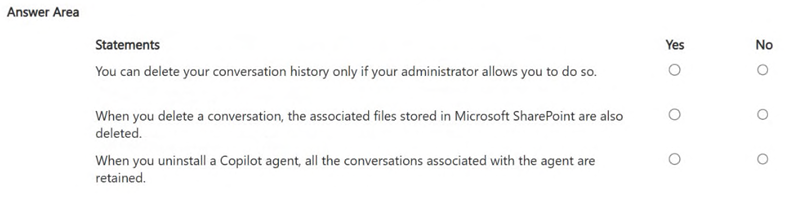
Statement 1: Deletion Permissions The statement claims users can delete history only if the administrator allows it. This is No. By default, Microsoft 365 Copilot empowers users to manage their own conversation history. Users can delete individual conversations or clear all history from the Copilot interface without requiring explicit administrative approval for each deletion. While admins can configure data retention policies globally, the act of a user deleting their own chat history is a standard feature available to them, not a restricted action dependent on per-user permission flags for deletion itself.
Statement 2: File Association with Conversations The statement claims that deleting a conversation also deletes associated files in SharePoint. This is No. Copilot conversations are text-based interactions (prompts and responses). They may reference, cite, or generate content based on files in SharePoint or OneDrive, but the conversation record itself is distinct from the source documents. Deleting the chat history removes the log of the interaction, but it does not touch the underlying files stored in the organization's cloud storage. The files remain intact in their original locations.
Statement 3: Agent Uninstallation and Data Retention The statement claims that uninstalling a Copilot agent retains all associated conversations. This is Yes. When a custom Copilot agent is uninstalled or removed from a user’s list of available agents, the system is designed to retain the historical conversations associated with that agent. This retention supports audit trails, compliance requirements, and potential recovery scenarios. Unlike some ephemeral chat features, agent-specific conversation logs are preserved even after the agent definition is no longer active or accessible to the user.
Exam Strategy
When answering questions about Copilot data lifecycle, always distinguish between 'conversation logs' (text records) and 'source files' (documents). Remember that user deletion rights are generally broad for personal history, while agent data retention is prioritized for compliance even after removal.
Discussion 7 contributions
Compiled from public community threads and reader submissions, lightly edited for clarity. Handles and vote tallies are shown as recorded, and comments reflect the views of individual contributors.
From public community threads 7
-
fa62dd5 👍 8You can delete your conversation history only if your administrator allows you to do so.❌ NoWhen you delete a conversation, the associated files stored in Microsoft SharePoint are also deleted.❌ NoWhen you uninstall a Copilot agent, all the conversations associated with the agent are retained.✅ Yes
-
rveney 👍 7✔️ Explanation 1. “You can delete your conversation history only if your administrator allows you to do so.” → NO Users can delete their own Copilot conversation history at any time. This action does not require admin approval. 2. “When you delete a conversation, the associated files stored in SharePoint are also deleted.” → NO Deleting a Copilot conversation does not delete any files in: SharePoint OneDrive Teams Files remain where they are stored. 3. “When you uninstall a Copilot agent, all the conversations associated with the agent are retained.” → NO Uninstalling a Copilot agent removes the agent and its associated conversations. They are not retained.
-
876LKZ 👍 3First one is Yes — You can delete your conversation history in Microsoft 365 Copilot only if your administrator has enabled this capability.
-
C10140404550 👍 1✅ Sí: La capacidad de eliminar el historial de conversaciones puede estar controlada por las políticas configuradas por el administrador de la organización. ❌ No: Eliminar una conversación de Copilot no elimina automáticamente los archivos subyacentes almacenados en SharePoint o OneDrive. Los archivos permanecen en su ubicación original. ✅ Sí: Las conversaciones permanecen almacenadas incluso si se desinstala el agente de Copilot; la desinstalación del agente no elimina el historial de conversaciones asociado.
-
944e7a1 👍 1Should be -Yes -No -No 1. Copilot conversation history is governed by tenant level admin controls. So if the admin disables that you as a user can't delete your history. 2. Copilot doesn't own or manage file storage. 3. Uninstalling an agent removes its conversations, because the conversations are tied to its lifecycle. If you delete the agent you delete everything associated with it.
Show 2 more comments
-
Ali_Khan7 👍 1✅ Yes Deletion permissions are controlled by admin policy. Users can delete history only if allowed by their admin. ✅ No Deleting a conversation does not remove SharePoint or OneDrive files; those remain intact. ✅ Yes Uninstalling an agent does not delete its conversations; they’re retained for audit and recovery.
-
microsoft29 👍 1Y-Y-N N : When an agent is uninstalled, the agent is removed from your list of available agents, but Microsoft specifically notes that saved prompts remain available in the Copilot Prompt Gallery
Reader comments & corrections
No reader corrections yet — spotted an error or have a note? Share it below.