Microsoft 365 Copilot Chat Licensing and Capabilities
Short answer
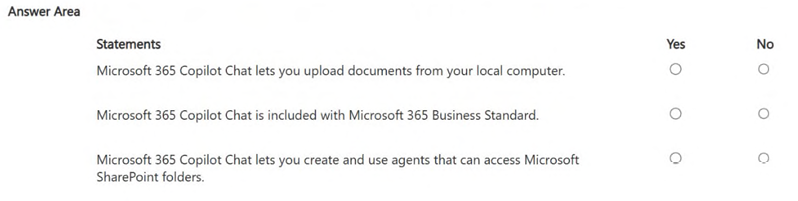
1. YES - You can upload local documents to Copilot Chat without a Copilot license. 2. YES - Copilot Chat is included with Microsoft 365 Business Standard. 3. NO - You cannot use agents to access SharePoint data without a dedicated Copilot for Microsoft 365 license.
Question
You have a Microsoft 365 subscription.
You do NOT have a Microsoft 365 Copilot license.
For each of the following statements, select Yes if the statement is true. Otherwise, select No.
NOTE: Each correct selection is worth one point.
Key Takeaways
The trap is confusing the free 'Copilot Chat' experience (available to all M365 tenants) with the premium 'Copilot for M365' license (required for Graph/SharePoint integration).
Determine if Copilot Chat features are available without a Copilot license. Confirm that local uploads and the chat experience are included with Business Standard, but SharePoint agent access requires the specific license.
Common mistake: Learners often mark the SharePoint question as 'Yes' assuming all Copilot features are available to any M365 user, failing to distinguish between the basic Chat app and the licensed Graph-integrated Agent capabilities.
Expert Analysis
Local File Uploads: Yes Microsoft 365 Copilot Chat (the standalone web and desktop app) allows users to upload files directly from their local device, such as Word documents, Excel spreadsheets, PowerPoint presentations, PDFs, and images. This capability is available to all Microsoft 365 work accounts, regardless of whether they hold a specific Copilot for Microsoft 365 license. The uploaded file provides context for the AI model within that specific conversation session.
Availability with Business Standard: Yes Microsoft 365 Copilot Chat is included with most Microsoft 365 commercial licenses, including Microsoft 365 Business Standard. A separate paid license for "Copilot for Microsoft 365" is only required to access the deep integration features (Graph data, agents, etc.) within apps like Word, Excel, Outlook, and Teams. However, the standalone Chat experience itself is accessible to Business Standard subscribers at no extra cost.
Accessing SharePoint via Agents: No The question specifies that you do NOT have a Microsoft 365 Copilot license. Without this specific license, you cannot use Copilot Agents or advanced features that query Microsoft Graph data sources like SharePoint, OneDrive, or Teams. While Copilot Chat can read locally uploaded files, it cannot browse, search, or access content stored in SharePoint libraries because those capabilities require the Graph-enabled Copilot license.
Official Reference
This link opens the official vendor documentation in a new tab.
Exam Strategy
Always distinguish between the 'Copilot Chat' application and the 'Copilot for Microsoft 365' license when reading exam questions. If the question asks about accessing Microsoft Graph data (SharePoint, OneDrive, Outlook, Teams), verify if the specific Copilot license is mentioned. If not, assume Graph access is denied, even if Chat is available.
Frequently Asked Questions
Is Copilot Chat free for all Microsoft 365 users?
Can I use Copilot Agents to search SharePoint without a Copilot license?
Discussion 8 contributions
Compiled from public community threads and reader submissions, lightly edited for clarity. Handles and vote tallies are shown as recorded, and comments reflect the views of individual contributors.
From public community threads 8
-
rveney 👍 19✔️ Explanation 1. Upload documents from your local computer → YES Even without a Copilot license, Copilot Chat allows you to upload files directly from your device for grounding in the conversation. 2. Copilot Chat included with Microsoft 365 Business Standard → YES Copilot Chat is available to all work accounts with Microsoft 365 licenses, including Business Standard. A paid Copilot license is not required to use Chat. 3. Create and use agents that access SharePoint folders → NO Creating agents that can read: SharePoint folders OneDrive files Microsoft Graph data requires a Microsoft 365 Copilot license and organizational approval. Without a license, you can use only free declarative agents, which cannot access enterprise data.
-
876LKZ 👍 3Last one is no
-
SrWalk49 👍 2I think the last one is yes. Microsoft 365 Copilot Chat can use agents that access SharePoint data, but only within the user’s permissions and with limited granularity (often site-level, not specific folders).
-
fa62dd5 👍 2Y Y Y that is the answer
-
fa62dd5 👍 2aNSWER IS YNN
Show 3 more comments
-
C10140404550 👍 11. YES. Microsoft 365 Copilot Chat allows users to upload files directly from their local computer, such as Word documents, Excel spreadsheets, PowerPoint presentations, PDFs, and images. Copilot can then analyze the uploaded content and use it as context when generating responses. This capability is available even for users who do not have a Microsoft 365 Copilot license. 2. YES. Microsoft 365 Copilot Chat is included with eligible Microsoft 365 subscriptions, including Microsoft 365 Business Standard. Users can access Copilot Chat without purchasing a separate Microsoft 365 Copilot license. 3. NO. Without a Microsoft 365 Copilot license, Copilot Chat cannot directly access Microsoft Graph data, including SharePoint content. While organizations can configure specialized agents through Copilot Studio and metered consumption to access SharePoint resources, these require additional tenant configuration and are not a standard capability available to a user who only has a Microsoft 365 subscription.
-
deca0d4 👍 1YYN What " Chat does NOT include: ❌ Access to Microsoft Graph (SharePoint, OneDrive, Outlook, Teams) ❌ Agents that can browse or query SharePoint libraries ❌ Ability to scope or connect knowledge sources Copilot Chat cannot see or search SharePoint folders, even if the user personally has access to them.
-
asc 👍 1Chat does not let you upload from SharePoint, Outlook, Teams or One Drive you need a license,
Reader comments & corrections
No reader corrections yet — spotted an error or have a note? Share it below.