When MFA Fixes Conditional Access and When It Does Not
Short answer
Statement 1: Yes. Statement 2: Yes. Statement 3: No. MFA satisfies the CA1 grant control, but CA2 still blocks Exchange ActiveSync and other legacy clients from Exchange Online.
Question
You have a Microsoft 365 subscription that contains three users named User1, User2, and User3.
The subscription has Conditional Access policies assigned to all users. The policies are configured as shown in the following table.

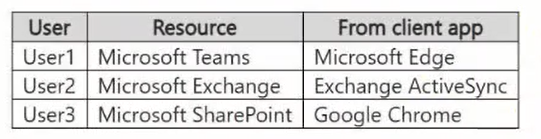
The users report that they fail to access Microsoft 365 resources as shown in the following table.
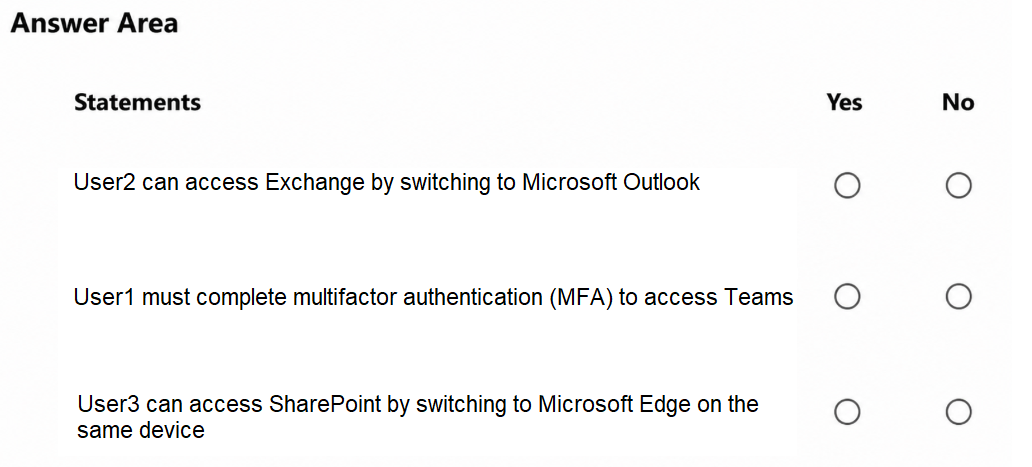
For each of the following statements, select Yes if the statement is true. Otherwise, select No.
NOTE: Each correct selection is worth one point.
Key Takeaways
You must separate a grant control (MFA required) from a block control (legacy clients barred from Exchange Online) — MFA only resolves the former.
This Conditional Access hotspot tests which policy explains each user's Microsoft 365 sign-in failure. The verdict: MFA completion satisfies the grant-control policy (Statements 1 and 2 are Yes), but it never clears the explicit block on legacy clients targeting Exchange Online (Statement 3 is No).
Common mistake: Marking Statement 3 as Yes because the user completed multifactor authentication; CA2's block on Exchange ActiveSync and other clients is independent of any grant control, so a legacy client still fails.
Expert Analysis
Governing principle: how Conditional Access evaluates a sign-in
A Conditional Access policy in Microsoft Entra evaluates the sign-in context — user, client/app, location, device state, and any required controls — and grants or blocks access based on the assignments and controls configured in the policy. A block control takes precedence over a grant control, and a policy only affects sign-ins that match its assignments (targeted users plus targeted client apps/conditions). The key practice is to read each policy's user scope, client-app targeting, and grant/block controls, then map each user's reported failure onto the policies that actually match their sign-in.
Mapping the scenario
Policy CA1 targets all users with a grant control requiring multifactor authentication, so any user whose sign-in lacks MFA is blocked from the protected resources. Policy CA2 specifically blocks legacy authentication clients — Exchange ActiveSync and "Other clients" — from Exchange Online. Microsoft Outlook uses modern authentication, which is outside CA2's targeting, so switching to Outlook (and completing the MFA required by CA1) lets that user in. Legacy or non-modern clients such as Exchange ActiveSync-based mail apps remain blocked by CA2 no matter what.
Reading the statements
Statement 1: Yes — the user on a legacy/other client is blocked from Exchange Online by CA2, but signing in with Microsoft Outlook (modern auth) satisfies CA1's MFA grant and is not targeted by CA2, so access succeeds.
Statement 2: Yes — the user whose failure is caused by missing MFA under CA1 regains access once multifactor authentication is completed during sign-in, because the grant control is then satisfied.
Statement 3: No — completing MFA satisfies CA1 only; it does not change CA2's block on Exchange ActiveSync and other legacy clients, so a legacy client still fails to reach Exchange Online.
The trap is treating MFA as a universal fix: it clears a grant-control failure but never clears an explicit block.
Exam Strategy
For Conditional Access hotspots, build a two-column note for each policy: what it targets (users + client apps) and what control it applies (grant or block). Then test each user's failure against the policies that actually match their sign-in context. If an explicit block matches, no grant-control fix such as MFA will clear it — mark the recovery statement No; if only a grant control is unmet, completing that control makes the statement Yes.
Frequently Asked Questions
Why does completing MFA fix one user's access but not another's in this scenario?
Does Microsoft Outlook count as a legacy authentication client under Conditional Access?
Which Conditional Access control wins when both a block and a grant apply?
Discussion 1 contributions
Compiled from public community threads and reader submissions, lightly edited for clarity. Handles and vote tallies are shown as recorded, and comments reflect the views of individual contributors.
From public community threads 1
-
linux_admin 👍 1Statement 1: Yes. Statement 2: Yes. Statement 3: No. Explanation: For Statement 1, Policy CA2 blocks access to Exchange Online specifically for legacy authentication clients using Exchange ActiveSync and Other clients. Microsoft Outlook uses modern authentication, which is not targeted by CA2\. When User2 switches to Microsoft Outlook and completes multifactor authentication as required by Policy CA1, User2 can successfully access Exchange. For Statement 2, Policy CA1 applies to all resources and any client app, requiring multifactor authentication. Microsoft Teams is included under all resources, and Microsoft Edge is an evaluated client app. Therefore, User1 must complete multifactor authentication to access Teams. For Statement 3, Policy CA3 targets SharePoint Online for any client app and mandates that the device must be marked as compliant. User3 failed to access SharePoint because the underlying device is not compliant. Simply switching the web browser from Google Chrome to Microsoft Edge on the same non-compliant device does not fulfill the device compliance requirement, so access remains blocked.
Reader comments & corrections
No reader corrections yet — spotted an error or have a note? Share it below.