What an Exchange Auto-labeling Policy Actually Labels
Short answer
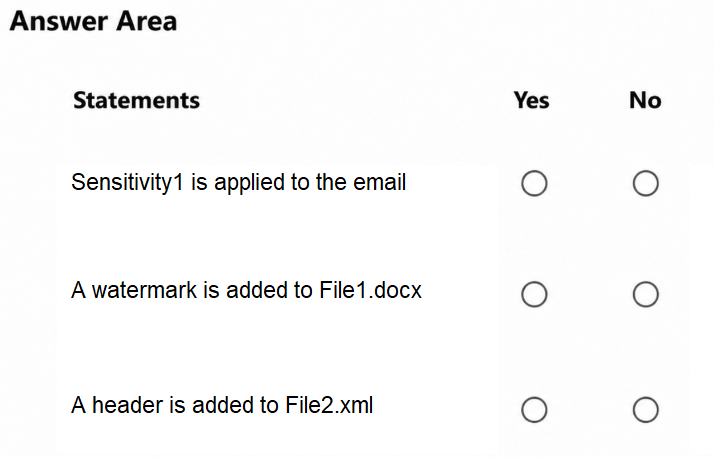
Statement 1: Yes. Statement 2: No. Statement 3: No. The Exchange-scoped auto-labeling policy applies Sensitivity1 to the email message itself when the sensitive info type rule matches; it does not label the attached files or extend the label beyond the mail item.
Question
You have a Microsoft 365 E5 tenant.
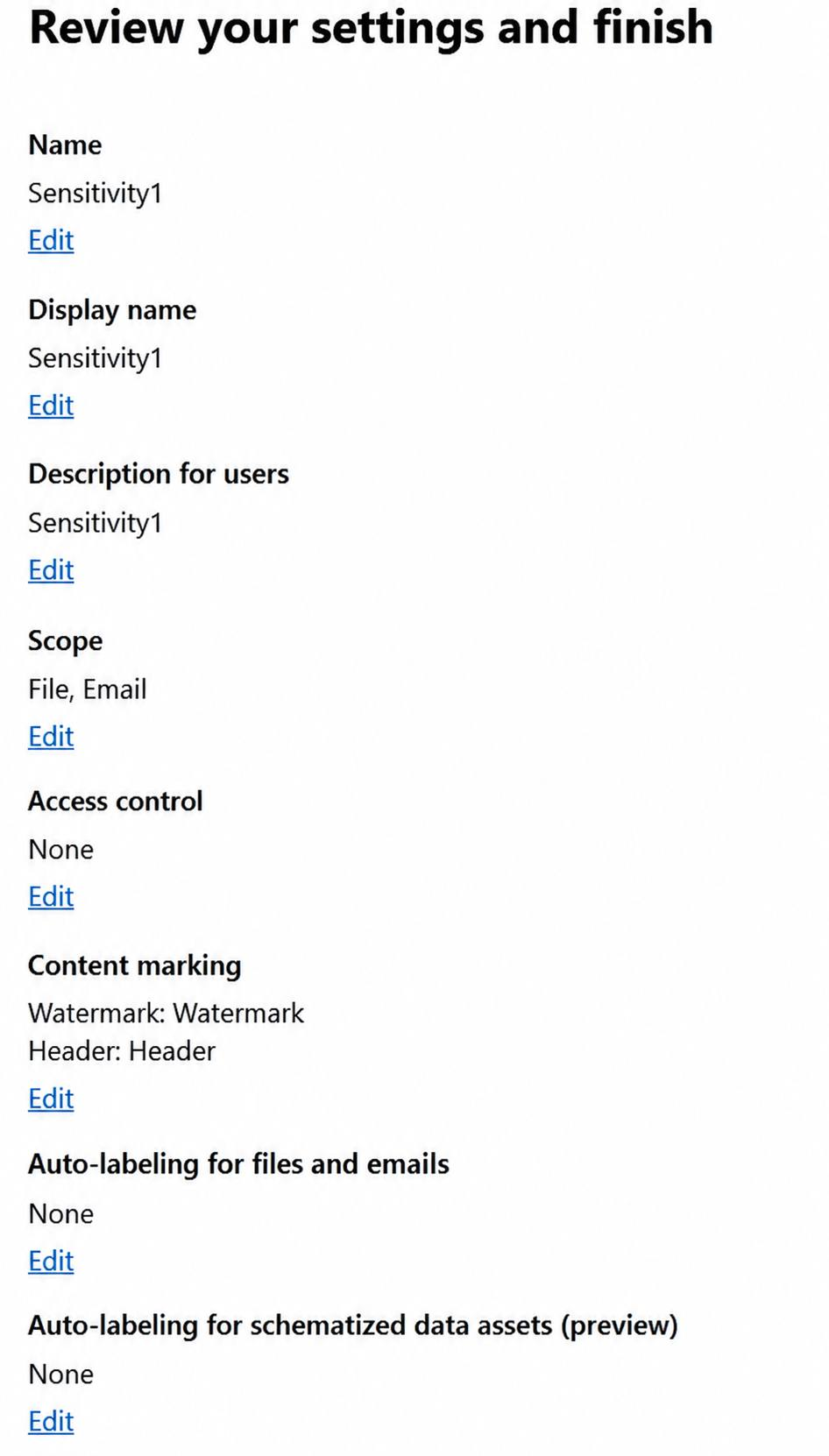
You have a sensitivity label configured as shown in the Sensitivity label exhibit. (Click the Sensitivity label tab.)
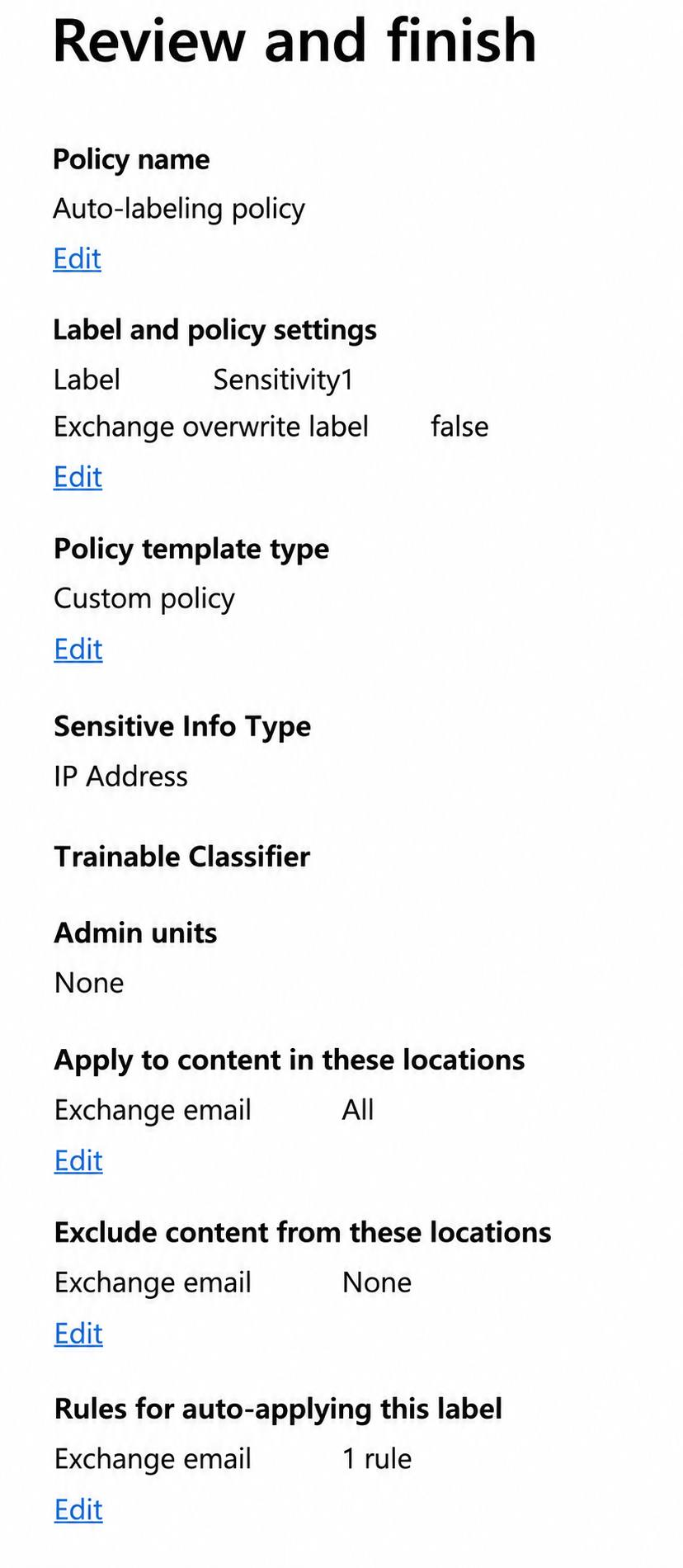
You have an auto-labeling policy as shown in the Auto-labeling policy exhibit. (Click the Auto-labeling policy tab.)
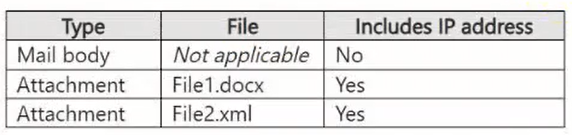
A user sends an email that contains the components shown in the following table.
Sensitivity label:
Auto-labeling policy:
For each of the following statements, select Yes if the statement is true. Otherwise, select No.
NOTE: Each correct selection is worth one point.
Key Takeaways
The trap is confusing content inspection with label application — attachments are read to evaluate the rule, but only the email message receives the label.
This AB-650 scenario tests Microsoft Purview auto-labeling scope: an Exchange policy that matches a sensitive information type applies the sensitivity label to the email message, not to the attached files. The verdicts are Statement 1 Yes, Statements 2 and 3 No.
Common mistake: Choosing Yes for the statements that claim the attachments themselves get labeled, because the sensitive data lives inside File1.docx and File2.xml; an Exchange-scoped policy inspects those files but labels only the message.
Expert Analysis
The boundary this question tests This scenario turns on one precise distinction: a sensitive information type rule can read content without labeling every piece of content it reads. An auto-labeling policy scoped to the Exchange mail location evaluates the message body and the contents of attached files against the rule, but when the rule matches, the label it writes is applied to the email message itself.
Where each statement falls The email body carries the IP-address components the rule looks for, so the policy matches and Sensitivity1 is applied to the message: that statement is Yes. The remaining two statements are No, because they claim effects that sit on the other side of the boundary — writing the sensitivity label into File1.docx or File2.xml as separately labeled items, or extending the label beyond the mail item to content the Exchange location does not control. Purview labels items, not fragments of content, so attachments serve only as evidence for the match.
Why the trap works Learners reason "the sensitive data is inside the files, so the files must receive the label." That inference fails: the attachments are inspected in memory for evaluation, not stamped with label metadata. Related settings configured on the sensitivity label — encryption, access restrictions, or user-removal controls — activate only when the label is actually applied to an item in a supported workload, which here is the email message.
Exam Strategy
Read the location scope first: it tells you which item type the policy can write a label to. Then separate what the rule evaluates (body and attachment contents) from what the policy labels (the mail item). Statements that push the label onto attachments or other workloads are almost always No.
Frequently Asked Questions
Does an Exchange auto-labeling policy label the attached files?
Why do attachments matter if they are not labeled?
Would the label reach content outside Exchange?
Discussion 1 contributions
Compiled from public community threads and reader submissions, lightly edited for clarity. Handles and vote tallies are shown as recorded, and comments reflect the views of individual contributors.
From public community threads 1
-
linux_admin 👍 1Statement 1: Yes. Statement 2: No. Statement 3: No. Explanation: For Statement 1: Auto-labeling policies applied to the Exchange email location inspect the email body as well as attached files for sensitive information types. Because both File1.docx and File2.xml contain IP addresses, the policy matches the Sensitive Info Type rule and automatically applies the Sensitivity1 label to the email message. For Statement 2: Exchange service-side auto-labeling policies apply sensitivity labels and content markings to the email message container itself. The policy does not open or apply visual content markings, such as watermarks, directly inside attached files like File1.docx. For Statement 3: Exchange auto-labeling policies do not alter or apply headers directly to email attachments. Additionally, XML files are not a supported file format for visual content markings like headers.
Reader comments & corrections
No reader corrections yet — spotted an error or have a note? Share it below.