Agent 365: User Access vs Sharing Settings
Short answer
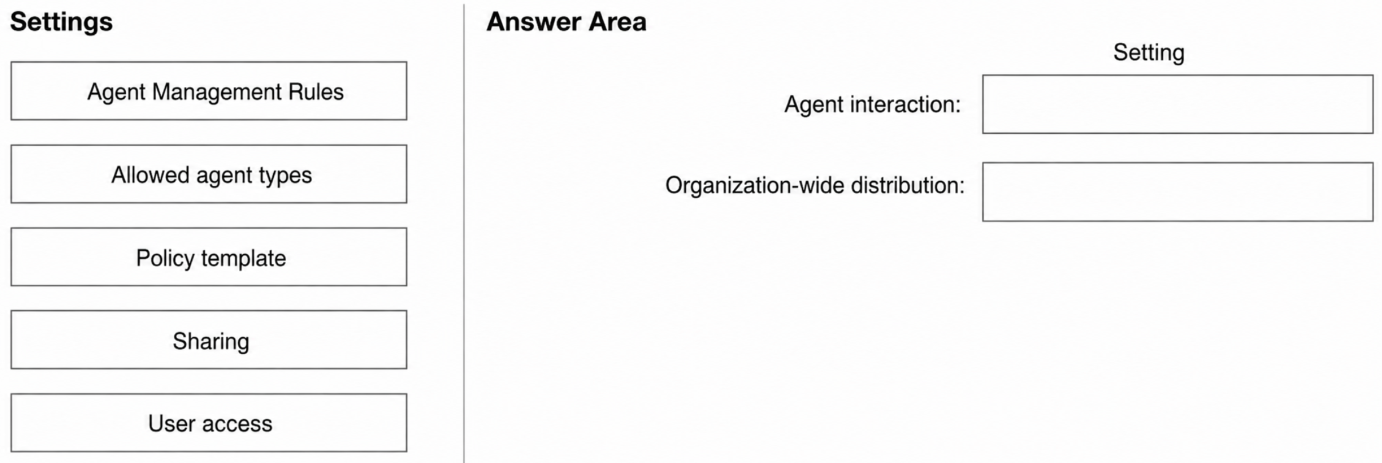
Set User access to Group1 for interaction with the agents, and set Sharing to Group2 for distributing the agents organization-wide.
Question
You have a Microsoft 365 subscription that uses Microsoft Agent 365. The subscription contains two security groups named Group1 and Group2.
Users create agents by using Agent Builder in Microsoft 365 Copilot.
You need to configure Agent settings to meet the following requirements:
Only the users in Group1 must be able to interact with the agents.
Only the users in Group2 must be able to distribute the agents to your organization.
What should you configure for each requirement? To answer, drag the appropriate settings to the correct requirements. Each setting may be used once, more than once, or not at all. You may need to drag the split bar between panes or scroll to view content.
NOTE: Each correct selection is worth one point.
Key Takeaways
The question tests whether you can separate agent consumption rights (User access) from agent publication rights (Sharing) inside Agent settings; the trap is treating both as interchangeable 'who can reach the agent' controls.
In Microsoft Agent 365, Agent settings split agent permissions into two controls: User access governs who can discover, run, and interact with an agent, while Sharing governs who can publish and distribute it organization-wide. This page maps Group1 to User access and Group2 to Sharing for the Agent Builder scenario.
Common mistake: Assigning Group2 to User access and Group1 to Sharing, or applying one group to both settings, because both controls mention users — this fails because User access gates running the agent while Sharing gates distributing it.
Expert Analysis
What the scenario is actually asking This is a drag-drop mapping question: two requirements in a Microsoft Agent 365 tenant must each be paired with the correct setting inside Agent settings for agents built with Agent Builder in Microsoft 365 Copilot. There are no option letters to reason about — the deliverable is an ordered mapping of requirement → setting.
Trace the two permission paths
- Interaction path (Group1). A user opens Copilot and attempts to use an agent. Before the agent runs, Microsoft Agent 365 evaluates who is entitled to discover and use it. That entitlement is governed by the User access setting in Agent settings, where you scope users or security groups — here Group1 — as the audience permitted to find, run, and interact with the agent. If Group1 is not listed there, the agent never becomes usable for those users regardless of how it is shared.
- Distribution path (Group2). A user attempts to publish or deploy the agent across the organization so others can adopt it. That gate is the Sharing setting, which controls whether and to whom an agent can be distributed organization-wide. Scoping Sharing to Group2 restricts the distribution action itself — publishing and rollout — to members of Group2, while everyone else can at most consume an agent they are granted access to.
The correct mapping Only Group1 interacts → User access. Only Group2 distributes → Sharing. Note the learner record confirming this reasoning: "User access is correct for Agent interaction because... the User access configuration controls which users or security groups are permitted to discover, run, and interact with agents created via Agent Builder. Sharing is correct for Organization-wide distribution because the Sharing setting governs publishing and deployment."
Why learners get this wrong The settings look interchangeable — both mention who can "reach" an agent — but they sit at different points in the request path: User access gates consumption, Sharing gates publication. Swapping them produces a tenant where Group2 can push agents nobody in Group1 can run, or where Group1 can distribute agents they cannot interact with.
Exam Strategy
When a drag-drop question pairs requirements with settings, read each requirement as a verb — 'interact' versus 'distribute' — and match it to the setting that gates that verb, not to a setting that merely mentions users. Ask yourself where in the request path the control sits: consumption rights before the agent runs, publication rights before it is pushed to the organization. Then confirm each setting is used only where it fits, since a setting may legitimately be unused or reused.
Frequently Asked Questions
What does the User access setting control for Agent Builder agents?
How does the Sharing setting differ from User access in Agent 365?
Can one security group be used for both User access and Sharing?
Discussion 1 contributions
Compiled from public community threads and reader submissions, lightly edited for clarity. Handles and vote tallies are shown as recorded, and comments reflect the views of individual contributors.
From public community threads 1
-
linux_admin 👍 1User access Sharing Explanation: User access is correct for Agent interaction because within Agent settings in Microsoft Agent 365, the User access configuration controls which users or security groups are permitted to discover, run, and interact with agents created via Agent Builder. Sharing is correct for Organization-wide distribution because the Sharing setting governs publishing and deployment permissions, allowing administrators to restrict who can distribute custom agents to the broader organization catalog (scoped here to Group2). Other options: Agent Management Rules is used to automate lifecycle governance and compliance triggers for agents rather than scoping interaction or distribution permissions. Allowed agent types specifies which categories of agents (e.g., custom declarative vs. external/prebuilt) are enabled in the tenant. Policy template establishes baseline security, compliance, and DLP policies across agents rather than assigning user group rights for interaction or sharing.
Reader comments & corrections
No reader corrections yet — spotted an error or have a note? Share it below.