Resolving Agent 365 Compliance Gaps with Agent Settings and DSPM
Short answer
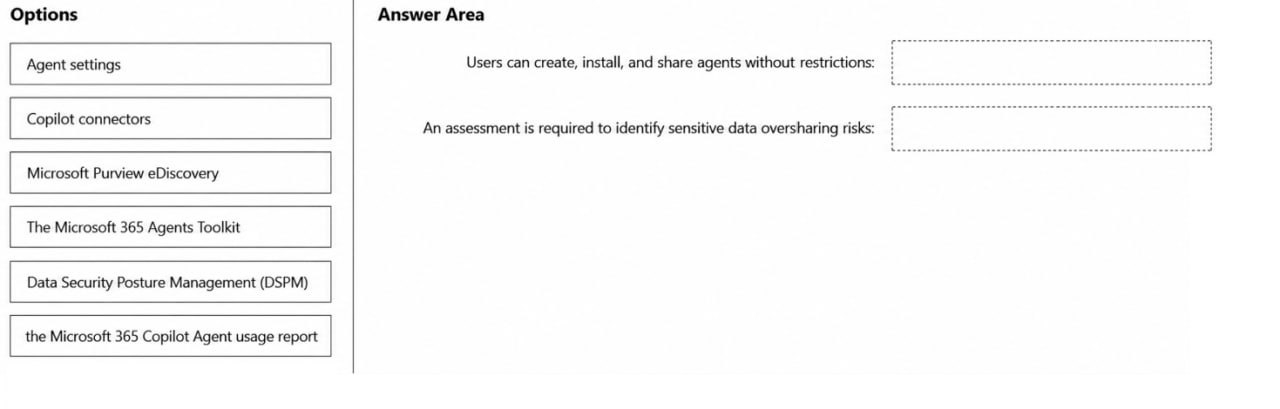
To restrict users from creating, installing, and sharing agents without restrictions, use Agent settings in Microsoft Agent 365. To assess sensitive data oversharing risks, use Data Security Posture Management (DSPM).
Question
You have a Microsoft 365 subscription.
The following agent compliance gaps are identified in Microsoft Agent 365:
Users can create, install, and share agents without restrictions.
An assessment is required to identify sensitive data oversharing risks.
What should you use to resolve each gap? To answer, drag the appropriate options to the correct gaps. Each option may be used once, more than once, or not at all. You may need to drag the split bar between panes or scroll to view content.
NOTE: Each correct selection is worth one point.
Key Takeaways
This question tests the distinction between preventive governance controls (Agent settings) and detective assessment tools (DSPM) in Microsoft Agent 365.
Microsoft Agent 365 compliance gaps are resolved by using Agent settings to restrict agent creation, installation, and sharing, and Data Security Posture Management (DSPM) to assess sensitive data oversharing risks.
Common mistake: A common mistake is assigning DSPM to the first gap, assuming it can restrict agent creation. DSPM is an assessment tool for data exposure, not a policy enforcement mechanism for controlling who can create or share agents.
Expert Analysis
Gap 1: Restricting Agent Creation, Installation, and Sharing
The first gap states that users can create, install, and share agents without restrictions. The qualifier "without restrictions" signals that the solution must be a governance control that directly limits these user actions. Agent settings in Microsoft Agent 365 is the correct resolution because it provides tenant-level controls such as Allowed agent types, User access policies, and Sharing controls. These settings allow administrators to define who can create agents, which agent types are permitted, and how agents can be shared across the organization. No other feature in the Agent 365 toolkit directly addresses all three actions—creation, installation, and sharing—in a single configuration surface.
Gap 2: Assessing Sensitive Data Oversharing Risks
The second gap requires an assessment to identify sensitive data oversharing risks. The key word "assessment" indicates a discovery or posture-management capability rather than a preventive policy. Data Security Posture Management (DSPM) is the correct resolution because it scans and evaluates how sensitive information is exposed through AI services, including agents. DSPM provides visibility into oversharing by identifying where sensitive data is accessible to AI workloads and generating risk assessments. This is distinct from a blocking or restriction mechanism—it is an analytical tool that surfaces exposure so administrators can take corrective action.
Why the Mapping Is Not Interchangeable
The question's structure—two distinct gaps with different verbs ("restrict" vs. "assess")—eliminates cross-assignment. Agent settings is a preventive control, while DSPM is a detective/analytical control. Swapping them would fail because Agent settings cannot perform data risk assessments, and DSPM cannot block users from creating or sharing agents.
Exam Strategy
When matching solutions to compliance gaps, identify the verb in each gap statement: "restrict" points to a preventive control, while "assess" points to a detective or analytical tool. In Microsoft Agent 365, Agent settings enforces who can create, install, and share agents, whereas DSPM discovers and evaluates sensitive data exposure. Always separate governance controls from posture-management tools before assigning them.
Discussion 1 contributions
Compiled from public community threads and reader submissions, lightly edited for clarity. Handles and vote tallies are shown as recorded, and comments reflect the views of individual contributors.
From public community threads 1
-
linux_admin 👍 1Agent settings Data Security Posture Management (DSPM) Explanation: Agent settings is correct for the first gap because in Microsoft Agent 365, administrators use Agent settings (such as Allowed agent types, User access, and Sharing controls) to restrict who can create, install, and share agents across the tenant. Data Security Posture Management (DSPM) is correct for the second gap because Microsoft Purview Data Security Posture Management (DSPM) for AI discovers and assesses sensitive data interactions, oversharing vulnerabilities, and data exposure risks across AI assistants and agents. Other options: - Copilot connectors manages integrations that ground Copilot in external third-party data repositories rather than assessing internal oversharing risks or configuring agent creation permissions. - Microsoft Purview eDiscovery is an investigative tool used to search, hold, and export electronic records for legal or regulatory matters rather than conducting proactive oversharing risk assessments. - The Microsoft 365 Agents Toolkit is a developer tool used in Visual Studio Code for authoring and building custom agents rather than managing tenant-wide governance settings. - The Microsoft 365 Copilot Agent usage report provides operational adoption and interaction metrics for agents rather than assessing security configurations or sensitive data oversharing risks.
Reader comments & corrections
No reader corrections yet — spotted an error or have a note? Share it below.