Microsoft Purview DLP Rule Actions and External Access
Short answer
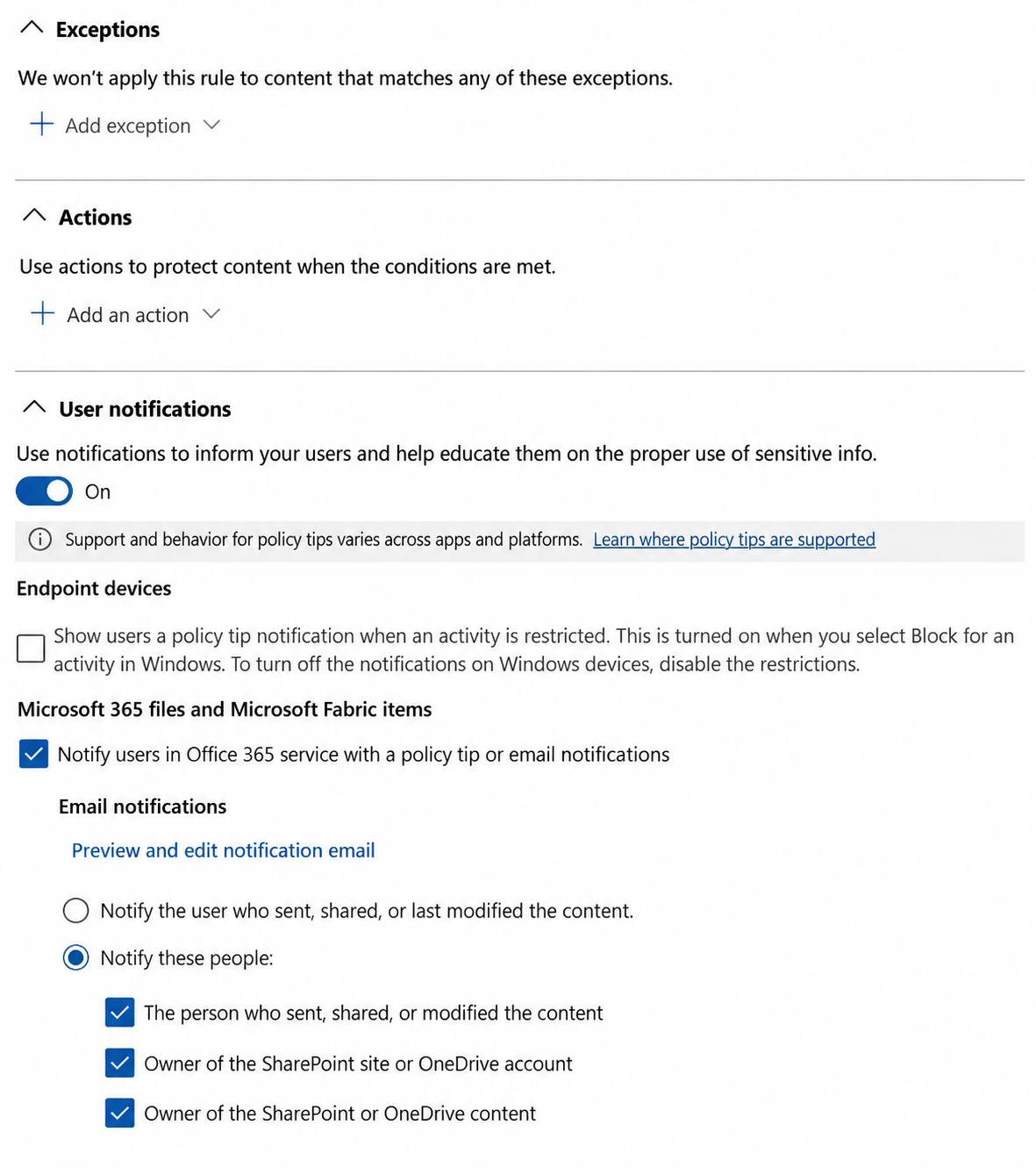
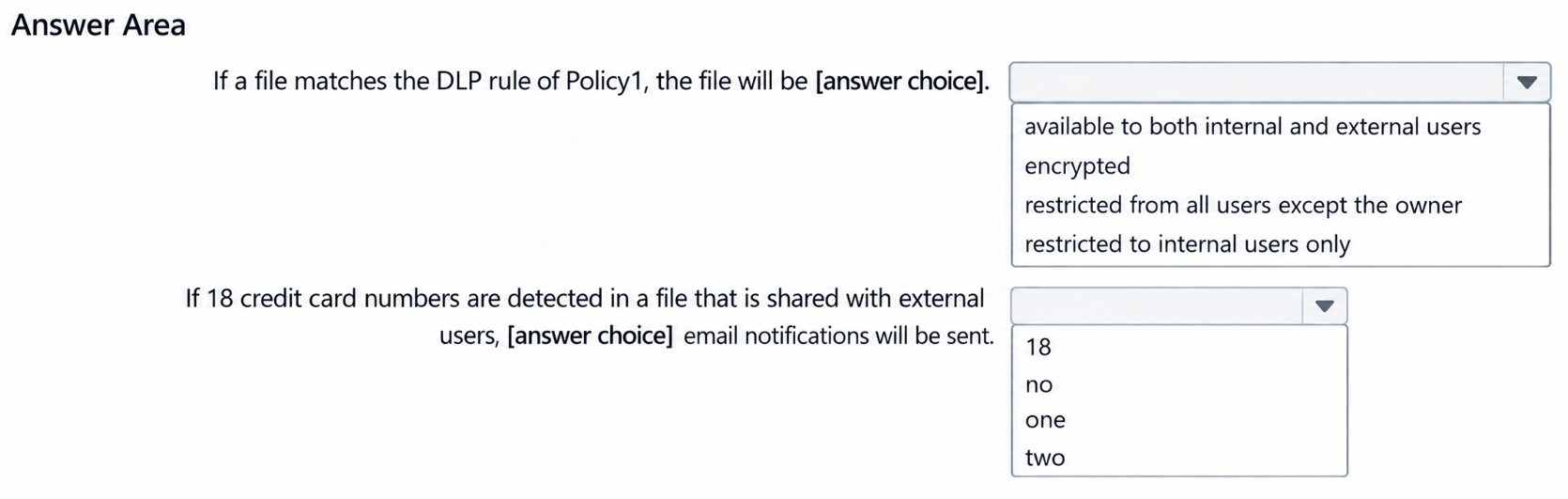
The file is available to both internal and external users because the DLP rule only includes user notifications and lacks a restrict action.
Question
You have a Microsoft 365 E5 subscription.
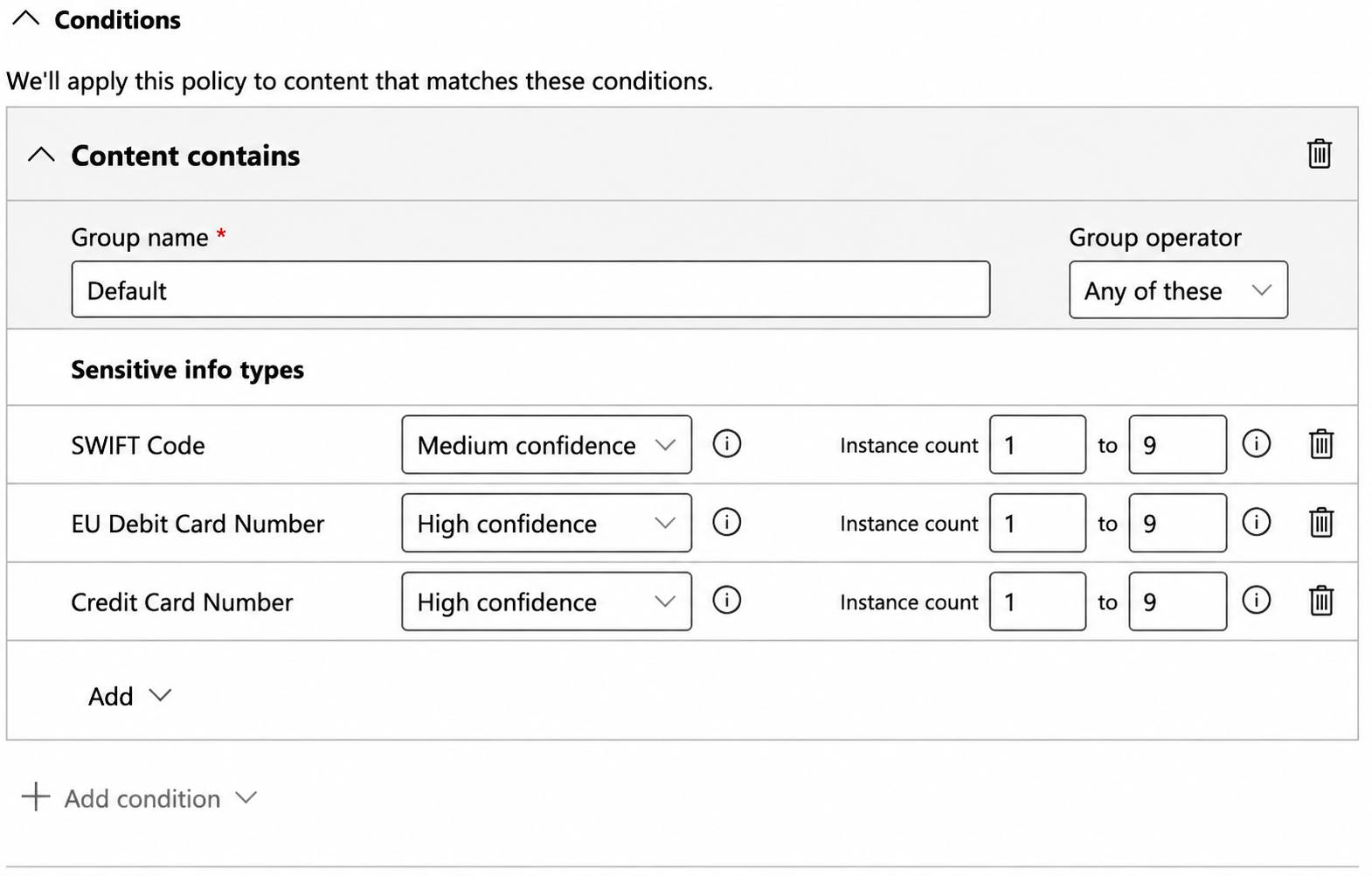
You configure a new data loss prevention (DLP) policy named Policy1 that detects when sensitive content is shared externally.
Policy1 has the DLP rule shown in the following exhibit.
Use the drop-down menus to select the answer choice that completes each statement based on the information presented in the graphic.
NOTE: Each correct selection is worth one point.
Key Takeaways
The main trap is assuming detection equals blocking; without an explicit restrict action in the DLP rule, access is not limited.
A DLP rule with only user notifications allows files to be accessed by both internal and external users, as no restrict action blocks access.
Common mistake: Assuming that detecting external sharing automatically restricts access for external users, leading them to incorrectly select 'restricted to internal users only'.
Expert Analysis
The scenario involves a Microsoft 365 E5 subscription where Policy1 is configured to detect sensitive content shared externally. The exhibit shows the DLP rule's actions section, which specifically lists User notifications (policy tips and alert emails) but lacks any Restrict action.
In Microsoft Purview DLP, detection rules can perform different actions. If a "Restrict" action were selected, external users would be blocked or denied access to the file, while internal users might retain access depending on the specific restriction settings. However, the exhibit clearly shows that no restriction action has been added to this rule. Consequently, when the policy detects a violation, it only sends notifications to the user and administrators; it does not enforce any access control measures.
Therefore, because there is no restriction action in place, the file remains accessible to anyone who has the link or permission, regardless of their location. Both internal and external users can view the content. The common trap is assuming that detecting external sharing automatically implies blocking it. Without an explicit restrict action, the policy is purely informational.
Exam Strategy
When analyzing DLP policy exhibits, always check the 'Actions' section carefully. Look specifically for 'Restrict' actions. If you see only 'User notifications' or 'Incident reports', the policy is non-enforcing and will not block access. Do not assume blocking occurs just because a sensitive content type is detected.
Frequently Asked Questions
What happens if a DLP rule only has user notifications?
How do I prevent external users from viewing sensitive files?
Discussion 2 contributions
Compiled from public community threads and reader submissions, lightly edited for clarity. Handles and vote tallies are shown as recorded, and comments reflect the views of individual contributors.
From public community threads 2
-
linux_admin 👍 1restricted to internal users only no Explanation: First drop-down (restricted to internal users only): Policy1 is configured to detect when sensitive content is shared externally. When a file matches a Data Loss Prevention (DLP) rule targeting external sharing, Microsoft Purview restricts access for external recipients while allowing internal organization members to retain access. This makes the file restricted to internal users only. Second drop-down (no): The conditions specify an instance count of 1 to 9 for Credit Card Numbers. Because 18 credit card numbers exceeds the upper threshold of 9, the file fails to meet the criteria for this specific rule. As a result, the rule is not triggered, and no email notifications will be sent.
-
linux_admin 👍 1Available to both internal and external users. Reason: In the rule exhibit under Actions, no restriction or protection actions were added (it still displays + Add an action). Instead, the rule only configures User notifications (policy tips and alert emails). Because Microsoft Purview Data Loss Prevention (DLP) does not automatically block or restrict external sharing unless a specific Restrict access or encrypt content action is explicitly configured, matching files remain accessible to both internal and external users.
Reader comments & corrections
No reader corrections yet — spotted an error or have a note? Share it below.