Dynamics 365 Sales Reporting Tool Selection Strategy
Short answer
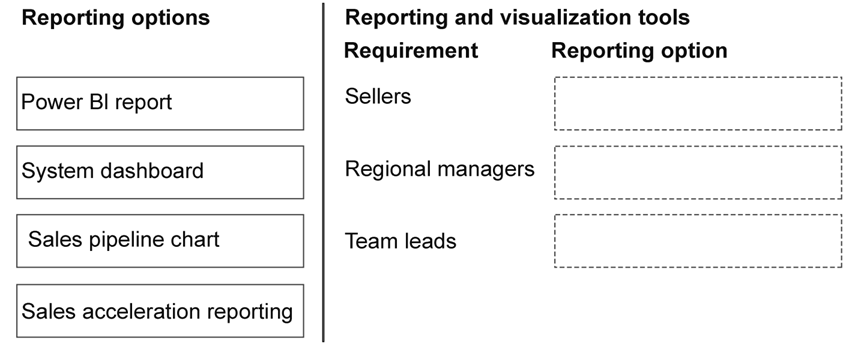
Sellers should use the Sales pipeline chart to view opportunities by phase; Regional managers should use Power BI reports for multi-source in-depth analysis; Team leads should use System dashboards for real-time consolidated views of opportunities and activities.
Question
Case Study
This is a case study. Case studies are not timed separately from other exam sections. You can use as much exam time as you would like to complete each case study. However, there might be additional case studies or other exam sections. Manage your time to ensure that you can complete all the exam sections in the time provided. Pay attention to the Exam Progress at the top of the screen so you have sufficient time to complete any exam sections that follow this case study.
To answer the case study questions, you will need to reference information that is provided in the case. Case studies and associated questions might contain exhibits or other resources that provide more information about the scenario described in the case. Information provided in an individual question does not apply to the other questions in the case study.
A Review Screen will appear at the end of this case study. From the Review Screen, you can review and change your answers before you move to the next exam section. After you leave this case study, you will NOT be able to return to it.
To start the case study
To display the first question in this case study, select the “Next” button. To the left of the question, a menu provides links to information such as business requirements, the existing environment, and problem statements. Please read through all this information before answering any questions. When you are ready to answer a question, select the “Question” button to return to the question.
Background
AdventureWorks Cycles is a global manufacturer of high-performance bicycles headquartered in Seattle. The company sells products through distributors, specialty retailers, and a growing direct-to-consumer online channel. AdventureWorks Cycles recently expanded its product catalog to include the athlete package, which includes a cycle, connected devices and subscription-based analytics services.
The sales operations team is responsible for configuring the new Dynamics 365 Sales environment. Their goal is to implement AI-driven processes that streamline the lead-to-cash workflow while ensuring that sellers can easily identify the most promising opportunities.
Current Environment
Product managers maintain products and pricing in spreadsheets. Information regarding custom relationships, competitor analysis, and region-specific marketing content is stored in a SharePoint site called the sales portfolio.
The organization has identified reporting challenges they want to resolve:
Regional managers require in-depth reporting using information from the sales pipeline and seller activities, the point-of-sale solution, website analytics, and the accounting system.
Team leads require real-time information on active opportunities, as well as visibility of seller’s appointments and phone calls, without needing to navigate into multiple views.
Sellers must be able to quickly view their own opportunities by phase.
All sellers are assigned Dynamics 365 Sales Enterprise licenses, also, the CFO has requested that Copilot message packs are pre-purchased by using the Copilot Studio subscription license.
A Dynamics 365 sales sandbox environment has been in use for six months. There are 60 leads records with 30 records that are qualified and 20 that are disqualified. Ten of the qualified leads are over three months old.
Business Requirements
Sellers in all regions should be able to review the new mountaineer cycles. The cycles include economy and premium fittings. When creating opportunities, sellers should be able to select a metal type when adding a mountaineer cycle to an opportunity. The metal types include chrome, aluminum, and titanium.
Pricing managers must be able to create deals for the same products in their own currencies and at their own prices, without reference to the cost of the product.
Predictive scoring should be enabled for leads created within the last three months in the sandbox environment.
A segment of leads named Hot is needed that will contain all leads where the source is phone, employee referral or partner. Leads from this segment should be distributed to sellers using a round robin method.
Agents should not be able to take action on any data that is created in the production environment before they are started.
All sellers should be able to access leads disqualified by agents.
Technical Information & Requirements
Agents must use a dedicated service identity to execute write actions with a controlled security role in Dataverse.
The sales operations team lead must be assigned the Power Platform administrator role.
The lead pricing manager must be assigned to the Microsoft 365 billing admin role.
The vice president of sales must be assigned the AI admin role.
Both the sandbox and production environments must be enabled for AI capacity, but usage should be capped on the sandbox environment.
A trial environment must be created, with the sales qualification agent configured. Outreach emails must be automatically generated for leads but only sent when sellers deem it necessary.
All sellers must be assigned a customized version of the salesperson role on the production environment. This role should grant read access only to the leads that the sellers own.
The EnableRoleBasedSystemViews property must be set to true for the production environment.
No Azure subscriptions are available in the tenant.
Issues
The sales qualification agent has disqualified several leads in the trial environment. The vice president of sales has requested to understand the reason for the disqualified leads.
Sellers are not able to create agents in the production environment.
Agent consumption has been unreliable. The company requires that AI capacity is always available to sellers.
You need to recommend the appropriate reporting tool for each group of users.
Which reporting tool should be used for each scenario? To answer, move the appropriate reporting options to the correct requirements. You may use each reporting option once, more than once, or not at all. You may need to move the split bar between panes or scroll to view content.
NOTE: Each correct selection is worth one point.
Key Takeaways
The question tests the ability to distinguish between native visualization tools based on data source complexity and user interactivity needs, specifically avoiding the confusion between dashboard consolidation and report depth.
This page explains how to assign the correct reporting tool in Dynamics 365 Sales: Sales Pipeline Chart for sellers, Power BI for regional managers, and System Dashboards for team leads.
Common mistake: Learners often incorrectly assign Power BI to team leads or sellers because they assume 'advanced' tools are always better, failing to recognize that native dashboards and charts are optimized for the specific, simpler requirements of daily operational monitoring.
Expert Analysis
The scenario requires mapping specific user roles to the most appropriate reporting tools in Dynamics 365 Sales based on their distinct data needs and access patterns.
First, consider the Sellers. Their requirement is to "quickly view their own opportunities by phase." This is a personal, real-time need focused on individual pipeline health. The Sales Pipeline Chart is the standard tool for this purpose, providing a visual representation of opportunities across stages (Qualify, Develop, etc.) directly within the seller's interface. It offers immediate visibility into their personal workload without requiring complex setup or external connections.
Next, analyze the Regional Managers. They require "in-depth reporting" that aggregates data from multiple disparate sources: the sales pipeline, seller activities, point-of-sale solutions, website analytics, and the accounting system. This cross-functional data integration is beyond the scope of native D365 views. Power BI is the correct choice here, as it connects to various data sources (including Dataverse and external systems) to create comprehensive, interactive reports that satisfy the need for deep, multi-source analysis.
Finally, evaluate the Team Leads. They need "real-time information on active opportunities" along with visibility into seller appointments and phone calls, specifically "without needing to navigate into multiple views." A System Dashboard is designed exactly for this use case. Dashboards provide a consolidated, single-pane-of-glass view of key metrics and records (like upcoming tasks and open opportunities) tailored to the user’s role, allowing leads to monitor team performance efficiently without switching contexts.
The common trap is confusing dashboards with charts or reports. Charts are for visualizing trends (pipeline), dashboards are for monitoring current state (leads/team activity), and Power BI is for deep, cross-system analysis (regional managers).
Official Reference
- https://learn.microsoft.com/en-us/dynamics365/sales-apps/pipeline-chart
- https://learn.microsoft.com/en-us/power-bi/fundamentals/desktop-get-the-power-bi-app
- https://learn.microsoft.com/en-us/dynamics365/sales-apps/create-dashboards
These links open the official vendor documentation in a new tab.
Exam Strategy
When faced with reporting tool questions, first identify the data sources. If the data comes from multiple external systems (e.g., POS, Accounting), select Power BI. If the need is for real-time, consolidated monitoring of specific entities (like tasks and opportunities) in one view, select System Dashboards. If the need is purely for visualizing the stage-based progression of a single entity type (opportunities), select the Pipeline Chart. Always match the complexity of the tool to the complexity of the data requirement.
Frequently Asked Questions
Why can't sellers use Power BI to view their opportunities?
What is the difference between a System Dashboard and a Sales Pipeline Chart?
Discussion 1 contributions
Compiled from public community threads and reader submissions, lightly edited for clarity. Handles and vote tallies are shown as recorded, and comments reflect the views of individual contributors.
From public community threads 1
-
Evincible 👍 11. Sellers Sales pipeline chart 2. Regional managers Power BI report 3. Team leads System dashboard Explanation 1. Sellers → Sales pipeline chart Sellers need to quickly view their own opportunities by sales phase. The Sales pipeline chart displays opportunities across pipeline stages such as Qualify, Develop, Propose, and Close. 2. Regional managers → Power BI report Regional managers require in-depth reporting that combines Dynamics 365 Sales data with point-of-sale transactions, website analytics, and accounting information. Power BI is the appropriate solution for reporting across multiple data sources. 3. Team leads → System dashboard Team leads need a single place to monitor active opportunities, appointments, and phone calls. Dynamics 365 system dashboards combine charts, views, and activity information in one interface. Power BI can combine data from multiple business systems in a single reporting model.
Reader comments & corrections
No reader corrections yet — spotted an error or have a note? Share it below.
Related Analysis
Practice All AB-210 Questions
Access 100 questions with complete answers and detailed explanations.
View Full AB-210 Practice Test →