Dynamics 365 Sales Product Catalog Configuration: Family, Product, Bundle
Short answer
Shared attributes map to Product Family; individual purchase maps to Product; purchasing together at a discount maps to Bundle.
Question
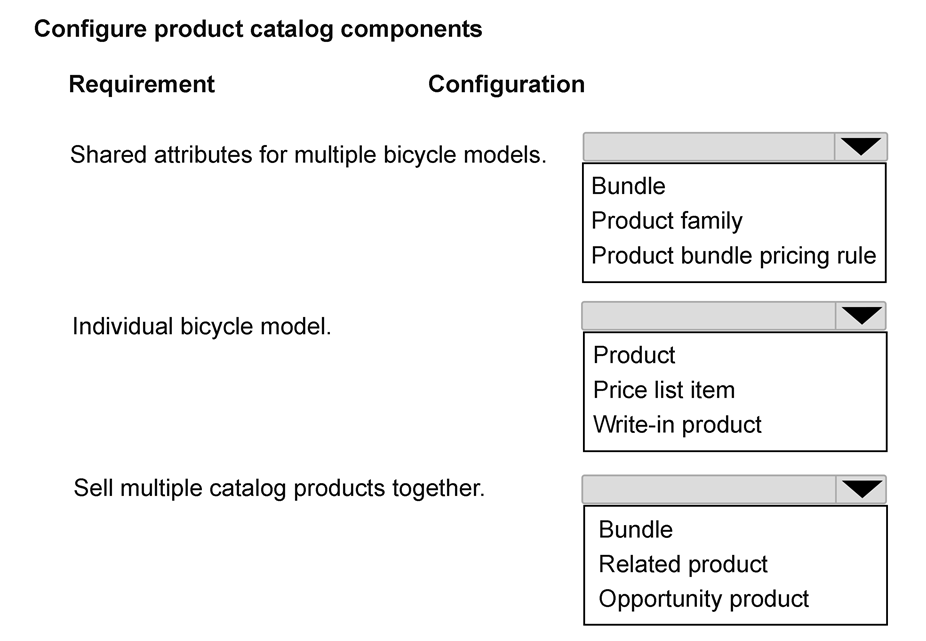
You are configuring the product catalog for a company. The company sells several bicycle models that share common specifications.
The sales operations team has the following requirements:
Product attributes such as frame material and warranty period must automatically apply to multiple bicycle models.
Bicycle models must be able to be purchased individually.
Bicycles, accessories and warranties must be able to be purchased together at a discounted price.
You need to configure the product catalog.
How should each catalog requirement be configured? To answer, select the appropriate options in the answer area.
NOTE: Each correct selection is worth one point.
Key Takeaways
The main trap is confusing Product Families with simple categories; remember that Families are specifically designed for attribute inheritance across multiple product records.
Learn how to configure Dynamics 365 Sales product catalogs using Product Families for shared attributes, Products for individual items, and Bundles for discounted group sales.
Common mistake: Learners often mistake 'Product' for the shared attribute container. However, Products represent individual SKUs; only Product Families provide the inheritance mechanism for attributes like frame material across multiple models.
Expert Analysis
The question requires mapping three distinct catalog requirements to the correct Dynamics 365 Sales product catalog entities. The scenario involves configuring a product structure for bicycle models with shared attributes, individual sales capability, and bundled pricing.
1. Shared Attributes Requirement: The requirement states that "Product attributes such as frame material and warranty period must automatically apply to multiple bicycle models." In Dynamics 365 Sales, Product Families are used to group related products that share common attributes. When a product is added to a family, it inherits the family's attribute values. This allows for centralized management of specifications across multiple variants (e.g., different bike models sharing the same frame material type). Therefore, this requirement maps to Product Family.
2. Individual Purchase Requirement: The requirement states that "Bicycle models must be able to be purchased individually." A standard Product record represents an individual item or service that can be sold on its own. While it may belong to a family for attribute inheritance, the entity itself that is transacted in a single-unit sale is the Product. Thus, this requirement maps to Product.
3. Discounted Bundle Requirement: The requirement states that "Bicycles, accessories and warranties must be able to be purchased together at a discounted price." This describes a Bundle. Bundles allow you to group multiple products (the bicycle, the accessory, and the warranty) into a single selling unit. Crucially, bundles support discounting at the bundle level, which aligns with the "discounted price" constraint. Other options like simple product groups do not typically handle the complex pricing/discounting logic of a multi-item sale as effectively as a Bundle in this context.
The comment provided confirms this logic: "1. Shared attributes... Product family 2. Individual bicycle model. Product 3. Sell multiple catalog products together. Bundle."
Official Reference
https://learn.microsoft.com/en-us/dynamics365/sales-admin/product-catalog/configure-product-catalog
This link opens the official vendor documentation in a new tab.
Exam Strategy
When facing Hotspot questions about catalog structures, isolate the keyword describing the relationship between items. 'Inherit' or 'share attributes' points to Product Family. 'Sell alone' points to Product. 'Group + Discount' points to Bundle. Always check if the requirement implies a structural hierarchy (Family) versus a transactional grouping (Bundle).
Frequently Asked Questions
What is the difference between a Product Family and a Bundle?
Can a Product be part of both a Family and a Bundle?
Discussion 1 contributions
Compiled from public community threads and reader submissions, lightly edited for clarity. Handles and vote tallies are shown as recorded, and comments reflect the views of individual contributors.
From public community threads 1
-
Evincible 👍 11. Shared attributes for multiple bicycle models. Product family 2. Individual bicycle model. Product 3. Sell multiple catalog products together. Bundle Explanation 1. Product family: Groups related products and allows them to inherit shared properties such as frame material and warranty period. 2. Product: Represents an individual bicycle model that can be sold separately. 3. Bundle: Combines multiple catalog products, such as a bicycle, accessories, and warranty, into a single offering with bundle pricing.
Reader comments & corrections
No reader corrections yet — spotted an error or have a note? Share it below.
Related Analysis
Practice All AB-210 Questions
Access 100 questions with complete answers and detailed explanations.
View Full AB-210 Practice Test →