Dynamics 365 Sales Product Catalog Configuration
Short answer
Define quantities using Units; group pricing by currency using Price Lists; and identify the specific sale price using Price List Items.
Question
You are implementing Dynamics 365 Sales for a company.
The company sells products globally and requires pricing to be managed for different currencies.
The company has the following requirements:
Must define the quantities in which a product can be sold.
Must group product pricing based on different currencies.
Must identify the sale price of a product.
You need to configure the product catalog.
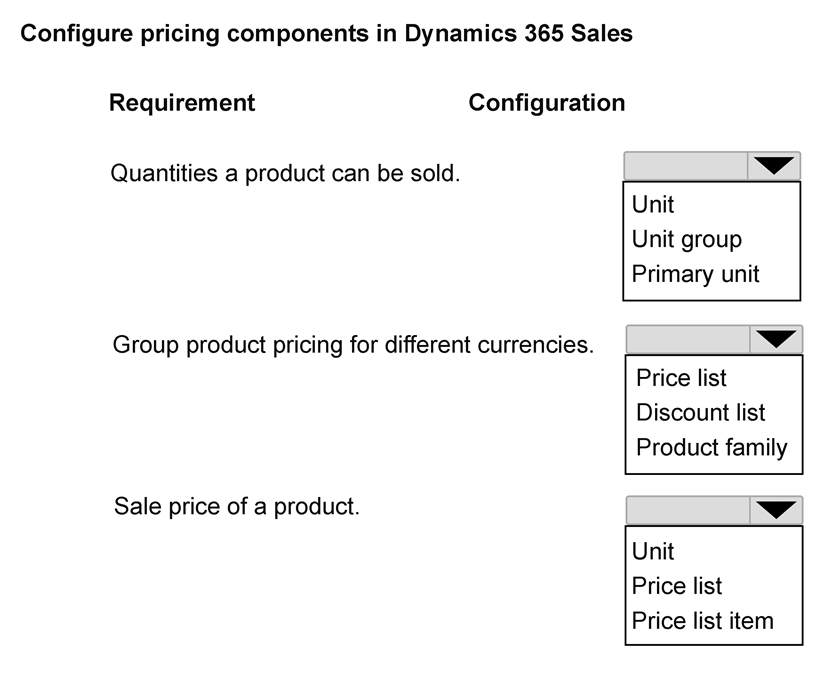
How should each pricing requirement be configured? To answer, select the appropriate options in the answer area.
NOTE: Each correct selection is worth one point.
Key Takeaways
The trap is confusing Price Lists with Price List Items; remember that Price Lists organize prices by currency/market, while Price List Items hold the actual price value for a specific product within that list.
Learn how to configure the Dynamics 365 Sales product catalog by correctly mapping quantity definitions to Units, currency grouping to Price Lists, and specific sale prices to Price List Items.
Common mistake: Learners often select 'Product' or 'Unit Group' for the sale price, failing to recognize that the specific monetary value is stored in the Price List Item record associated with a Price List.
Expert Analysis
The question requires mapping three specific business requirements to the correct Dynamics 365 Sales product catalog components. The governing principle is the hierarchical structure of the product catalog: Units define measurement, Price Lists define currency-based pricing rules, and Price List Items define the specific price for a product within a price list.
First, the requirement to "define the quantities in which a product can be sold" refers to Units. In Dynamics 365, units (like each, box, pallet) are defined at the unit group level to standardize how products are counted and sold. This is distinct from pricing or inventory tracking.
Second, the requirement to "group product pricing based on different currencies" points to Price Lists. A Price List in Dynamics 365 is specifically designed to hold prices for a specific currency. You create separate Price Lists for USD, EUR, etc., allowing the system to apply the correct pricing logic based on the customer's or transaction's currency context.
Third, the requirement to "identify the sale price of a product" corresponds to Price List Items. A Price List Item is the actual record that links a specific Product to a specific Price List and assigns a numerical value (the sale price). Without the Price List Item, the Price List has no specific values to apply.
The comment provided correctly identifies this mapping: Unit for quantity, Price List for currency grouping, and Price List Item for the specific sale price. This aligns with Microsoft’s official documentation on configuring the product catalog.
Official Reference
- https://learn.microsoft.com/en-us/dynamics365/sales/product-catalog-overview
- https://learn.microsoft.com/en-us/dynamics365/sales/configure-product-catalog
- https://learn.microsoft.com/en-us/dynamics365/sales/price-lists
These links open the official vendor documentation in a new tab.
Exam Strategy
When configuring catalogs, always distinguish between the container (Price List), the measurement (Unit), and the value (Price List Item). Visualize the data flow: Unit defines 'how many', Price List defines 'which currency', and Price List Item defines 'how much'.
Frequently Asked Questions
What is the difference between a Unit and a Unit Group?
Can I have multiple Price Lists for the same currency?
Discussion 1 contributions
Compiled from public community threads and reader submissions, lightly edited for clarity. Handles and vote tallies are shown as recorded, and comments reflect the views of individual contributors.
From public community threads 1
-
Evincible 👍 11. Quantities a product can be sold. Unit 2. Group product pricing for different currencies. Price list 3. Sale price of a product. Price list item Explanation 1. Unit: Defines the quantity or measurement in which a product is sold, such as pieces, boxes, or pallets. A unit group is a collection of related units. 2. Price list: Organizes product pricing for specific currencies, regions, or markets. Dynamics 365 Sales supports separate price lists for different currencies. 3. Price list item: Defines the actual selling price of a specific product and unit within a price list. It includes pricing methods and amounts.
Reader comments & corrections
No reader corrections yet — spotted an error or have a note? Share it below.
Related Analysis
Practice All AB-210 Questions
Access 100 questions with complete answers and detailed explanations.
View Full AB-210 Practice Test →