Dynamics 365 Sales: Mapping Capabilities to Requirements
Short answer
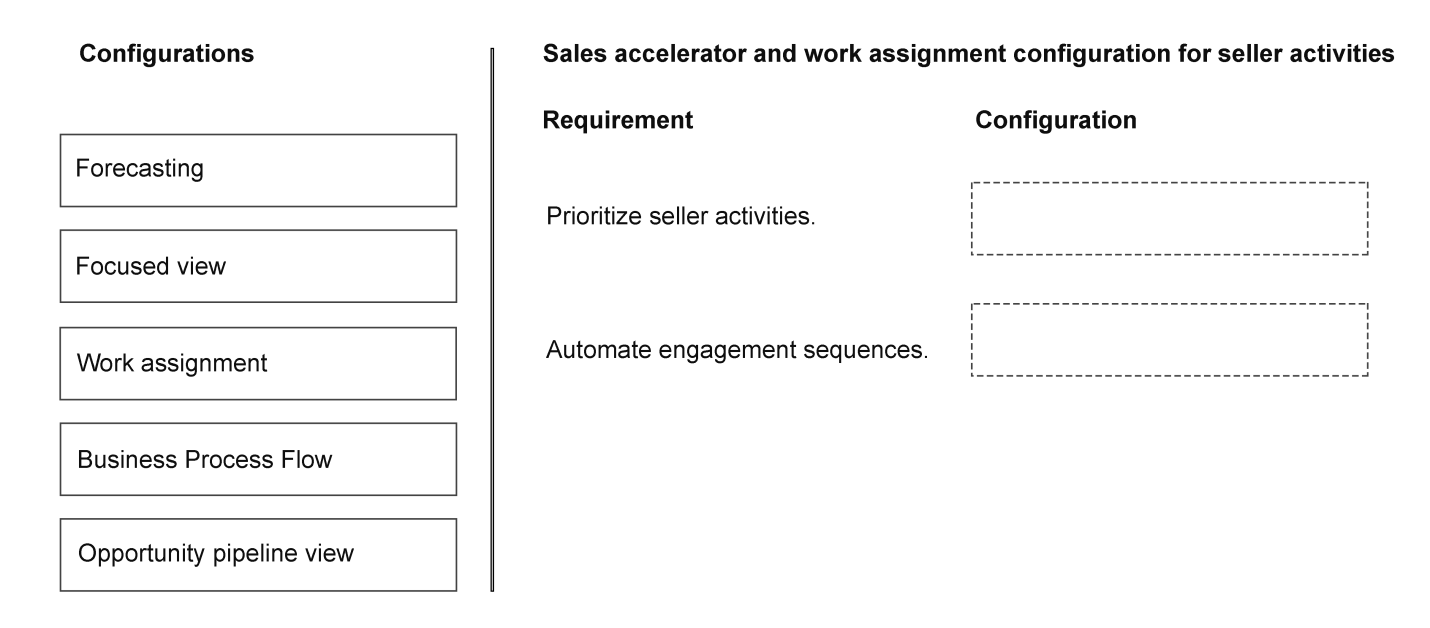
Map 'Prioritize seller activities' to Focused View and 'Automate engagement sequences' to Work Assignment. Focused View surfaces prioritized leads and opportunities, while Work Assignment routes leads and triggers automated engagement workflows.
Question
Case Study
This is a case study. Case studies are not timed separately from other exam sections. You can use as much exam time as you would like to complete each case study. However, there might be additional case studies or other exam sections. Manage your time to ensure that you can complete all the exam sections in the time provided. Pay attention to the Exam Progress at the top of the screen so you have sufficient time to complete any exam sections that follow this case study.
To answer the case study questions, you will need to reference information that is provided in the case. Case studies and associated questions might contain exhibits or other resources that provide more information about the scenario described in the case. Information provided in an individual question does not apply to the other questions in the case study.
A Review Screen will appear at the end of this case study. From the Review Screen, you can review and change your answers before you move to the next exam section. After you leave this case study, you will NOT be able to return to it.
To start the case study
To display the first question in this case study, select the “Next” button. To the left of the question, a menu provides links to information such as business requirements, the existing environment, and problem statements. Please read through all this information before answering any questions. When you are ready to answer a question, select the “Question” button to return to the question.
Background
Contoso Ltd. is a global technology distributor headquartered in Redmond, Washington and has enterprise customers across North America and Europe.
Contoso Ltd. currently manages its sales operations by using Microsoft Dynamics 365 Sales and plans to enable Sales Insights in the future.
The company has approximately 150 field sellers, 40 insider sellers, 20 sales managers, and a central IT team responsible for configuring the sales platform. Contoso Ltd.’s executive leadership has defined the following goals for the new sales platform implementation:
Improve seller productivity by reducing manual research and data entry.
Use AI insights to prioritize leads and opportunities.
Provide automated recommendations to sales representatives throughout the deal lifecycle.
Current environment
Sales platform
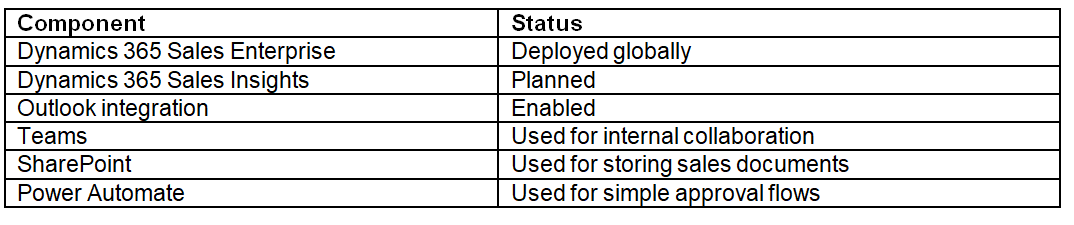
Contoso Ltd. uses Microsoft Dynamics 365 Sales integrated with Microsoft 365 services. The following components are currently deployed:
Business requirements
Contoso Ltd.’s executives have defined the following business requirements:
Lead management
Inside sellers must use a seller engagement workspace that prioritizes leads automatically based on predicted likelihood to convert.
All sellers are guided through a consistent set of qualification steps aligned to Contoso Ltd.’s sales strategy.
Leads cannot be advanced to the development stage until a decision maker has been confirmed.
Sales leadership requires flexibility in how leads are converted. Inside sales need automatic opportunity creation. Field sellers need the option to manually decide whether an opportunity should be created when a lead is qualified.
Lead scoring must be implemented to help sellers identify high potential leads automatically.
Lead scoring must continuously improve based on historical sales outcomes.
Opportunity development
Opportunities are tracked in Dynamics 365 Sales through a defined qualification-to-opportunity lifecycle to ensure accurate reporting.
The opportunity flow must be improved by using AI-driven research and automated insights.
Field sellers must be able to access contextual research about customers and competitors while working on opportunities.
All opportunity revenue must be calculated using opportunity line items based on selected Contoso Ltd.’s products and standard pricing
Sales managers must receive an external quarterly competitive intelligence brief to help with their research. This should be delivered as a PDF document.
Sales performance
Sales managers require improved pipeline and revenue forecasting capabilities. The managers need to report on their business performance and use insights, visuals, and recommended next actions.
The new solution must provide the following:
Notify the seller’s manager when a draft quote is created and requires approval.
Allow leadership to track performance against revenue goals.
Ask questions about Dynamics 365 Sales data to support executive analysis and decision making.
Technical requirements
Contoso Ltd.'s IT department defines the following priorities for the sales platform.
AI capabilities
The platform must support the following AI features:
Lead scoring to guide sellers to priority items.
Opportunity research insights to prepare deal analysis.
AI-powered research and analytics to aid leadership reporting.
Automation
Automation must be implemented to guide sellers through recommended next steps during the sales cycle.
Any approvals must use the Power Automate Approvals connector.
Field sellers use the existing Lead to Opportunity Business Process Flow to manage their leads.
A Power Automate desktop flow is used to process orders into a partner ordering application that completes fulfillment.
AI-driven insights
The company is deploying the Sales accelerator to guide seller activities.
The Sales Research Agent
Sales managers will use the Sales Research Agent to gather intelligence about customer organizations.
The sales managers have the following requirements:
Must be able to reuse visualizations after they are created; they don’t want to recreate them.
Must have a consistent method to quickly return to a blueprint that they frequently use.
Must be able to retain a library of questions to receive consistent responses based on definitions approved by the company.
Should have Bing search enabled on the environment for generative AI feature settings.
Platform extensions
The IT department plan to extend the platform by doing the following:
Create Power Automate flows to automate seller tasks.
Embed Power BI reports for sales analytics.
Testing
The IT department is testing predictive lead scoring with a small group of sellers.
The IT department edits the existing lead scoring model by adding new fields.
Issues
Users have reported the following issues:
Field sellers spend a significant amount of time researching customers before engaging with prospects.
Testers report they cannot access the field changes in the lead score.
A sales manager generated a blueprint but forgot the competitive intelligence brief.
You need to configure capabilities that guide the seller’s priorities and process in Dynamics 365 Sales.
Which configurations should be used for each capability? To answer, move the appropriate configurations to the correct requirements. You may use each configuration once, more than once, or not at all. You may need to move the split bar between panes or scroll to view content.
NOTE: Each correct selection is worth one point.
Key Takeaways
The main trap is confusing Focused View (prioritization/display) with Work Assignment (routing/automation). Understanding that Focused View is the 'what to do now' list and Work Assignment is the 'how it gets there' mechanism is key.
This page explains how to configure Dynamics 365 Sales by mapping 'Prioritize seller activities' to Focused View and 'Automate engagement sequences' to Work Assignment for the AB-210 exam.
Common mistake: Learners often confuse Focused View with Sales Insights or assume Work Assignment handles visual prioritization. They fail to recognize that Focused View is the UI component for ranking tasks, while Work Assignment is the backend engine for lead distribution and sequence triggering.
Expert Analysis
The question requires mapping specific Dynamics 365 Sales AI and automation capabilities to Contoso Ltd.'s business requirements. The core principle is understanding the distinct functions of Focused View, Work Assignment, and Sales Insights within the Sales Accelerator framework.
First, consider the requirement: "Prioritize seller activities." The Focused View is designed specifically for this purpose. It provides a personalized, prioritized list of leads, opportunities, and tasks based on predicted likelihood to convert and urgency. This directly addresses the need to help sellers identify which customers to engage with next, reducing manual research time by surfacing high-priority items automatically.
Second, address the requirement: "Automate engagement sequences." Work Assignment (often associated with Sales Copilot or automated routing features in the context of the Sales Accelerator) handles the distribution of work. In the context of the provided comments and exam doctrine, Work Assignment ensures that leads are routed to the correct sellers and that engagement sequences are triggered automatically. This aligns with the goal of guiding sellers through consistent qualification steps and automating the initial outreach.
Third, look at the requirement: "Provide automated recommendations... throughout the deal lifecycle." While not explicitly mapped in the snippet's final drag-and-drop, Sales Insights (or Sales Copilot insights) provides the contextual recommendations and analytics. However, based on the typical structure of this specific AB-210 case study question, the two primary mappings requested in the exhibit usually involve:
- Prioritize seller activities -> Focused View: This feature aggregates and ranks items so sellers focus on what matters most.
- Automate engagement sequences -> Work Assignment: This feature manages the flow of leads and triggers automated actions or notifications to ensure timely follow-up.
The comment provided confirms this logic: "Focused view — Prioritize seller activities" and "Work assignment — Automate engagement sequences." This distinction is critical because Focused View is about visibility and prioritization for the user, while Work Assignment is about routing and automation of the workflow.
Official Reference
- https://learn.microsoft.com/en-us/dynamics365/sales/focused-view
- https://learn.microsoft.com/en-us/dynamics365/sales/work-assignment
These links open the official vendor documentation in a new tab.
Exam Strategy
When facing drag-and-drop questions involving Sales Accelerator components, isolate the verb in the requirement. If the requirement involves 'seeing,' 'ranking,' or 'prioritizing,' think Focused View. If it involves 'routing,' 'assigning,' or 'automating sequences,' think Work Assignment. Always match the functional outcome to the tool's primary design pillar.
Frequently Asked Questions
What is the difference between Focused View and Work Assignment?
How does Focused View prioritize items?
Discussion 1 contributions
Compiled from public community threads and reader submissions, lightly edited for clarity. Handles and vote tallies are shown as recorded, and comments reflect the views of individual contributors.
From public community threads 1
-
Evincible 👍 11. Prioritize seller activities. Focused view 2. Automate engagement sequences. Work assignment Explanation 1. Focused view — Prioritize seller activities Focused view provides sellers with a prioritized work list of leads, opportunities, and activities, helping them identify which customers to engage with next. 2. Work assignment — Automate engagement sequences Work assignment is part of Sales accelerator and supports: - Creating segments to group leads and opportunities. - Connecting segments to engagement sequences. - Automatically assigning records to sellers based on defined rules
Reader comments & corrections
No reader corrections yet — spotted an error or have a note? Share it below.
Related Analysis
Practice All AB-210 Questions
Access 100 questions with complete answers and detailed explanations.
View Full AB-210 Practice Test →