Dynamics 365 Sales: Configure Product Catalog Structure
Short answer
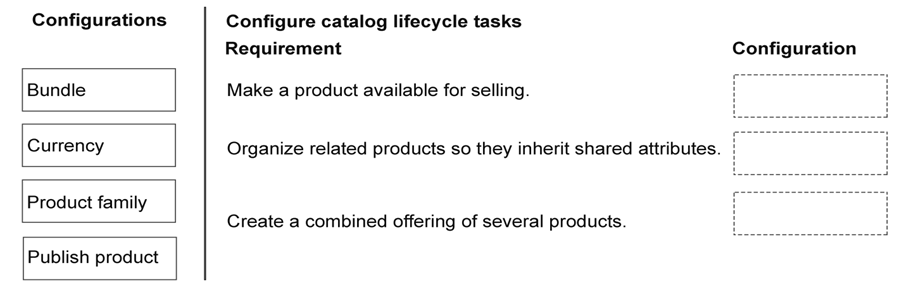
1. Publish; 2. Product family; 3. Bundle
Question
You configure the product catalog for a company that sells coffee machines and accessories.
The company requires that new products be structured and made available to the sales team. The company also needs to group multiple products under a single parent item. Sellers need to be able to sell coffee machines, filters, and grinders together.
You need to determine the correct configuration for each catalog requirement.
Which configurations should you use? To answer, move the appropriate configurations to the correct requirements. You may use each configuration once, more than once, or not at all. You may need to move the split bar between panes or scroll to view content.
NOTE: Each correct selection is worth one point.
Key Takeaways
The main trap is distinguishing between Product Families (hierarchical organization) and Bundles (transactional packages).
Learn how to configure the Dynamics 365 Sales product catalog using Publish, Product Family, and Bundle to meet specific sales team requirements.
Common mistake: Learners often select 'Bundle' for grouping products under a parent item, failing to realize that Bundles are for selling combinations, not just organizational structure.
Expert Analysis
This question tests the structural configuration of the Dynamics 365 Sales product catalog, specifically focusing on how to manage inventory items and their relationships for sales transactions. The scenario presents three distinct requirements that map directly to specific catalog entities.
First, to make new products available for selling, you must change their status from Draft to Active. This is achieved by selecting Publish. Without this step, the product remains hidden from sales teams and cannot be added to quotes or orders, regardless of its other settings.
Second, when the requirement is to group multiple products under a single parent item so they share attributes (like category or brand), the correct configuration is Product Family. A Product Family acts as a hierarchical container, allowing sellers to navigate related items easily while ensuring consistency in data entry across grouped products.
Third, to create a combined offering of several products that can be sold together as a single unit (e.g., a coffee machine with filters and grinders), you must use a Bundle. Bundles allow the aggregation of individual products into a sellable package, simplifying the transaction process for the customer and the sales representative.
The common trap here is confusing Product Families with Bundles. While both involve grouping, a Family is for organizational hierarchy and attribute inheritance, whereas a Bundle is for transactional packaging. Getting this wrong leads to either unmanageable catalogs or complex checkout processes.
Official Reference
https://learn.microsoft.com/en-us/dynamics365/sales-admin/configure-product-catalog
This link opens the official vendor documentation in a new tab.
Exam Strategy
When faced with drag-and-drop questions involving catalog structures, focus on the end-user action. If the goal is 'selling together,' choose Bundle. If the goal is 'grouping for management/attributes,' choose Product Family. If the goal is 'making visible,' choose Publish.
Frequently Asked Questions
What is the difference between a Product Family and a Bundle?
Why must I publish a product before it appears in opportunities?
Discussion 1 contributions
Compiled from public community threads and reader submissions, lightly edited for clarity. Handles and vote tallies are shown as recorded, and comments reflect the views of individual contributors.
From public community threads 1
-
Evincible 👍 11. Make a product available for selling. Publish product 2. Organize related products so they inherit shared attributes. Product family 3. Create a combined offering of several products. Bundle Explanation 1. Publish product: Changes a product from Draft to Active, making it available for sales transactions such as opportunities, quotes, orders, and invoices. 2. Product family: Groups related products under a parent structure and allows them to inherit shared attributes, such as brand, warranty, and specifications. 3. Bundle: Combines multiple products, such as a coffee machine, filters, and grinder, into a single offering that sellers can sell together.
Reader comments & corrections
No reader corrections yet — spotted an error or have a note? Share it below.
Related Analysis
Practice All AB-210 Questions
Access 100 questions with complete answers and detailed explanations.
View Full AB-210 Practice Test →