Configuring Product Catalog Elements for Drones and Packages
DRAG DROP
You configure the product catalog for a company. The company sells drones, spare batteries, and accessories.
The company has the following requirements:
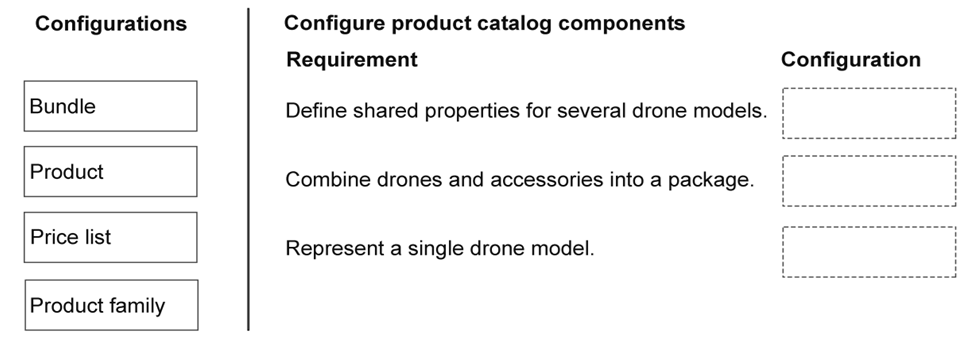
Must define shared properties for several drone models.
Must combine drones and accessories into a package.
Must represent a single drone model.
You need to determine how product catalog elements should be configured.
Which catalog configurations should you use? To answer, move the appropriate configurations to the correct requirements. You may use each configuration once, more than once, or not at all. You may need to move the split bar between panes or scroll to view content.
NOTE: Each correct selection is worth one point.
Community Insight
The question tests the distinction between Product Families (inheritance), Bundles (grouping), and Products (individual units) while eliminating distractors like Price Lists.
This scenario tests the ability to map specific business requirements to Dynamics 365 Sales product catalog elements. The page establishes that Product Families, Bundles, and Products are the correct configurations for shared properties, packages, and individual items respectively.
Learners often confuse Product Families with Products or attempt to use Price Lists for structural grouping. They may also fail to recognize that 'shared properties' specifically trigger the need for a Product Family hierarchy rather than just standard product attributes.
Community Discussion (2 comments)
Comments & Corrections
No comments yet — spotted an error or have a note? Share it below.
Expert Analysis
Why the Answer Is Correct
To meet the requirement of defining shared properties for several drone models, you must use a Product Family. In Dynamics 365 Sales, a Product Family allows you to define common attributes (like voltage or weight) that child products inherit, ensuring consistency across similar models. For combining drones and accessories into a package, the correct configuration is a Bundle. Bundles allow you to group multiple distinct products into a single sellable unit, which is essential for kits or sets. Finally, to represent a single drone model, you use a Product. This is the base entity representing an individual item available for sale. These three elements directly address the structural and grouping needs without involving pricing logic.Why Other Candidate Answers Are Wrong
Price List is incorrect because it is used to assign monetary values to products, not to define their structural relationships or inheritance. It does not help in grouping items or defining shared physical properties. Confusing these roles leads to misconfiguration of the catalog's hierarchy.Community Comment Notes
As Estbert noted, "Product family: Used to group related products and define properties that are inherited by products in the family," which perfectly aligns with the first requirement. Another commenter asked "which option is correct here?" indicating confusion between the drag-and-drop options; clarifying that Bundles are for packages and Products are for singles resolves this ambiguity.Exam Strategy
When configuring the product catalog, always ask: 'Does this require inheritance?' if yes, use Product Family. 'Is this a group of items sold together?' if yes, use Bundle. 'Is this a single sellable item?' if yes, use Product. Ignore Price Lists unless the question explicitly mentions cost, currency, or pricing rules.
Frequently Asked Questions
What is the difference between a Product Family and a Product?
A Product Family defines shared attributes inherited by child products, while a Product represents a single, individual item sold to customers.
When should I use a Bundle instead of a Product?
Use a Bundle when you need to sell multiple distinct products together as a single package or kit, such as a drone with batteries and accessories.
Related Analysis
Practice All AB-210 Questions
Access 100 questions with complete answers and detailed explanations.
View Full AB-210 Practice Test →