How to Configure Dynamics 365 Opportunity Stages
DRAG DROP
A company is using Dynamics 365 Sales.
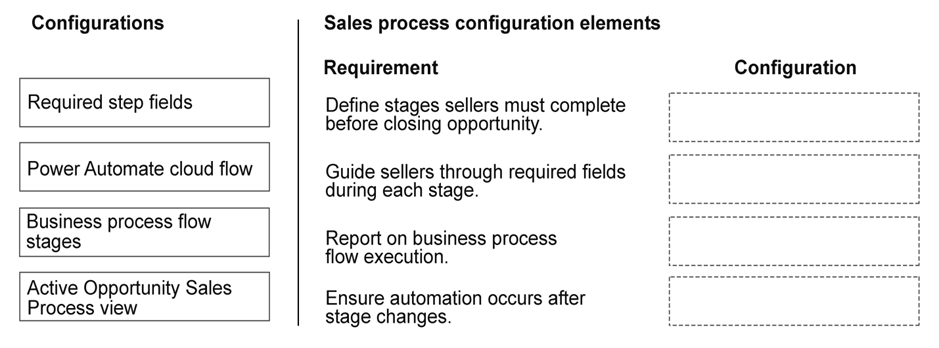
The company wants sellers to use a repeatable sequence for opportunities. The company has the following requirements for the opportunity stages:
Must define the flow of work sellers must complete before closing an opportunity.
Must guide sellers through data entry at each stage.
Must report on the business process flow execution.
Must ensure background process occurs after stage changes.
You need to configure a solution for each requirement.
Which configuration should you use for each requirement? To answer, move the appropriate configurations to the correct requirements. You may use each configuration once, more than once, or not at all. You may need to move the split bar between panes or scroll to view content.
NOTE: Each correct selection is worth one point.
Community Insight
The question tests mapping Dynamics 365 business process flow components to their specific functional capabilities, with the common trap of confusing workflows for data entry guidance instead of business rules.
This scenario establishes how to configure Dynamics 365 Sales opportunity stages using business process flows, business rules, workflows, and the business process flow entity to meet specific operational and reporting requirements.
A frequent mistake is assigning the business process flow entity to define work flow instead of reporting, or using workflows to guide data entry rather than business rules.
Community Discussion (1 comments)
Comments & Corrections
No comments yet — spotted an error or have a note? Share it below.
Expert Analysis
Why the Answer Is Correct
A Business Process Flow defines the sequence of stages and steps, establishing the flow of work. Business Rules are specifically designed to guide data entry and enforce logic within a stage. The Business Process Flow Entity is automatically created to log execution data, enabling reporting. Workflows (or Power Automate flows) are the correct tool to trigger background processes upon stage transitions.Why Other Candidate Answers Are Wrong
Using a workflow to guide data entry is incorrect because workflows are process automation tools, not user interface logic controllers. Using the BPF entity for work flow definition is wrong as it merely stores the instance data for reporting. Assigning business rules to background processing ignores that business rules operate synchronously in the UI to assist users.Community Comment Notes
The community discussion briefly touches on reporting views, with lonico2 mentioning an "active opty sales process view," but the core mechanism for reporting on BPF execution fundamentally relies on the underlying business process flow entity that powers such views.Official Reference
Exam Strategy
When matching D365 requirements to configurations, remember the UI vs. backend split: Business Rules control the UI (data entry), Workflows/Power Automate handle backend logic, and BPF Entities handle data logging for reporting.
Related Analysis
Practice All AB-210 Questions
Access 100 questions with complete answers and detailed explanations.
View Full AB-210 Practice Test →