Correcting Opportunity Pricing via Price List Assignment
Short answer
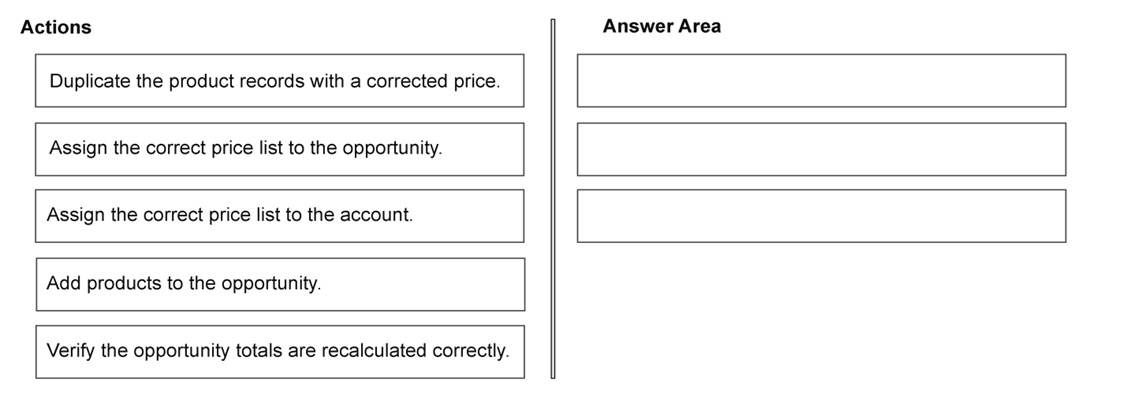
1. Assign the correct price list to the opportunity. 2. Add products to the opportunity. 3. Verify the opportunity totals are recalculated correctly.
Question
A company uses Dynamics 365 Sales with the product catalog and multiple price lists.
The sales representatives create opportunities and add products. Some opportunity lines show incorrect unit prices, and the opportunity total is inaccurate. The company needs pricing to be calculated using the correct price list and totals to update automatically on the opportunity.
You need to ensure opportunity product pricing is calculated correctly.
Which three actions should you perform in sequence? To answer, move the appropriate actions from the list of actions to the answer area and arrange them in the correct order.
Key Takeaways
The primary trap is the order of operations; you must assign the correct price list to the opportunity before or during product addition to ensure the system pulls the right unit prices from the catalog.
This page explains how to fix inaccurate opportunity totals in Dynamics 365 Sales by correctly sequencing price list assignment, product addition, and total verification.
Common mistake: Adding products first and then trying to fix the price list, which may not trigger an immediate recalculation of existing line items, leading to persistent incorrect totals.
Expert Analysis
The Core Issue: Price List Context vs. Product Selection
In Dynamics 365 Sales, the accuracy of opportunity totals hinges on the relationship between the Opportunity entity's price list and the products added to its lines. When units prices are incorrect or totals fail to update automatically, it usually indicates that the system is either using a default/incorrect price list or failing to refresh the line items after assignment.
Step-by-Step Resolution Logic
- Assign the Correct Price List: The foundational step is ensuring the Opportunity itself is linked to the right price list. In D365, the opportunity's price list determines which specific pricing data (from the product catalog) is queried for each product. If this field is blank or set to an outdated list, all subsequent calculations will be wrong. This must happen before or immediately as products are added to ensure context is correct.
- Add Products to the Opportunity: Once the correct price list is assigned, the products are added to the opportunity lines. During this action, the system looks up the unit price from the assigned price list. If the price list was already correct, the system should auto-populate the correct unit price. If products were already present with wrong prices, they may need to be re-added or the price list changed before finalizing the addition to trigger the lookup.
- Verify Opportunity Totals Are Recalculated: After assigning the price list and adding products, the system calculates the extended price (Unit Price × Quantity) and sums the total. Verification ensures that the automatic calculation engine has processed the new data correctly. This step confirms that the configuration change (price list assignment) resulted in the desired financial outcome.
Common Trap
Learners often confuse the order, attempting to add products first and then changing the price list. While changing the price list later can sometimes trigger a recalculation, the most robust sequence for ensuring initial accuracy is establishing the pricing context (Price List) first, then populating the data (Products), and finally validating the result (Totals). Another trap is ignoring the need to explicitly verify totals, assuming automation is infallible without checking for validation errors.
Official Reference
https://learn.microsoft.com/en-us/dynamics365/sales-app/assign-price-lists-opportunities
This link opens the official vendor documentation in a new tab.
Exam Strategy
When dealing with drag-and-drop process questions in D365, always look for the 'context-setting' action first. For pricing issues, the price list assignment is the context. Identify the prerequisite (setting the rule), the execution (applying the rule to data), and the validation (checking the result). This logical flow applies to many configuration scenarios beyond just pricing.
Frequently Asked Questions
Does changing the price list on an existing opportunity automatically update product prices?
What if the product catalog doesn't have a price for the selected price list?
Discussion 1 contributions
Compiled from public community threads and reader submissions, lightly edited for clarity. Handles and vote tallies are shown as recorded, and comments reflect the views of individual contributors.
From public community threads 1
-
Evincible 👍 11 Assign the correct price list to the opportunity. 2 Add products to the opportunity. 3 Verify the opportunity totals are recalculated correctly. Explanation 1. Assign the correct price list: The opportunity's price list determines which product prices Dynamics 365 Sales uses. 2. Add products: Products added to the opportunity use the selected price list to determine unit prices. 3. Verify totals: Ensure that Revenue is set to System Calculated so the opportunity total reflects product prices, quantities, discounts, and taxes. Recalculate if necessary.
Reader comments & corrections
No reader corrections yet — spotted an error or have a note? Share it below.
Related Analysis
Practice All AB-210 Questions
Access 100 questions with complete answers and detailed explanations.
View Full AB-210 Practice Test →