Configuring AI Agents in Dynamics 365 Sales
Short answer
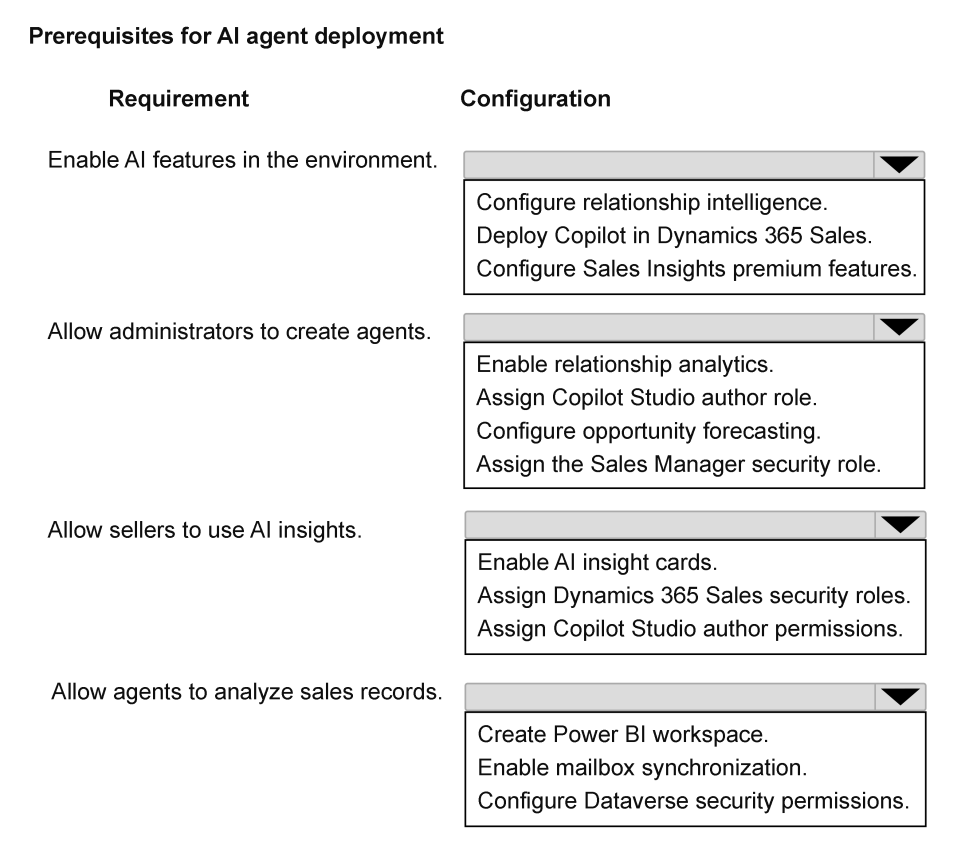
1. Deploy Copilot in Dynamics 365 Sales; 2. Assign Copilot Studio Author role; 3. Assign Dynamics 365 Sales User role; 4. Configure Dataverse security permissions.
Question
A company plans to deploy AI agents in Dynamics 365 Sales to help sellers research accounts and summarize opportunity activity.
The company has the following requirements:
AI capabilities must be activated in the environment.
Administrators must be able to design, create, and manage AI agents.
Sellers must have permissions that allow them to interact with AI-generated insights in Sales.
AI agents must be able to read and analyze the organization’s sales data stored in the platform.
You need to configure platform capabilities required for AI agents.
Which configuration should you apply for each requirement? To answer, select the appropriate options in the answer area.
NOTE: Each correct selection is worth one point.
Key Takeaways
The main trap is confusing general admin roles with the specific Copilot Studio Author role needed for agent creation, and overlooking that agents rely on Dataverse permissions for data access.
Learn how to configure AI agents in Dynamics 365 Sales by deploying Copilot, assigning Copilot Studio Author roles, and setting Dataverse permissions.
Common mistake: Learners often select 'Global Administrator' for agent creation instead of 'Copilot Studio Author', and may forget to explicitly mention Dataverse permissions for data access.
Expert Analysis
This question tests the specific configuration steps required to enable AI agents within Dynamics 365 Sales, mapping four distinct requirements to their corresponding platform capabilities. The correct configuration is derived from Microsoft's official documentation on Sales Copilot and Copilot Studio integration.
- Activate AI Capabilities: To enable AI features in the environment, you must Deploy Copilot in Dynamics 365 Sales. This action activates the underlying AI services and makes Copilot capabilities available to the tenant.
- Admin Agent Management: For administrators to design, create, and manage AI agents, they need authoring permissions. The appropriate role is the Copilot Studio Author role (or a custom role with equivalent permissions). This allows users to build and configure agents without granting full administrative access to the entire Dynamics 365 instance.
- Seller Interaction with Insights: Sellers require standard access to Sales data and interfaces to interact with AI-generated insights. Assigning the Dynamics 365 Sales User security role (or a similar base Sales role) provides the necessary permissions to view records and engage with Copilot features.
- Agent Data Access: For AI agents to read and analyze sales data stored in the platform, they operate within the Dataverse security model. You must configure Dataverse security permissions (specifically ensuring the agent's identity has read access to the relevant tables/records) or rely on the default behavior where agents inherit user context, but explicit permission configuration often involves ensuring the Sales Professional role or specific Dataverse table-level permissions are set for the data entities being accessed.
The comments reinforce this mapping: enabling Copilot, using Copilot Studio Author roles for admins, Sales roles for sellers, and Dataverse permissions for data access.
Official Reference
- https://learn.microsoft.com/en-us/dynamics365/sales/copilot/overview
- https://learn.microsoft.com/en-us/power-platform/guidance/adoption/roles
- https://learn.microsoft.com/en-us/dynamics365/sales/copilot/configure-sales-copilot
These links open the official vendor documentation in a new tab.
Exam Strategy
When configuring AI features, always map the user persona (admin vs seller) to the least-privilege role that fulfills the task. For agents, remember that 'creation' requires Copilot Studio authoring rights, while 'data access' is governed by Dataverse security, not just general app licenses.
Frequently Asked Questions
What role allows admins to create AI agents?
How do AI agents access sales data?
Discussion 1 contributions
Compiled from public community threads and reader submissions, lightly edited for clarity. Handles and vote tallies are shown as recorded, and comments reflect the views of individual contributors.
From public community threads 1
-
Evincible 👍 11. Enable AI features in the environment. Deploy Copilot in Dynamics 365 Sales. 2. Allow administrators to create agents. Assign Copilot Studio author role. 3. Allow sellers to use AI insights. Assign Dynamics 365 Sales security roles. 4. Allow agents to analyze sales records. Configure Dataverse security permissions. 1. Deploy Copilot in Dynamics 365 Sales: Enables AI-powered capabilities, including account research and opportunity summarization, in the Sales environment. 2. Assign Copilot Studio author role: Grants the agent-authoring capabilities required to create and manage AI agents. In actual Copilot Studio configuration, the Environment Maker role is commonly used for authoring. 3. Assign Dynamics 365 Sales security roles: Sellers require appropriate roles, such as Salesperson or Sales Manager, to access sales data and AI-powered functionality. 4. Configure Dataverse security permissions: AI agents must have appropriate permissions to access and analyze account, opportunity, and other sales records stored in Microsoft Dataverse.
Reader comments & corrections
No reader corrections yet — spotted an error or have a note? Share it below.
Related Analysis
Practice All AB-210 Questions
Access 100 questions with complete answers and detailed explanations.
View Full AB-210 Practice Test →