Configure Multi-Market Pricing Hierarchy in Dynamics 365 Sales
Short answer
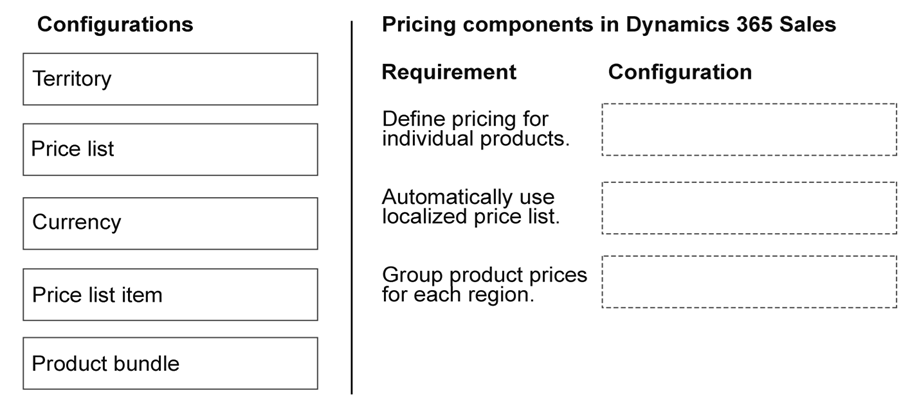
Define pricing for individual products: Price list item. Automatically use a localized price list: Territory. Group product prices for each region: Price list.
Question
You are implementing Dynamics 365 Sales for a company that sells products in different markets.
The company has the following requirements:
Must define pricing for products.
Must automatically use a localized price list.
Must group product prices for each region.
You need to configure pricing.
What should you configure for each requirement? To answer, move the appropriate configurations to the correct requirements. You may use each configuration once, more than once, or not at all. You may need to move the split bar between panes or scroll to view content.
NOTE: Each correct selection is worth one point.
Key Takeaways
The main trap is confusing the container (Price list) with the association mechanism (Territory); Territories automate the assignment, while Price lists group the data.
Learn to configure Dynamics 365 Sales pricing by mapping requirements to Price list items, Territories, and Price lists for automated regional localization.
Common mistake: Learners often confuse 'Territory' with 'Price list'. Territory is the *link* that enables automatic usage based on user location, whereas the Price list is the *grouping* of the prices themselves.
Expert Analysis
This drag-and-drop scenario tests the precise configuration hierarchy within Dynamics 365 Sales for multi-market pricing. The solution relies on understanding how Microsoft structures price lists, items, and territories.
1. Define pricing for individual products: Price list item To set a specific cost or selling price for a product, you must create a Price list item. This is the granular record that links a specific Product to a specific Price List, defining the actual currency and amount.
2. Automatically use a localized price list: Territory The requirement to "automatically" apply prices based on location is handled by associating Price Lists with Territories. When a salesperson works in a specific Territory (e.g., Europe), Dynamics 365 automatically surfaces the Price List linked to that Territory, eliminating manual selection.
3. Group product prices for each region: Price list To group these prices logically by region, you create a distinct Price list for that region (e.g., "EMEA Price List"). This acts as the container for all Price list items belonging to that geographic area.
The comment provided aligns perfectly with this logic: assigning 'Price list item' to the first requirement, 'Territory' to the second, and 'Price list' to the third.
Official Reference
https://learn.microsoft.com/en-us/dynamics365/sales-enterprise/configure-price-lists
This link opens the official vendor documentation in a new tab.
Exam Strategy
When asked about 'automatic' localization in Dynamics 365, always look for 'Territory' as the enabler. If the question asks about grouping or defining specific amounts, distinguish between the 'Price list' (the group) and the 'Price list item' (the specific value).
Frequently Asked Questions
What is the difference between a Price list and a Price list item?
How does Dynamics 365 know which price list to use?
Discussion 1 contributions
Compiled from public community threads and reader submissions, lightly edited for clarity. Handles and vote tallies are shown as recorded, and comments reflect the views of individual contributors.
From public community threads 1
-
Evincible 👍 11. Define pricing for individual products. Price list item 2. Automatically use localized price list. Territory 3. Group product prices for each region. Price list Explanation 1. Price list item: Defines the selling price of an individual product within a specific price list, including pricing method, unit, and currency. 2. Territory: Allows price lists to be associated with sales territories so an appropriate regional price list can be selected automatically when default price list selection is configured. 3. Price list: Groups product prices for different regions, markets, or currencies. Each region can have its own price list containing multiple products.
Reader comments & corrections
No reader corrections yet — spotted an error or have a note? Share it below.
Related Analysis
Practice All AB-210 Questions
Access 100 questions with complete answers and detailed explanations.
View Full AB-210 Practice Test →