Selecting Microsoft Sentinel Analytic Rule Types
Short answer
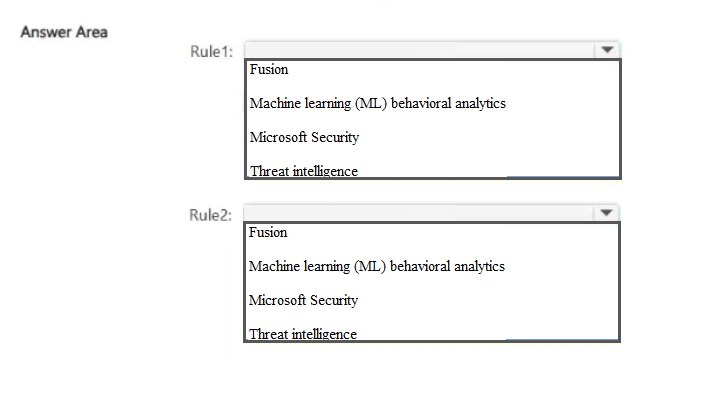
Rule 1: Threat intelligence; Rule 2: Machine learning (ML) behavioral analytics
Question
You have an Azure subscription.
You configure Microsoft Sentinel to use multiple data sources.
You need to create analytic rules that meet the following requiremets:
Rule1: Automatically match Common Event Format (CEF) logs and syslog data with domain, IP address, and URL indicators.
Rule2: Use Microsoft proprietary algorithms.
Which type of detection should you use for each rule? To answer, select the appropriate options in the answer area.
NOTE: Each correct selection is worth one point.
Key Takeaways
Threat Intelligence rules match logs against known IOCs (IPs, domains, URLs), while ML Behavioral Analytics rules use proprietary algorithms to detect anomalous behavior patterns.
Learn how to choose between Threat Intelligence and Machine Learning behavioral analytics rules in Microsoft Sentinel for SC-500 certification preparation.
Common mistake: Learners often confuse Threat Intelligence rules with Custom Queries, assuming manual KQL coding is needed for IOC matching, or they misidentify ML rules as Scheduled rules, failing to recognize the role of algorithmic anomaly detection.
Expert Analysis
This scenario requires selecting the correct Microsoft Sentinel analytic rule types for two distinct detection needs. The key is understanding how different rule templates process data and generate alerts.
Rule 1: Automatically match Common Event Format (CEF) logs and syslog data with domain, IP address, and URL indicators. This describes a Threat Intelligence rule. Threat intelligence rules in Microsoft Sentinel are designed to enrich and correlate incoming log data (such as CEF, Syslog, or Windows DNS events) against external threat intelligence feeds. These feeds contain known malicious indicators of compromise (IOCs), such as IP addresses, domains, and URLs. When an event matches an indicator, the rule generates an alert. This is a deterministic, lookup-based approach rather than a statistical one.
Rule 2: Use Microsoft proprietary algorithms. This refers to Machine Learning (ML) Behavioral Analytics. Microsoft provides pre-built ML behavioral analytics templates that use proprietary algorithms to detect anomalies and unusual patterns in user and entity behavior. These rules do not rely on static IOCs but instead establish baselines of normal activity and flag deviations. Examples include detecting impossible travel, anomalous login locations, or unusual file access patterns. This is a probabilistic, pattern-recognition approach.
The common mistake is confusing these two mechanisms. Learners might incorrectly select 'Custom Query' for Rule 1 because it involves matching, but Custom Queries require writing Kusto Query Language (KQL) code manually, whereas Threat Intelligence rules automate this matching against predefined indicators. Similarly, learners might choose 'Scheduled' rules for Rule 2, but Scheduled rules also rely on static thresholds or logic, not dynamic machine learning models.
Official Reference
https://learn.microsoft.com/en-us/azure/sentinel/tutorial-detect-threats-built-in
This link opens the official vendor documentation in a new tab.
Exam Strategy
When faced with questions about Microsoft Sentinel rule types, identify the underlying mechanism: if the question mentions matching against known bad actors (IOCs like IPs, domains), select Threat Intelligence. If it mentions detecting unusual patterns, anomalies, or uses terms like 'behavioral' or 'proprietary algorithms', select Machine Learning Behavioral Analytics. Avoid Custom Queries unless explicit KQL coding requirements are stated.
Discussion 1 contributions
Compiled from public community threads and reader submissions, lightly edited for clarity. Handles and vote tallies are shown as recorded, and comments reflect the views of individual contributors.
From public community threads 1
-
SchnitzelLicker 👍 2Rule1: Threat intelligence Rule2: Machine learning (ML) behavioral analytics Rule1: Microsoft’s documentation describes the Microsoft Threat Intelligence rule as matching CEF logs, Syslog data and Windows DNS events against Microsoft threat intelligence indicators: domains, IPs and URLs. That’s an exact match. Rule2: Microsoft’s documentation describes ML behavioral analytics templates as “based on proprietary Microsoft machine learning algorithms,” so you can’t see the internal logic or change how they work.
Reader comments & corrections
No reader corrections yet — spotted an error or have a note? Share it below.
Related Analysis
Practice All SC-500 Questions
Access 100 questions with complete answers and detailed explanations.
View Full SC-500 Practice Test →