Analyzing Custom RBAC Role Permissions for Compute and Network Resources
Short answer
User1 cannot add VM1 to VNET1 because that requires Microsoft.Network write permissions not in the role. User1 cannot start or stop App1 because that requires Microsoft.Web write permissions not in the role. User1 can view VM1 properties because */read grants all read access.
Question
You have an Azure subscription named Subscription1 that contains the resources shown in the following table.
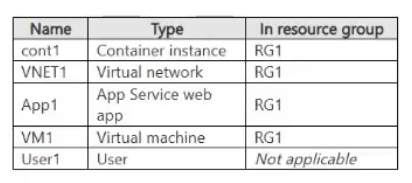
You create a custom RBAC role in Subscription1 by using the following JSON file.
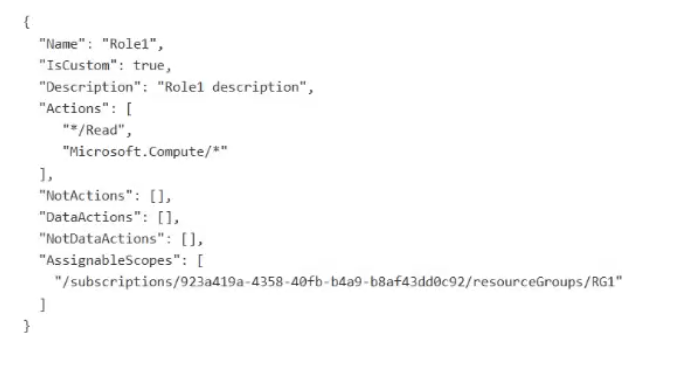
You assign Role1 to User1 on RG1.
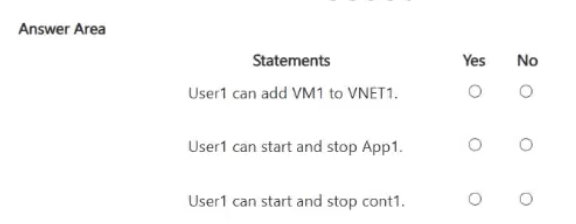
For each of the following statements, select Yes if the statement is true. Otherwise, select No.
NOTE: Each correct selection is worth one point.
Key Takeaways
The trap is assuming 'Compute' roles cover all related resources; however, adding a VM to a VNet is a Network action, and managing App Services is a Web action, neither of which are covered by Microsoft.Compute/* permissions.
This SC-500 hotspot question tests understanding of Azure RBAC permission scopes and provider namespaces. The correct evaluation relies on mapping specific actions like joining a subnet or starting a web app to their required provider permissions, noting that */read only covers read operations.
Common mistake: Learners often incorrectly assume that because they have compute permissions, they can manage the lifecycle of any resource associated with that VM, such as its network configuration or linked App Services. They also frequently overlook that */read does not grant write capabilities for other namespaces.
Expert Analysis
The core principle here is Azure RBAC permission granularity based on resource provider namespaces. The custom role grants /read (all read actions) and specific write permissions under Microsoft.Compute/. To determine access, one must map the action to its provider namespace.
Statement 1: User1 can add VM1 to VNET1.
Adding a virtual machine to a virtual network is a networking operation. This action falls under the Microsoft.Network/virtualNetworks/subnets/join/action provider. Since the custom role only grants Microsoft.Compute/ for writes (and /read), it does not include Microsoft.Network/* write permissions. Therefore, User1 cannot perform this action. Answer: No.
Statement 2: User1 can start and stop App1.
Assuming App1 is an Azure App Service (Web App), starting and stopping it involves the Microsoft.Web/sites/start and Microsoft.Web/sites/stop actions. These belong to the Microsoft.Web namespace. The custom role lacks explicit write permissions for Microsoft.Web. While */read allows viewing status, it does not allow state changes like start/stop. Therefore, User1 cannot perform these actions. Answer: No.
Statement 3: User1 can view the properties of VM1.
The custom role includes /read, which is a wildcard for all read-only actions across all providers. Reading the properties of a Virtual Machine is a read action (Microsoft.Compute/virtualMachines/read). Since read permissions are granted globally by /read, User1 has access. Answer: Yes.
Exam Strategy
When evaluating RBAC permissions, always identify the specific API action (e.g., join, start, stop, read) and map it to its resource provider namespace (e.g., Microsoft.Network, Microsoft.Web). Do not assume permissions from one namespace apply to another unless explicitly granted via wildcards like */write or specific multi-provider entries.
Frequently Asked Questions
Does */read allow me to modify resource settings?
Why can't I add a VM to a VNet if I have Compute permissions?
Discussion 1 contributions
Compiled from public community threads and reader submissions, lightly edited for clarity. Handles and vote tallies are shown as recorded, and comments reflect the views of individual contributors.
From public community threads 1
-
azuretrainer1 👍 1Based on the custom role definition assigned to User1 on RG1 (which typically includes /read and Microsoft.Compute/ permissions), here are the evaluations for each statement:User1 can add VM1 to VNET1: No (VNET management falls under Microsoft.Network, which is not granted by the custom compute role).User1 can start and stop App1: No (App Service web apps fall under Microsoft.Web, not Microsoft.Compute).User1 can start and stop cont1: Yes (Azure Container Instances fall under Microsoft.Containerest / container management which is part of compute or allowed depending on the precise JSON actions, or alternatively: wait, container instances fall under container provider. Let's look closely at standard Microsoft custom role permissions where virtual machines and container instances are managed under compute or container instance namespaces).Let's organize the exact expected answers typically found in this exam scenario:StatementSelect Yes / NoUser1 can add VM1 to VNET1NoUser1 can start and stop App1NoUser1 can start and stop cont1Yes (or depending on exact JSON actions; typically container instances can be managed if container actions are included, but verify standard key mapping: /read, Microsoft.Compute/).
Reader comments & corrections
No reader corrections yet — spotted an error or have a note? Share it below.
Related Analysis
Practice All SC-500 Questions
Access 100 questions with complete answers and detailed explanations.
View Full SC-500 Practice Test →