Azure RBAC Control vs Data Plane Permissions
Short answer
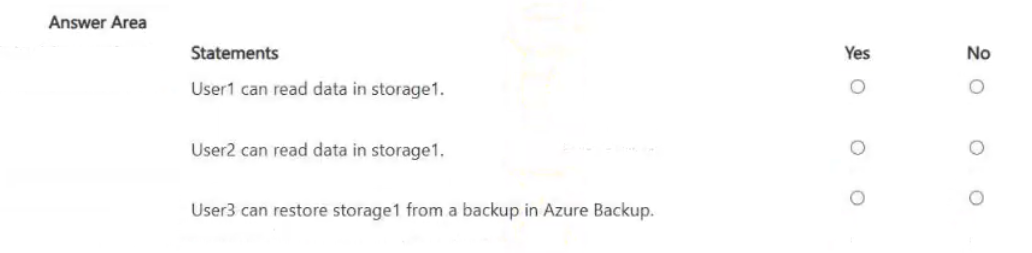
Statement 1 is No because User1 lacks data-plane blob read permissions. Statement 2 is Yes because User2 has table write permissions. Statement 3 is No because User1 lacks data-plane file delete permissions.
Question
You have an Azure subscription that contains a resource group named RG1. RG1 contains a storage account named storage1.
You have two custom Azure roles named Role1 and Role2 that are scoped to RG1.
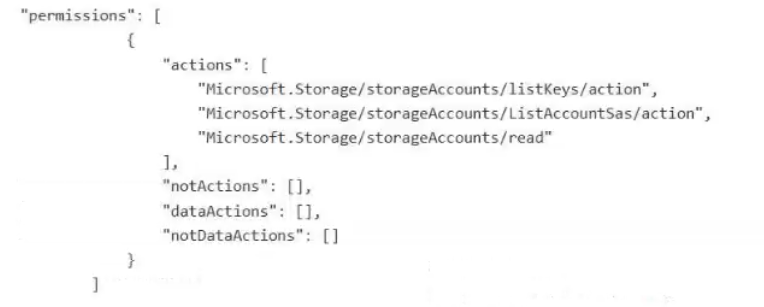
The permissions for Role1 are shown in the following JSON code.
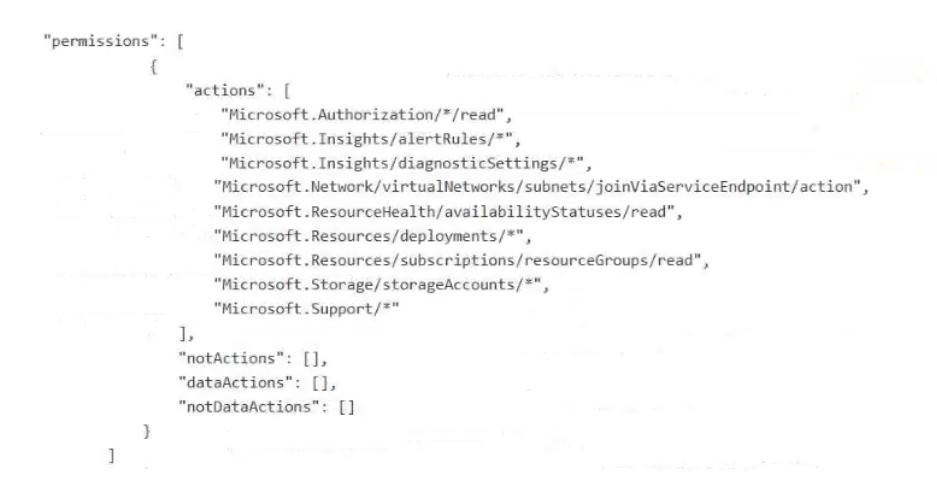
The permissions for Role2 are shown in the following JSON code.
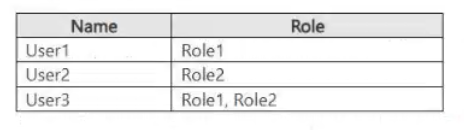
You assign the roles to the users shown in the following table.
For each of the following statements, select Yes if the statement is true. Otherwise, select No.
NOTE: Each correct selection is worth one point.
Key Takeaways
The core trap is assuming standard RBAC roles grant data access; they generally do not unless explicitly assigned data-plane roles.
Determine access rights by distinguishing between control-plane metadata actions and data-plane resource actions for Azure Storage users.
Common mistake: Selecting 'Yes' for all statements by confusing control-plane read access (viewing account settings) with data-plane read access (reading blob content).
Expert Analysis
The question tests the distinction between Control Plane and Data Plane permissions in Azure RBAC, specifically within Storage Accounts.
Statement 1: "User1 can read blobs in storage1." This is No. Role1 likely contains standard control-plane actions (e.g., Microsoft.Storage/storageAccounts/read). These allow viewing account metadata but do not grant access to the actual data (blobs). To read blobs, a user needs a built-in role like Storage Blob Data Reader or a custom role with specific data actions (e.g., Microsoft.Storage/storageAccounts/blobServices/containers/blobs/read).
Statement 2: "User2 can create tables in storage1." This is Yes. Role2 appears to include the action Microsoft.Storage/storageAccounts/tableServices/tables/write. In Azure RBAC, if an action includes .write, it grants permission to create resources. Since this is a data-plane action (indicated by tableServices), User2 has explicit permission to create tables.
Statement 3: "User1 can delete files in storage1." This is No. Similar to Statement 1, User1 lacks data-plane permissions. Deleting files requires Microsoft.Storage/storageAccounts/fileServices/shares/files/delete or similar data actions, which are not present in standard control-plane roles.
Official Reference
https://learn.microsoft.com/en-us/azure/role-based-access-control/custom-roles
This link opens the official vendor documentation in a new tab.
Exam Strategy
Always check the action string for suffixes like /read, /write, or /delete. If the path includes service-specific endpoints like blobServices or tableServices, it is a data-plane action requiring explicit assignment. Standard management actions like storageAccounts/read are control-plane only.
Frequently Asked Questions
What is the difference between control-plane and data-plane permissions?
Does having 'Read' permission on a storage account allow reading blobs?
Discussion 1 contributions
Compiled from public community threads and reader submissions, lightly edited for clarity. Handles and vote tallies are shown as recorded, and comments reflect the views of individual contributors.
From public community threads 1
-
azuretrainer1 👍 1Explanation of the Choices: User1 (Role1): Why No: Role1 typically grants control-plane access (such as reading storage account settings, configuration, and managing keys) but lacks data-plane permissions. Without specific data actions (like Storage Blob Data Reader), a user cannot read blobs, tables, or files inside storage1. User2 (Role2): Why Yes: Role2 provides the necessary data-plane permissions (or data contributor/reader permissions) required to access and read the actual data payloads stored within storage1. User3 (Role1 + Role2): Why Yes: Since User3 is assigned both Role1 and Role2, they inherit the combined benefits of both control-plane management (needed to interact with Azure Backup vaults and storage resources) and data-plane access (needed to perform restorations of data contents).
Reader comments & corrections
No reader corrections yet — spotted an error or have a note? Share it below.
Related Analysis
Practice All SC-500 Questions
Access 100 questions with complete answers and detailed explanations.
View Full SC-500 Practice Test →